Solid Explorer File Manager is a file management application. It provides a shortcut to all options in a single folder, allowing you to quickly browse all subfolders. It also categorizes and organizes all media files, making it easy to find what you're looking for. It's simple, user-friendly, and lightweight, yet it can handle large amounts of data. Working with cloud storage and network connection storage, it delivers a superior file management experience.
Usage
This file manager features a well-designed and easy-to-use interface. Like other file managers, Solid Explorer provides a shortcut, with all options located in the `/storage/emulated/0` folder. You can use this shortcut to browse all subfolders on your Android device. Furthermore, it boasts the ability to categorize and organize all multimedia files, such as photos, music, videos, and apps, making it easy to find your most frequently used files.
Features
• Dual-pane layout — Manage two folders side-by-side
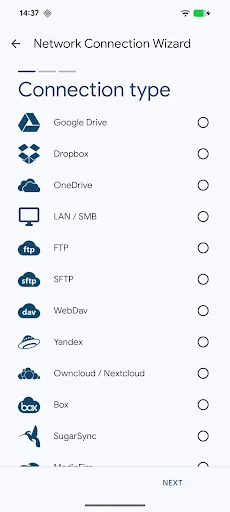
• Cloud storage — Supports Google Drive, OneDrive, Dropbox, Box, NextCloud, SugarSync, MediaFire, Yandex, Mega*
• Network protocols — Supports FTP, SFTP, SMB/CIFS (Samba), WebDAV
• Web file sharing — Share files with any device via a browser
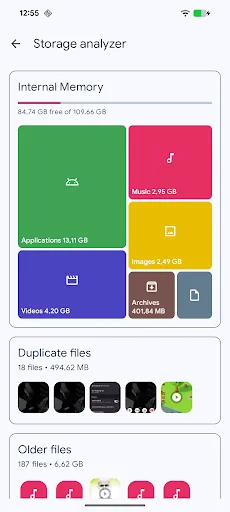
• Storage analyzer — Find and clean up duplicate files, large files, and junk files
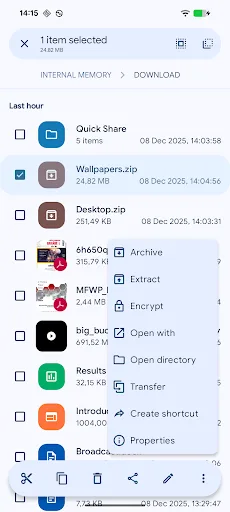
• File encryption — Supports AES-256 encryption with password and fingerprint
• Compress files — Create and decompress ZIP, 7ZIP, RAR, and TAR files
• Root permission manager — Browse system files on rooted devices
• Indexed search — Quickly find files using filters
• Collections — Downloads, Recently Used, Photos, Videos, Music, Documents, Apps
• Built-in media library — Image viewer, music player, video player, text editor
• Batch renaming — Rename multiple files using a specified pattern
• FTP server — Access phone files from your computer
• Themes and icon sets — Rich customization options
• Chromebook and tablet support — Supports mouse, keyboard, and trackpad input
Highlights
It helps you manage files in a simple and convenient way.
It supports the latest Android version.
It's very easy to use and won't take up too much of your time.
It can handle large amounts of data and can be used with cloud storage and network-connected storage.
You can connect to any of the following storage devices:
Local - On your device
Cloud storage — including Google Drive, Dropbox, Box, OneDrive, etc.
Local network — for Windows, Mac, and Linux.
If you're using a local network, you can manage files using a file browser.
You can also connect to the internet through this file browser to access your storage devices from anywhere.
This is very useful if you need to share files between two or more computers, or between mobile devices and computers.
Advantages and Disadvantages
Advantages
Dual-pane interface speeds up file operations
Strong AES encryption with fingerprint recognition support
Extensive cloud and network protocol coverage
Rich customization options for themes and icons
Built-in viewer and batch renaming utility
Disadvantages
Recent updates have caused occasional lag and crashes.
No dedicated visual storage analysis dashboard
Conclusion
Solid Explorer File Manager is an application trusted and used by tens of millions of people. It boasts numerous unique features and a user-friendly experience. You probably need an app like this too, right? Download and experience Solid Explorer, and feel its powerful capabilities!