

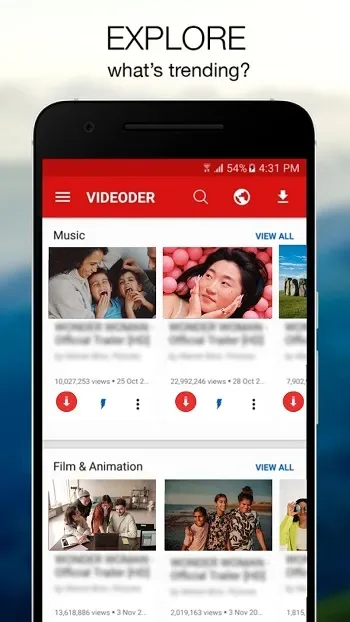
Videoder is a mobile application for downloading videos and music. Here, you can quickly access and easily save high-definition videos directly from popular platforms like YouTube, Facebook, and Instagram. It supports various resolutions, from 144p to 4K, ensuring you can find the resolution you need for video playback. Videoder can convert video or music formats with a single click, saving significant data usage when offline! With Videoder, you don't need to wait for individual videos to finish downloading before moving on to the next; you can download all videos at once, prioritizing them as needed.
Features
Download Media from Multiple Sources
Videoder supports downloading content from numerous websites and social media platforms. This eliminates the hassle of installing multiple applications, consolidating your download needs into a single convenient application. Users can easily access their favorite content sources and save them directly to their devices.
Easily Customize Download Settings
The application allows users to customize download preferences, including video quality, format, and download location. This ensures that downloaded files meet the user's specific needs and storage capacity. Users can choose the optimal settings for their device and viewing habits.
Enjoy In-App Video Previews
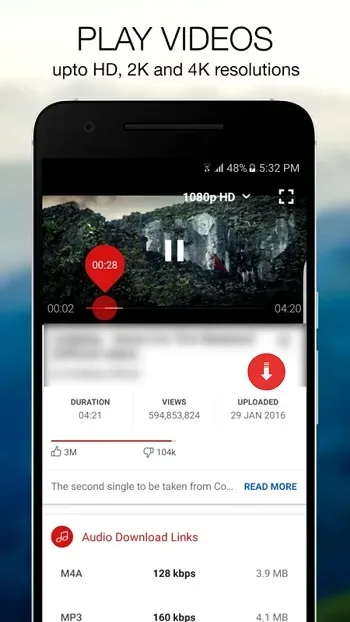
Before downloading, Videoder offers a built-in video preview function. Users can preview video content and quality, avoiding the download of unnecessary files. This preview function ensures users only download the content they need, saving time and data.
Easily Manage Downloads
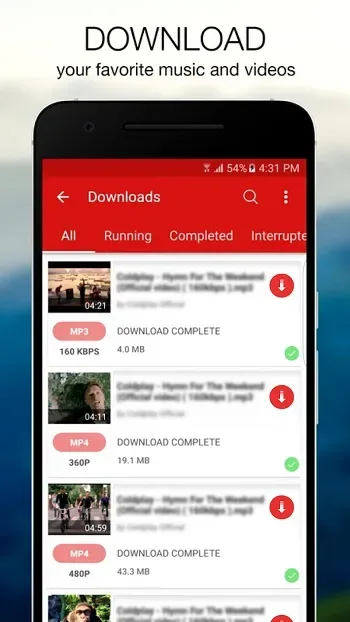
Videoder has a powerful download manager that allows users to pause, resume, and cancel downloads. This gives users better control over the download process and effectively manages bandwidth. The download manager simplifies the entire download experience.
Convert Videos to Audio Files
In addition to video downloads, Videoder can also convert videos to audio files. This function can be used to extract music from videos or create audio versions of lectures and presentations. Users can quickly and easily convert their favorite videos to audio formats.
Highlights
For users who want complete control over their online media experience, choosing the Videoder APK for Android is a wise choice.
In today's world where internet access is not always reliable or affordable, this app lets you download your favorite videos and music and enjoy them offline anytime, anywhere.
One of the main reasons people like using Videoder APK for Android is its support for various websites and platforms, allowing users to freely save content from multiple sources without restrictions.
The application features a clean and user-friendly interface, suitable for both Android beginners and advanced users.
Its built-in browser helps users search, preview, and download media without switching between applications, saving time and effort.
Videoder also allows you to choose different video resolutions and audio formats, ensuring a perfect balance between quality and file size based on your device's storage space.
Another important reason for choosing Videoder is its fast download speed and stable performance.
Large files can be downloaded smoothly and efficiently thanks to intelligent download acceleration technology.
Furthermore, the Videoder APK for Android supports batch downloads, allowing users to download multiple videos or songs simultaneously.
This feature is especially useful for users who want to create an offline media library.
Pros and Cons
Pros: User-friendly interface, multiple customization options, integrated search engine, fast download speed
Cons: Minor glitches
FAQs
What is Videoder?
Videoder is a mobile application that allows users to download videos from platforms like YouTube, Instagram, and Facebook and convert them to MP3 format.
Is Videoder available for download on the Google Play Store?
No, Videoder typically downloads from third-party sources because it has media download functionality and is therefore not available on the Play Store.
Can Videoder convert videos to MP3 format?
Yes, Videoder includes a one-click function to convert downloaded videos to MP3, making it ideal for building music libraries.
Does Videoder support 4K video downloads?
Absolutely. Users can download videos at various resolutions, from 144p to 4K, depending on the quality of the source video.
Is Videoder free to use?
Yes, Videoder is free and does not display ads during use, making it lightweight, smooth, and easy to use.
Summary
So, who is Videoder suitable for? For anyone who wants to download videos but can't, Videoder is for you. Whether you want to save tutorials, extract music, or collect emojis for offline viewing, Videoder has you covered. Simple to use, powerful features, all in one concise tool.








