

PC Remote is a remote control application that allows you to operate your computer using your mobile phone, which is extremely useful when you're tired but need to turn on your computer. It offers various connection methods, including Wi-Fi, Bluetooth, mobile hotspot, and USB tethering. PC Remote provides numerous remote functions, allowing you to simulate a computer's mouse and keyboard on your phone for easy presentation manipulation or desktop navigation. In addition, PC Remote lets you view your computer screen in real-time on your phone and can be used as a long-distance webcam.
Features
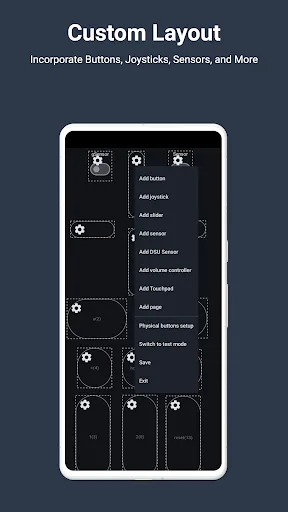
Turn your Android device into a keyboard, touchpad, gamepad, mouse…
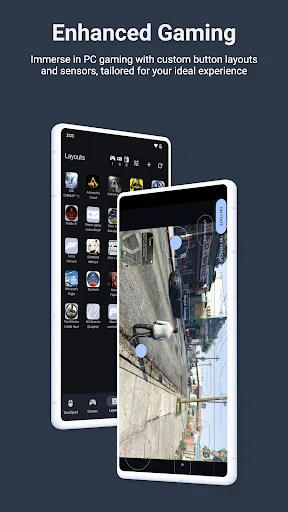
Maximize the performance of your computer games with specific configurations (e.g., racing games, fighting games, GTA series games, etc.).
Create and save your own settings.
Access your computer's multimedia controls, such as video playback or volume adjustment.
Access your computer via mobile remote desktop mode.
Browse files on your computer or download them to your smartphone.
Simulate your computer's microphone input.
Create shortcuts to run programs on your computer.
Highlights
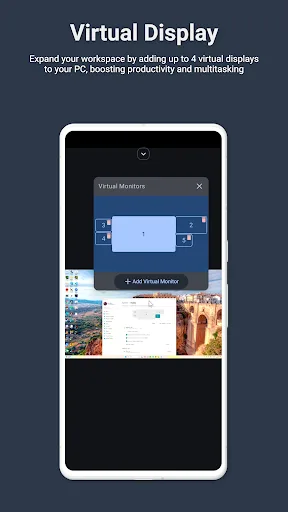
This software excels in file and media sharing, easily enabling photo, video, and screen sharing, and offering convenient file transfer capabilities. However, while the ability to create up to four virtual monitors is impressive, users may find setting up and optimizing these virtual screens somewhat complex and may require some technical knowledge. Furthermore, the stylus input function, highly useful for digital artists or note-taking enthusiasts, is limited to supported devices.
The device prioritizes security, employing AES encryption for all connections and offering flexible connectivity options including Wi-Fi, USB, Bluetooth, and even mobile hotspot. Its powerful scripting and automation features allow for writing input scripts to automate keyboard, mouse, and controller actions. However, these advanced scripting features may present a steep learning curve for users unfamiliar with programming or automation principles, limiting its use by the average user.
Advantages and Disadvantages
Advantages
Turns an Android phone into a keyboard, touchpad, gamepad, and universal PC controller.
Provides customizable layouts for motion-controlled games using gyroscopes and gravity sensors.
Screen mirroring and media sharing between phone and computer, and useful shortcuts that can trigger batch files.
Disadvantages
The connection to the computer may repeatedly disconnect during use.
Remote desktop mode may malfunction, displaying a black screen or turning off the screen while only playing audio.
Crashes occur when assigning images to utility shortcuts, and the developers have offered limited support for these issues.
Review
"More than just the layout, this app fully utilizes built-in sensors to provide users with an exceptional gaming experience (such as accelerometers, gravity sensors, gyroscopes, etc.). For example, FPS mode uses the gyroscope sensor to help you aim at targets; while racing mode uses the gravity sensor for steering. And this is just a small part of the advantages of this fully-featured, high-performance control app."
"Since our laptop's touchpad was broken, we tried the touchpad mode first. Everything worked perfectly. The buttons on the top edge allowed us to quickly switch between 12 modes. The function key mode allowed us to restart or shut down the host and set additional shortcuts. The typewriter layout is one of the best Android virtual keyboards we've ever seen. The racing, joystick, and shooting modes are all very cool (and practical)."
Summary
The true importance of PC Remote is only realized when we're exhausted and overwhelmed but still have to use our computers. Don't put yourself in that situation. Install this app on your device now, and you'll see how wise your decision was!








