

Speedtest is a network speed test application. It provides various speed statistics, tests your network connection speed according to standards, and diagnoses connection problems. The application has servers located around the world, allowing you to test not only speeds with nearby servers but also with distant ones. Speedtest is easy to use; simply click "Test," and it will automatically check your connection. In addition, Speedtest saves previous test results for easy review of settings to see if they have improved your network speed.
Usage
Install Speedtest, open the application, and wait for the main screen to load.
Confirm you are using Wi-Fi or mobile data, and then choose a location with a stable signal.
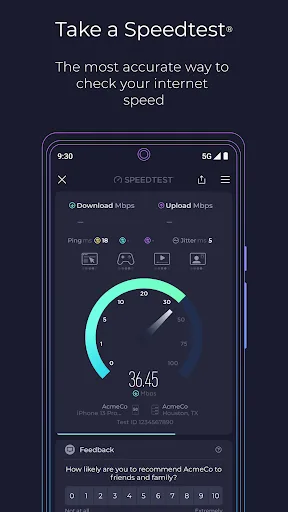
Click the "Start" button to begin the test. The speed test tool will measure download speed, upload speed, and latency sequentially.
After viewing the data, save the results to your history or share them as needed.
Repeat the test at different times or locations to compare performance and identify patterns.
Features
The most accurate network speed test from a brand you trust;
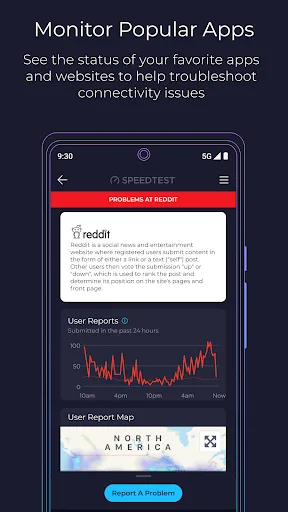
Downdetector real-time monitoring of apps and services;
Tracking your favorite services and getting outage status updates anytime;
Mobile operator coverage maps based on real data;
Video testing to ensure network smoothness;
Speedtest VPN for secure online connections;
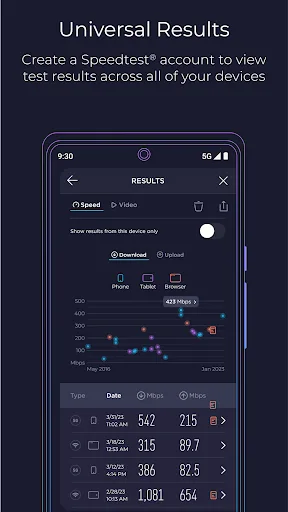
Detailed historical test result records for easy sharing.
Highlights
Speedtest boasts a clean and user-friendly interface, simplifying the network speed testing process. After launching the application, users can start testing with a single tap. Test results are displayed in real-time, including key metrics such as download speed, upload speed, and latency. These metrics clearly demonstrate the user's network performance, helping them understand the status of their network connection.
The application also integrates Downdetector functionality, enabling users to monitor the operational status of various online services and applications in real time. This feature helps users promptly identify potential service outages, allowing them to plan their online activities accordingly. Users can track their frequently used services to see if any reported issues exist, which is especially useful for users who rely on specific platforms for work or entertainment.
For privacy- and security-conscious users, Speedtest offers a VPN service. Speedtest VPN provides a secure connection while you browse the internet, protecting your data from potential threats. Up to 2GB of free traffic per month ensures the privacy of your online activities. Premium subscribers enjoy unlimited VPN traffic and an ad-free in-app experience.
Another important aspect of Speedtest is its comprehensive historical data capabilities. Users can view detailed records of past tests to track changes in network performance over time. This feature is especially useful for users who want to monitor network connection stability and identify any potential patterns, such as speed fluctuations at specific times of day.
In addition to speed tests, Speedtest offers a video test feature to evaluate the streaming quality of a user's network. This tool provides insights into the current streaming capabilities of the network, helping users understand whether their connection is sufficient for smooth video playback. By analyzing factors such as buffering and loading times, users can optimize their network settings for a better viewing experience.
Advantages and Disadvantages
Advantages: Provides speed test maps to check network coverage
Protects online privacy
Real-time connection graphs and historical data
Disadvantages: Advanced VPN features require a subscription
Summary
Speedtest saves your previous test results, allowing you to see if changes to your settings have improved network connection quality and speed. The entire test takes only about 30 seconds, and you can easily share your results. Test or verify the speeds promised by your internet service provider now!








