Panda Touch Pro is a game assistant tool. It helps you achieve a more relaxed gaming experience. The game offers numerous features, such as adding macros. With just a click, you can easily perform actions that are difficult to execute normally, and feel the cheers of your teammates. Of course, you can also adjust the crosshair in FPS games, including color, size, type, etc., allowing you to more easily master bullet trajectory and aiming, easily becoming a battlefield god!
Usage
To use Panda Touch Pro, you first need to activate it. If your device is running Android 11 or higher, no further action is required. Otherwise, you have two options: you can activate the app using Shizuku or a USB debugging tool on your Android device. Whichever method you choose, you can follow the step-by-step tutorial, which will guide you through activating the app and ensuring everything works correctly.
Features
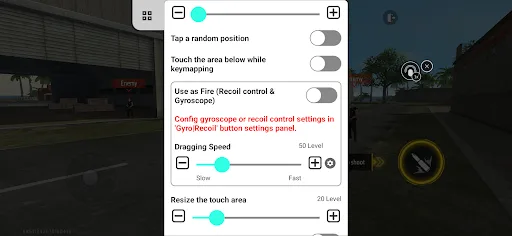
- Easily switch between simple touch controls: Map volume buttons, power buttons, and other physical buttons to complex actions such as multi-touch, swipes, sequential clicks, and even powerful macros.
- One-touch control: Perform complex multi-touch gestures, swipes, and macros with a single tap, giving you an edge in fast-paced games.
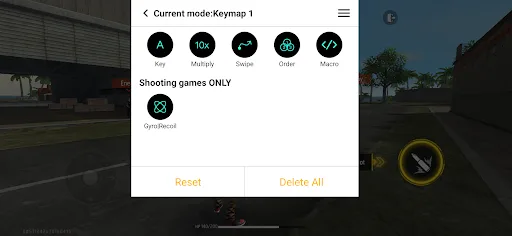
- Advanced macro engine: Create complex click, multi-click, delay, swipe, press, and multi-press sequences to automate complex actions and combinations. Ideal for optimizing your gaming experience.
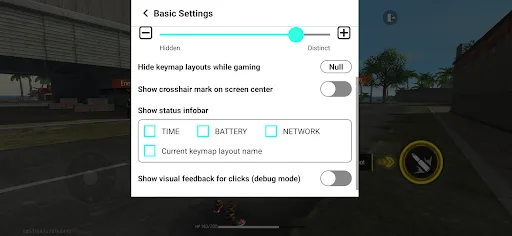
- Precise aiming: Customize your crosshair with various types, colors, and sizes to enhance accuracy and provide a visual advantage in FPS games.
- Take control of your gaming experience: Take complete control of your touchscreen experience, unlocking new levels of precision and efficiency. Panda Touch Pro is ideal for gamers seeking the ultimate experience.
- Easy activation: Get up and running quickly with a streamlined activation process. Works seamlessly on Android 11 and above; for Android 10 and below, simply connect to a PC/Mac. Rooted devices are automatically activated.
Highlights
Button function reuse: Reuse existing buttons and give them a variety of unique functions to create amazing and engaging entertainment interfaces.
Fast Action: Respond instantly. Once launched, this app allows for lightning-fast reactions. Experience the smoothest and most seamless gameplay for an amazing gaming experience.
Screenless Controls: This app offers incredibly intuitive controls. Control without on-screen buttons for a perfect user experience that perfectly matches your gaming style, delivering a fantastic and immersive gaming experience.
Tutorial
First, after installation, open the app and follow the on-screen activation prompts. Grant all requested permissions to enable overlays and touch mapping. If you are using Android 10 or earlier, connect to your computer when prompted. Rooted devices may activate automatically.
Next, create a new mapping profile and enable overlays. Open the target game so the app can display controls above the game screen. This makes it easier to place buttons precisely where actions occur.
Afterward, drag virtual buttons onto the screen and align them with in-game icons. Assign each button to a hardware button or a simple click or swipe action. Test each mapping briefly to confirm the touch point lands in the correct position.
Turns: Next, open the macro editor and create any actions you need to repeat frequently. Add clicks, delays, and swipes in the desired order, and give the macros clear names. Test the timing in a training or safe area, then adjust the delay until it feels right.
Finally, if the game requires a fixed center point, set a crosshair. Choose a type, size, and color to make it always visible on the map, save the settings, and enable it before starting the game. Toggle the settings when switching to other games or modes.
Conclusion
Panda Touch Pro is a powerful mobile game assistant that helps you optimize your actions, save stamina, and improve reaction speed in fast-paced games. If you're a hardcore gamer looking to upgrade from "finger controls" to "keyboard mastery," this app is definitely worth a try.