

##
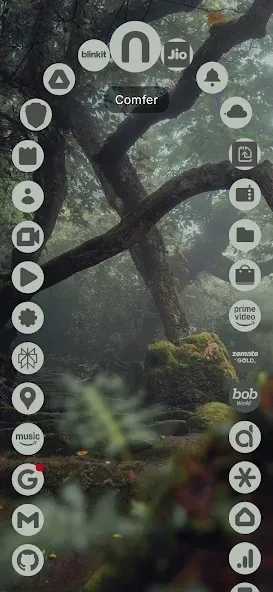
Comfer Launcher for Comfort is a home screen launcher for Android systems. Users can customize their frequently used apps or widgets for their home screen. The software also offers a variety of themes to meet diverse user needs. It employs a very simple app launch mode, requiring no complicated operations. Most importantly, the application supports hiding apps, prioritizing user privacy.
Features
The Launcher's Impact on Home Screen Interaction
Comfer Launcher for Comfort replaces the cluttered app grid with a clean and efficient app discovery tool. It offers instant search for quick app and contact finding and features a smart app drawer that sorts apps by frequency of use. Users can hide apps to reduce visual clutter, and this layout reduces the need to scroll through large app lists, shortening the path from unlocking the device to opening a specific app.
How Much Control Does It Offer for Navigation and Appearance?
Customization focuses primarily on clean navigation and an aesthetic theme. The launcher uses a seven-swipe operating system, allowing users to launch apps or shortcuts with specific swipe directions. Aesthetic options include dynamic colors and themed icons supporting Material Design, as well as compatibility with third-party icon packs. Furthermore, the design is optimized for one-handed operation on large screens, allowing users to assign shortcut gestures to frequently used tasks.
Its Impact on Device Resources and Compatibility
Comfer Launcher for Comfort prioritizes lightweight system footprint and broad compatibility. This app supports Android 6.0 and higher, and claims to have a small installation size and low resource consumption, reducing background processing load compared to larger launchers. Therefore, it's ideal for entry-level and mid-range devices where conserving RAM and CPU resources is crucial for daily use.
How user-friendly is it for everyday use and privacy-conscious users?
Daily setup and maintenance prioritize privacy and simplicity. The launcher uses minimal permissions, contains no ads or trackers, and includes a built-in app hiding feature to create an undisturbed desktop environment. The developers maintain the project and position it for users who prefer offline-first workflows and a clean, everyday interface, rather than feature-rich, cluttered icons.
Pros and Cons
Pros:
Privacy-first, ad-free experience (offline-first design)
Ultra-fast launch and navigation
Gesture-based controls for quick access and customization
Ergonomic one-handed layout with Material You support
Cons:
Limited built-in themes, but more customization options compared to some competitors.
Full gesture and badge functionality relies on optional permissions (AccessibilityService and Notification Listener).

User Reviews
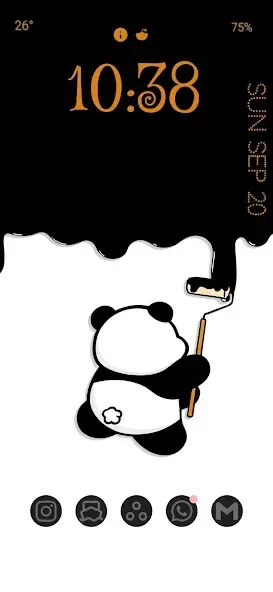
Fantastic! 20/20! The interface is great and the response time is fast. The curved design is ingenious; the time and average battery life are also displayed on the screen. The settings section is also very well done.
I'm growing to love it more and more, but I still need to explore it further. I'll use it for a while longer and then come back to share my experience.
Personally, this is absolutely the best launcher I've ever used. It's incredibly useful and surprisingly fast; overall, it's an excellent launcher.

Conclusion
However, if you're looking for a simple, clean, organized app focused on making everyday smartphone interactions more comfortable, then it's definitely worth considering. Comfer Launcher for Comfort's biggest advantage is that it removes unnecessary complexity without sacrificing essential phone functionality. Instead of constantly managing your home screen, just use it directly. This is perhaps the most important philosophy behind Comfer Launcher.








