
Screenshot Touch is a screen-capture application designed for mobile devices. With just a simple tap, users can capture screenshots or record the screen within a selected area; the resulting images and video files are automatically saved to the device, making them easy to access and edit. The app includes built-in tools—such as a brush, text editor, and cropping function—that allow users to enhance their images by adding elements like stickers or adjusting transparency, catering to a wide range of needs. Furthermore, the software enables users to convert images into various formats and easily share their screenshots with friends or upload them to social media platforms.
Click to load YouTube / 点击加载视频
YouTube ↗Features of Screenshot touch:
Custom save location: The application gives you a huge storage, with this storage you can store everything in the phone that you want, because the memory is super large and it can hold everything without any problems.
Timed capture feature: You can also take screenshots quickly by simply touching the screenshot without having to do difficult operations like before. Just touch the screen, and you can capture what you want on the screen.
Efficient folder creation: You can create subfolders to categorize the applications on your phone. You can put game apps in the same folder so you can easily find and access the games you want to play.
Automatic screenshot sorting: The app will also automatically rearrange screenshots by time, and you can search for the photos you took earlier faster and more conveniently.
No manual organization: With this app, you don’t need to manually arrange like before, the app will automatically arrange and do everything for you without you having to do anything.
Quality file control: The file format in your application can be adjusted, the application provides you with an editing tool that can convert different file formats quickly. In addition, the quality of the files is also extremely high, giving you the best results.
Highlights of Screenshot touch:
Screen Recording: Need to show more than a still image? Record your screen as an mp4 video, complete with customizable options for resolution, frame rate, and audio.
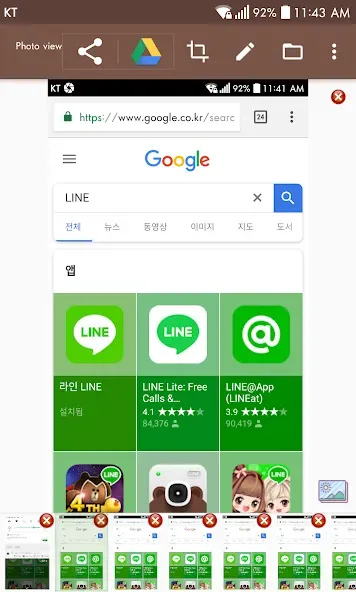
Full-Page Web Captures: Snap entire web pages in just one go. Use the in-app browser or share a website link straight to Screenshot touch for scrolling screenshots.
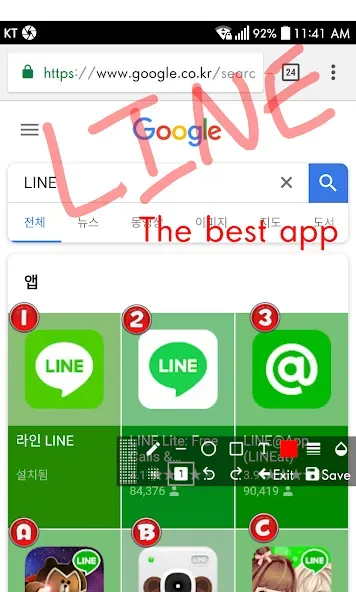
Quick and Flexible Editing: Edit your screenshots right after capturing. Draw, add text, drop in stickers and emojis, adjust opacity, or crop and rotate as needed.
Image Stitching: Combine several images into one seamless picture. Perfect for stitching together long chats or step-by-step guides.
Customizable Saving: Pick your file format, tweak the JPEG quality, set where files should go, and even add a delay before capturing.
Security & Privacy: Screenshots are always private. Sensitive apps like banking won’t be captured, and nothing is shared unless you say so.
User Reviews of Screenshot touch:
An indispensable app for those situations where a document or photo would otherwise be inaccessible; definitely worth five stars—top-notch.
I love this app and this way of 'shooting the screen'. Thank you so much for this much easier way to show what I see on my screen!
Does what I needed, I am very happy with this app, no complaints.
Very easy, practical use. Being able to choose tge location for the screenshot touch is nice. Thanks for developing this tool.
A highly customizable screenshot tool; the only annoying thing is that the 'X' used to remove it from the screen is positioned right in the middle, which makes it very easy to close it by accident. Is there any way to fix this? Also, how is it possible that I’m able to take screenshots of my bank statements?
Final Verdict:
Screenshot touch's capture and editing range is substantial, but users who only need an occasional still image may find the overlay, ads, and permissions heavier than Android's built-in controls. For frequent capture work, it is a capable all-in-one toolbox, provided the floating control behaves reliably on the device.








