

Gamepad Mouse is a gaming accessory for Android devices. This application offers powerful features and an easy-to-use user interface, allowing users to easily connect peripherals such as gamepads, mice, and keyboards to their Android devices. With Gamepad Mouse, users can customize their control system, from the layout of the controller, mouse, and keyboard, to create a personalized gaming experience. You can also record your most exciting gaming moments, relive those moments, and share your achievements with friends.
Highlights:
Connect various peripheral devices: It allows you to easily connect a mouse, wireless keyboard, or gamepad to your Android device, giving you more control and flexibility while gaming.
Supports popular games and game genres: Gamepad mouse supports most popular games on Android, ensuring that you can enjoy your favorite games with ease. It also offers various modes for different game genres, enhancing your gaming experience.
Compatibility with well-known brands: It is compatible with gamepads, keyboards, and mice from well-known brands such as Xbox, PlayStation, IPEGA, GameSir, Razer, and Logitech. This ensures that you can use your preferred devices without any compatibility issues.
Over 20 customizable components: With Gamepad mouse, you have access to over 20 different components that can be customized according to your preferences. This allows you to personalize your gaming setup and make it more comfortable for you.
Convenient calibration system: It provides a convenient calibration system that allows you to configure almost any gamepad to meet the requirements of a particular game. This ensures optimal control and accuracy while gaming.
Built-in recorder for epic gaming moments: It features a built-in recorder that allows you to capture and record your most epic gaming moments. You can review these recordings, relive your achievements, and easily share them with your friends.
Features:
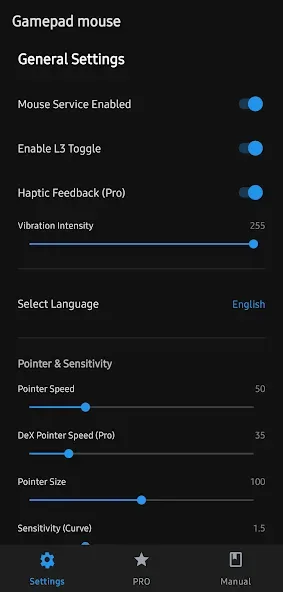
Precise Cursor Control: Smooth and accurate mouse movement via gamepad analog sticks.
Personalized Settings: Adjust cursor speed, acceleration, sensitivity, and size to fit your needs.
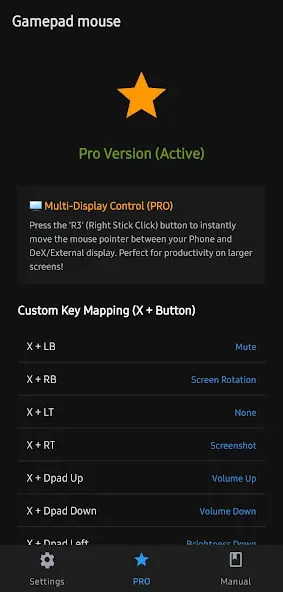
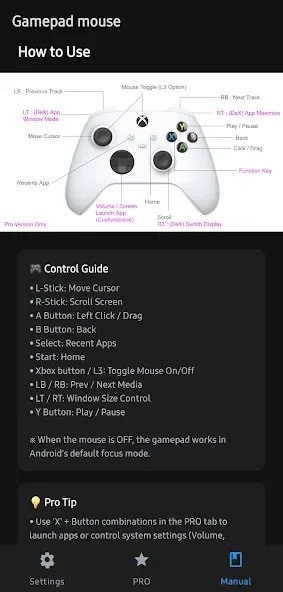
Custom Button Mapping: Assign actions like Back, Home, Recents, and Media controls (Volume, Brightness, Screenshot) to any gamepad button.
Optimized for DeX: Special productivity features for Samsung DeX, including window controls and resizing.
Auto-Hide Cursor: Automatically hides the cursor after inactivity to keep your screen clear.
Haptic Feedback: Get tactile confirmation through controller vibration for clicks and actions.
Tips and Tricks:
The app supports a wide range of peripherals, including popular brands such as Xbox, PlayStation, IPEGA, Gamesir, Razer, and Logitech. This compatibility enables players to use their preferred gaming devices for an improved experience on mobile platforms. Gamepad mouse provides preset key configurations for over 30 featured games, eliminating the need for lengthy setup processes and allowing users to start playing almost immediately.
With its two basic modes—Gamepad and Keyboard—Gamepad mouse caters to different gaming styles. Additionally, it includes specialized modes for specific genres, such as Advanced Shooting mode for first-person shooters and Smart Casting mode for multiplayer online battle arena games. This adaptability makes it suitable for a variety of gaming preferences and ensures that users can find the optimal setup for their favorite titles.
Customization is a significant aspect of Gamepad mouse. The app allows users to define their own keymaps, offering more than 20 control components that can be tailored to individual preferences. This high level of customization ensures that gamers can optimize their controls to suit their unique play styles, enhancing overall gameplay.
Pros & Cons:
Pros
Precise cursor control via gamepad sticks for smooth navigation
DeX-optimized productivity features (window controls, resizing)
Custom button mapping for Back, Home, Recents, and media controls
Works on non-Samsung devices and Android TV/tablets with clear privacy stance
Cons
Lacks some touchpad or keyboard-specific features found in some competitors
Primarily relies on gamepad input which may not suit all users seeking broader input methods
Conclusion:
Download the Panda Touch Pro APK if you regularly play online shooters and have encountered other players who are suspiciously good. The most likely answer is that they are using this tool or a similar one. Thanks to this app, you can create macros that speed up certain processes, providing you with a clear advantage in-game.








