
Funimate Video Editor & Maker is a professional mobile video editing software that allows you to edit your images and videos to create stunning videos. It boasts a wealth of practical editing tools. Simply choose the right templates, filters, and effects to elevate your videos to the next level. The software is constantly being updated with new modules and tools to enhance your experience. Download it and make your videos stand out.
Click to load YouTube / 点击加载视频
YouTube ↗Features:
Crop and adjust each frame: The first thing I want to mention about Funimate’s features is the ability to crop and edit each frame of the video. This allows you to customize the length of the video, remove unnecessary parts and create a complete video, including the content you want. You can also cut and combine videos flexibly, and even have the ability to add slow or fast motion as desired.In general, there is no need to say too much about this feature because it is the most basic feature of a video editing application. I wouldn’t even dare recommend this app to you if the basic video cutting and editing features don’t work well.
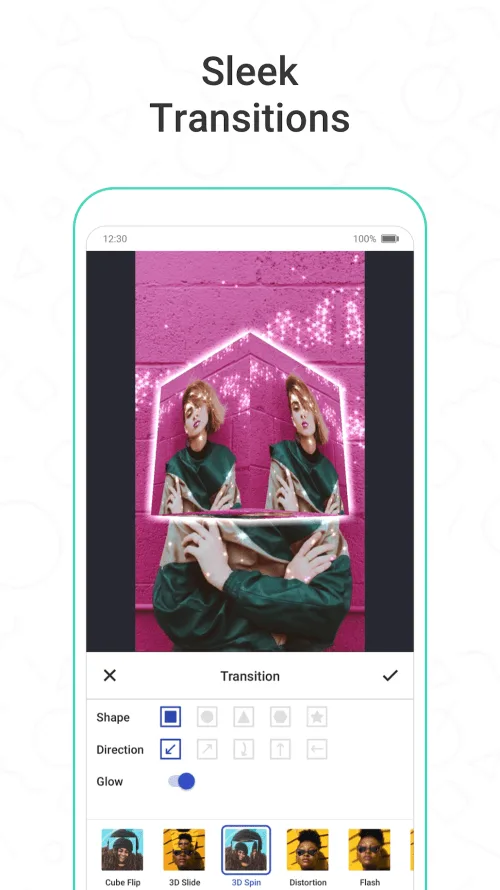
Unique transition effects: Funimate offers a variety of transition effects so you can create smooth connections between different parts of your video. You can add transition effects like slide, rotate, zoom, or fade to create smooth transitions between scenes to create a beautiful and artistic composition. In addition, with some transition effects requiring payment, you can see how great they are. Broadcaster effects must also give respect to your video!
Add effects and color filters: Funimate offers you a wide range of effects and color filters for you to customize your videos. You can add colors, lights, and shadows to create a colorful video. A golden sunlight effect can turn an ordinary video into a film of a warm afternoon, while a black and white filter can create a classic and romantic feel.This allows you to completely change the nature of your video and apply the style you want. Dreamy like Paris, ancient like Rome or modern like Tokyo, as long as Funimate takes action, any of your photos can have these unique styles.
Add some music: A video is often incomplete without sound, especially with today’s viral styles. Funimate understands this and allows you to add music and sounds to create music videos or at least add sounds to make it more lively. You can choose from a rich collection of music available in the app or upload your own favorite music.Funimate’s music store contains millions of songs with full copyright on the market today, you won’t worry about not finding your favorite song here! This helps create videos that are not only visually appealing but also audibly, making the video viewing experience more immersive.
Highlights:
Attempt to create your own effects: For those of you who’re interested, you can now engage yourself in the exciting mobile application of Funimate, with many of its amazing features. Have fun creating your own unique visual effects from any selected photos on your mobile devices. Be both the stars and the effects in any of your creative videos as you make uses of Funimate to the fullest. The included effect creator in Funimate will certainly make your in-app experiences a lot more engaging.
Add any selected music and audio files to your videos: And to make sure that your videos are a lot livelier after the edits, you can replace those uninvited noises or voices with the selectable music and audio files in Funimate. Feel free to pick up whichever files that’re currently available on your mobile devices and attempt to create your awesome videos as you progress. Simply select multiple audio files with varied sounds and effects, which can be used to promote your viral clips.
Add multiple graphics to your edits: Along with the interesting and editable audio experiences on your videos, Android users in Funimate can further improve the visual impressions from their clips, using the provided graphics in the app. Here, you can easily have the emoji, stickers, and texts being added to your videos. Also, feel free to make uses of the available editing options to further customize your selected graphic elements. All of which shall make your videos a lot more engaging and exciting.
Quickly edit your videos to better suit the selected social networks: For social network users, you can always make uses of the in-app features to further improve your video editing experiences. These include the options to edit and crop your videos to any preset quality and ratio for your social network channels on YouTube, Facebook, TikTok, Instagram, and Musically.
Standard editing operations for any selected videos: And with the standard video editing tools, you can easily make simple and convent changes to your audio files, which consist of all the awesome features that you might find interesting. Feel free cut, trim, and merge your videos to make sure that they’re better suited for editing. Hence, it’s quite easy to make whichever changes that you want to have on your videos.
Functions:
TRANSITIONS: Awesome transitions for your edits that you can add with a single tap! We have the best video transitions to wow your followers. Just add your pictures & videos and just by using a few taps you create a cool video with professional looking video transitions.
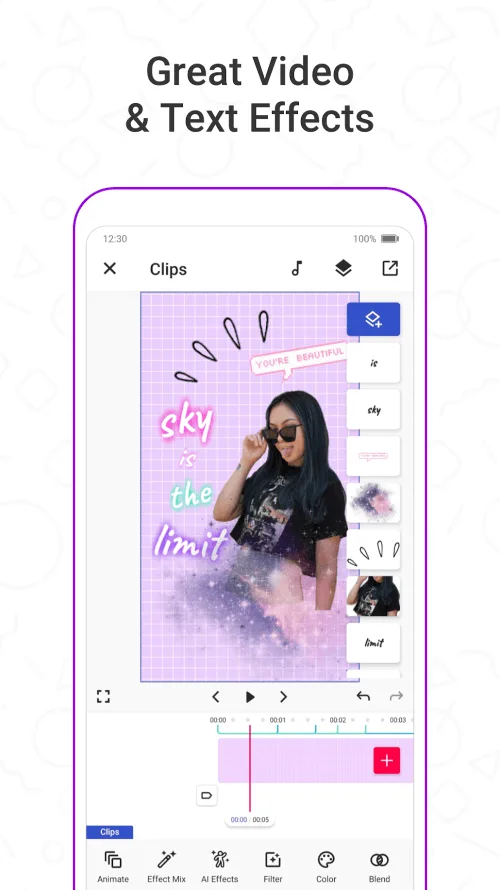
ELEMENT LIBRARY: Video editing is even more fun with overlays, stickers and backgrounds from our element library that has thousands of elements for you to select from. You can also use hundreds of emojis and add text to videos to create cool musical videos, lip sync videos or slow motion videos with Funimate.
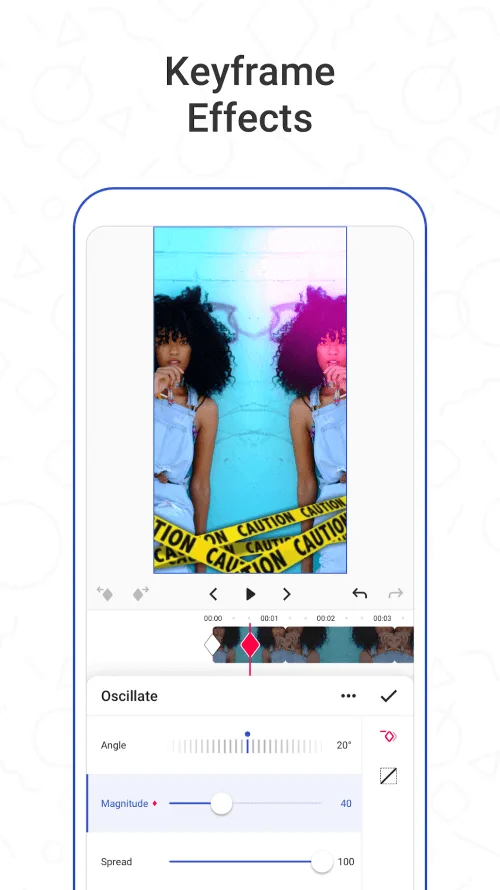
KEYFRAMES: You’re not limited to our effects when it comes to making your videos unique. You can create your own effects with the photos on your phone. It’s super easy to animate your layers using keyframes! Discover custom animations to show off your creative skills to your followers.
VIDEO MASK & AI EFFECTS: You can change the background of your videos and add cool mask effects to your videos with just a click! To try this out, add a dance/freestyle video, tap AI Effects button and choose the effect you want. That’s it!
EFFECT MIX: Tons of different effects to add a professional touch to your videos! You can try more than 100 advanced video effects on Funimate video editor.
INTRO & OUTRO EFFECTS: Tens of intro and outro animations you can select for your texts, images and videos.
TEXT EFFECTS: Add lyrics of the music to your video with many text effects like neon lights, colors and many more. Tens of different fonts available!
ADD MUSIC TO VIDEOS: Add your favorite music to videos, to make short music video clips with creative effects.
Useful Tips:
Explore features: Funimate is packed with innovative features and tools. Take the time to explore and get to know them. You will find many unique effects and uses to create special and impressive videos.
Experiment with effects and filters: Experiment with different effects and filters to find the right style and tone for your video. You can use them to create a unique graphic space or highlight important elements in the video.
Incorporate music: Music can add appeal and creativity to your videos. Try adding background music that matches the content and create special interactions between images and sounds.
Leverage the community: Funimate APK has a large user community. Take this opportunity to discover other users' creative videos and learn from them. You can also share your videos and get feedback from other users.
App Supply Search: Funimate APK can provide additional effects, filters, and music packs. Explore the app store to find and download these extensive resources to expand your creativity.
Do regular archiving: During editing, archive and back up your work regularly. This will help you avoid data loss due to errors or unexpected problems.
Practice and make lots of videos: Practice and make lots of videos to improve your editing skills. By experimenting and working with a variety of materials, you will become more proficient and create better and better videos.
Comments:
There’s really nothing wrong with it. I can’t have TikTok so this is the perfect app for me that doesn’t make me buy everything. But something weird with it is that when I use none of the Pro stuff it says that I have used them and makes me pay for Pro unless I get rid of them. Which is weird because I didn’t use and Pro stuff. And when I try to record without audio after a few seconds I can’t hear myself. I think that should be fixed because I have to make a video with whatever I want to say then memorize it. Then go back to the app chose that audio and try to lip sync with out messing up. Also I think that when you look at other people’s videos that all of them should be different because when I get on there I see all the videos that I’ve already seen and I have to scroll down a lot to find videos that I haven’t seen. I also wish that you could like and subscribe to other people even when you don’t have an account. But other than that it’s a really good app and I love that it’s almost exactly like TikTok but it’s not so I can still have it!! I love all the videos and how I can make my own dance videos. So yeah, if you can’t get TikTok then this is definitely the app for you. Thanks for reading my review!! Bye!!!!
Hello! Before I start, I would just like to say that Funimate is literally one of the most easiest apps to make my edits on. It’s not hard to use at all, and the transitions, filters, effects, etc. is a very nice touch! I would very much recommend to anyone looking for a real, free editing app. I have been using this app for three years now and I have had no major problems. This app is kind of like TikTok, but for editors. So if you’re not allowed to have TikTok yet like me, and you like to make edits, then you should get Funimate! You can even post your edits like TikTok! They also post tutorials so it’s helpful for beginners. There are a few minor problems for me though. Sometimes when I’m making my edit, I use some of the pre-made transitions available. It says at the top “PRO features used.” when I never even used a PRO effect. It goes away when I delete it though. But sometimes I have to start my edit all over again, so that’s frustrating. Another problem is, when I’m exporting my edit, it randomly closes out of the app. That’s really annoying, and I have to re-export my edit. Also, it freezes randomly when I’m making my edit. Anyway, besides those few problems I sometimes face, this app is amazing. 10/10, would highly recommend. Have a good day.
I like funimate but I do have to say, I am very upset that they took almost all the effects, and made them pro. When I found out that they all seemed like they were pro I got very mad. You need to leave some for the people who can’t spend their money on that stuff. It just isn’t fair. Now, funimate is one of my favorite apps, or at least it used to be. If you just change that one thing, less pro stuff, then it would go back to being my favorite app. I love the effects and the touch magic and the shapes, songs, lits and features, hashtags, funistars, and lots of other things. One last thing. I think that people who work like an hour on their video or it at least look a little bit good, then you should at LEAST like their video. So yeah. That’s my review/ opinion on Funimate. Well those were the more negative things. I have some positive things as well. Funimate is awesome that it’s free! Yes, I know you have to pay for the pro effects. But, I’m very glad it’s free. I love how you can do whatever sound you want and that pros don’t get special ones. I like funilive although I do wish non- pros or fun stars could have them. But otherwise beside those few things, I think Funimate is a great app! So I hope you’ll at least just listen to that top part and try and fix some things to make them more fair. But yeah I give it 3/5 stars!
Final Thoughts:
Funimate is an advanced video editing tool that enables its users to express their imagination without any limitations. We constantly aim to build sophisticated video editing features for the mobile world and offer a huge selection of animations, transitions, and keyframes. Using groundbreaking technology, Funimate combines complex AI effects with advanced editing features in a very responsive and playful way.Unlike traditional video editing tools, Funimate provides a grand platform for its users to share the creativity they are proud of while gathering many unique fan communities.