
Cx File Explorer is a powerful file manager designed for Android users, complete with built-in file cleaning tools. Cx File Explorer offers comprehensive file management, storage analysis, cloud storage integration, network access, app management, a storage cleaner, and many other advanced options. Download Cx File Explorer and use it to efficiently and conveniently manage files and clear up space on your phone, leaving your memory feeling refreshed!
Click to load YouTube / 点击加载视频
YouTube ↗Brief Introduction:
Cx File Explorer is a modern free application for managing all the files and applications on your Android quickly and easily. With this application you will immediately see all the text documents on your smartphone. You will be able to browse directories, copy and paste files and do many other things with ease. Download Cx File Explorer apk and try it yourself!
Key Features:
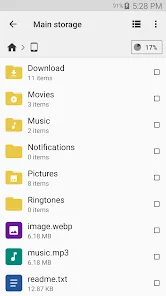
Organize your files and folders: With a user-friendly UI, you can easily browse, move, copy, compress, rename, extract, delete, create and share files (folders) on both internal and external storage of your mobile device.
Access files on cloud storage: You can manage the files on cloud storages.
Access files on NAS (Network-attached storage): You can access files within remote or shared storage like FTP, FTPS, SFTP, SMB, WebDAV, and LAN. Also you can access your mobile device from PC using FTP(File Transfer Protocol).
Manage your apps: You can manage the apps installed on your mobile device.
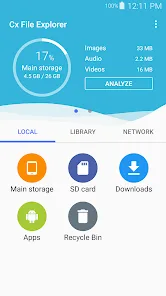
Analyze and manage your storage: Cx File Explorer provides visualized storage analysis so that you can quickly scan the available space and manage it. The Recycle bin also helps you easily manage your storage.
Clean up storage quickly: Discover and clean junk files, duplicate files and unused apps in storage cleaner.
Supported devices: Android TV, phone and tablet
Material Design interface: Cx File Explorer uses the Material Design interface.
If you are looking for a file manager app that has simple and sleek interface with full features, Cx File Explorer would be the best choice.
Unique Character:
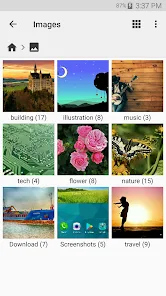
Cx File Explorer is a powerful file manager & storage cleaner app with a clean and intuitive interface. With this file manager app, you can quickly browse and manage the files on your mobile device, PC, and cloud storage, just like you use Windows Explorer or Finder on your PC or Mac. Also it provides a rich set of features that advanced users are looking for without feeling bloated. You can even manage the space used on your mobile device with a visualized storage analysis.
Final Summarize:
Cx File Explorer – full-featured Manager for managing files located in local, network and cloud storage. This is a really convenient and powerful application that is suitable for everyday interaction with the Android file system. You can use it to view and manage files on your mobile device, just as you would if you were using Windows Explorer or Finder on your PC or Mac. The program has a rich set of functions, so it is perfect for beginners and advanced users. View the contents of directories, copy, rename, delete, create, extract, and compress files, and perform other operations on files that are located locally or in remote storage. There is support for cloud services and various protocols: FTP, FTPS, SFTP, SMB, WebDAV and LAN, visual statistics showing available space, file separation by type, and an elegant interface in the style of material design.








