
gDMSS Plus APK is a professional security monitoring and management app that allows users to seamlessly connect multiple CCTV cameras, IP cameras, dashcams, and other devices to a single platform, enabling real-time monitoring and unified management across multiple locations. The app features a simple, easy-to-use interface and is compatible with Android phones and smart TVs. With the touch of a button, you can view a live preview of your home security devices from anywhere. It offers three modes: Camera, Access Control, and Alarm. Download and experience it now!
Click to load YouTube / 点击加载视频
YouTube ↗Features:
Remote Surveillance: gDMSS Plus enables users to remotely monitor their surroundings through their Android phones. This means that you can keep an eye on your office, home, or any other location in real-time, ensuring security and peace of mind.
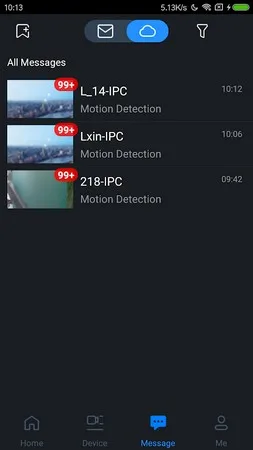
Push Alarm: The app offers a useful push alarm feature that sends notifications to your phone whenever any unusual activity is detected. This allows you to receive instant alerts and take immediate action if there is any security threat.
Video Playback: With gDMSS Plus, you can easily access recorded videos and playback footage from your Android phone. This feature comes in handy for reviewing past events or incidents, providing you with valuable evidence or information.
Ease of Use: The app incorporates intuitive features such as invisible task wheel, finger gesture, and windows slide, making it user-friendly and convenient to navigate. You don't need to be tech-savvy to use gDMSS Plus, as it offers a seamless and easy monitoring experience.
Protect your home from burglars:
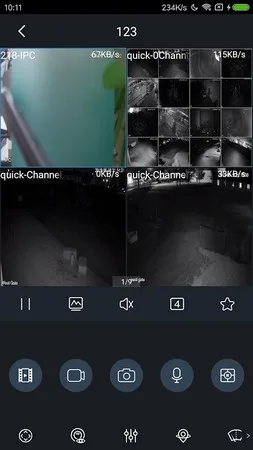
If you’re looking for an easier way to manage your home security equipment, check out gDMSS Plus. By selecting Camera, you’ll have virtual access to your security camera’s live video preview—safeguarding your home from criminals. Its calendar system—which is accessed by tapping the “Device List” icon on the upper right corner—allows you to watch CCTV footage that were captured in the previous days or months.
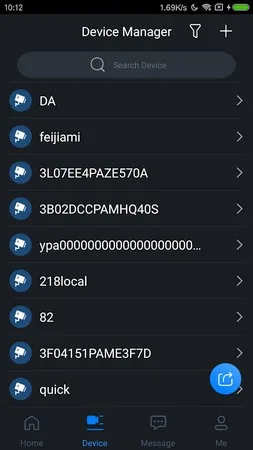
In Camera, you can tap demo if you want to give the app a quick spin before using it in the long run. Sadly, this option is unavailable in Door. Also, you can only view one live video at a time, in contrast to Camera’s four video previews. However, these two options enable you to add new devices or check all the ones that are currently connected to the app.
Finally, the Alarm button lets you connect an alarm hub to ensure the security of your home—just make sure the unit is initialized before it is added to the app’s device list. On the other hand, it has a Help section that contains information on how to maximize the tool’s functions. Its FAQ page found in Help teaches you how to troubleshoot common technical issues.
FAQs:
How do I enable the Push Alarm feature?
To use the Push Alarm feature, ensure that your device and phone have internet access. Additionally, you may need to re-subscribe in the "Push Config" section to activate push notifications if there have been changes to the Google Cloud Message server.
Can I remotely monitor multiple locations?
Yes, gDMSS Plus allows you to connect and monitor multiple locations simultaneously. Whether you need to keep an eye on your office, home, or any other place, you can easily switch between the different cameras or security systems from your Android phone.
Can I access recorded videos on my phone?
Absolutely. The app provides easy access to recorded videos, allowing you to playback footage from your Android phone. You can review past events or incidents whenever you need to, providing you with valuable evidence or information.
Final Words:
gDMSS Plus is a surveillance app that allows you to add all the security cameras you want and view them from the same interface. In total, you can choose to view thumbnails for 4, 9, or 16 cameras at once, as well as tap on each one to see the images they're capturing. Among the devices you can add, you'll find wireless cameras, wired cameras, network video recorders (NVR), digital video recorders (DVR/XVR), Dahua video surveillance services (IVSS), video intercoms, and automatic doorkeepers. Best of all, you can add one or several devices at once depending on the type of device you're connecting. If you want to access all your security cameras from the same app and interface, downloading the gDMSS Plus APK is one of the best ways to do so.








