

Cx File Explorer is a popular file manager designed to improve phone speed and performance, providing a more comfortable user experience. Users can monitor storage space at any time and move, delete, and extract files as needed, freeing up their phone's internal storage. Users can also import and export files in various formats without downloading decompression software. Users can download this software from this site.
Click to load YouTube / 点击加载视频
YouTube ↗Features:
Organize Your Folders/Files Easily: This application has several functionalities that will help you organize your folders and files more efficiently. For instance, it allows you to create new folders, move files between folders, and delete unwanted files.Additionally, Cx File Explorer includes a unique 'Recycle Bin' feature. This feature functions similarly to the Recycle Bin on your computer. It stores deleted files so that you can restore them if needed. However, it only stores files deleted from within the app.Even better, you can compress, extract, and rename files directly from the app. This way, you can save time and avoid using other apps to perform these tasks.
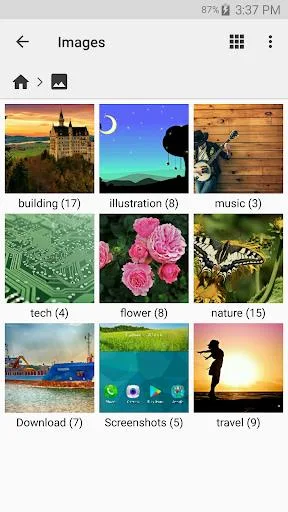
Browse Through Your Files Easily: Cx File Explorer's sleek interface makes it easy to browse through your files. It displays your folders in a tree structure, so you can easily navigate through them. Additionally, you can use the search function to quickly find the files you need.The app also supports multiple tabs. This way, you can easily switch between folders without going back to the main menu. As a result, you can save time and improve your productivity.
Access All Files on Cloud Storage: Cx File Explorer allows you to access all the files stored on your cloud storage. This includes Dropbox, Google Drive, OneDrive, and Box. With this feature, you can easily transfer files between your devices and the cloud.Additionally, you can download, upload, and delete files directly from the app. This way, you can manage your cloud storage more efficiently.
Share Files Easily: Cx File Explorer makes it easy to share files with others. You can share files via email by navigating to the 'Share' menu and adding the email addresses of the recipients.Additionally, you can create a shareable link for each file. This way, you can share large files without worrying about file size limits. This ease of sharing makes Cx File Explorer the perfect tool for collaboration.
Strengths:
User-friendly interface: CxFileExplorer has a clean and intuitive interface, making it easy for users to navigate and manage their files and folders.
Storage cleanup: This app helps users identify and clean junk files, duplicate files, and unused apps, providing a quick and easy solution for storage cleanup.
File management across devices: This app allows users to browse and manage files on their mobile devices, PC, and cloud storage. It offers a seamless experience similar to using Windows Explorer or Finder on PC or Mac.
Access files on cloud storage and NAS: Users can easily manage files on various cloud storages such as FTP, FTPS, SFTP, SMB, WebDAV, and LAN. Additionally, they can access files stored on NAS (Network-attached storage).
App management: CxFileExplorer enables users to manage the apps installed on their mobile devices. They can easily install, uninstall, or update apps using this app.
Storage analysis and management: With its visualized storage analysis feature, users can quickly scan their available space and manage it efficiently. The app also includes a Recycle bin for easy storage management.

Functions:
Appealing UI: Cx File Manager has such a simple and clean user interface that even a kid could use it with ease. The clutter-free design, with large, easy-to-read icons and categories, makes file management a no sweat.Up in the top left corner of the home screen, you get a neat overview of your storage, showing how much space is left and how much has been used. On the right, it breaks down how much space your Images, Audios, and Videos are consuming. It’s so handy that you get almost all the important info about your storage the second you open the app.
File Organization: Organizing files on Android has gotten super easy ever since Cx File Explorer came around. When a new file comes into the device, it automatically figures out what type it is and groups it with similar files. You can move, copy, delete, or share multiple files all at once, plus sort them by name, size, date, or type. There’s also a batch rename feature, which you won’t find in most other file managers. So yeah, getting your files organized is just this app install away!
Compress Files: Ever had to send a big file to your college? Ugh, it takes forever, right? But don’t fret, Cx File Explorer APK has got your back here too. With this app, you can compress files to shrink their size, making them way easier to store, send, and share. Also, you can bundle multiple files into one compressed file.
Hide & Unhide Files: Everyone has personal data that they don’t want others snooping through. If your friends are always taking your phone, the thought of them accessing your family info can be so annoying. That’s where Cx File’s hidden files feature comes in. Not only does it private your personal data, but it also reduces clutter in the file list. The method to hide files is so interesting; check it out here.

FAQs:
Q: Is the app free to use?
A: Yes, it is available for free. The MOD version offers additional features and is ad-free.
Q: Can I use the app to manage files on external storage?
A: Yes, it supports internal and external storage management.
Q: Does the app support cloud storage services?
A: It integrates with popular cloud storage services like Google Drive and Dropbox.
Q: How do I encrypt files with the app?
A: You can use the app’s encryption feature to protect your sensitive files.
Conclusion:
If you are in search of a file manager app with a simple and sleek interface that offers powerful features, CxFileExplorer would be the best choice. Its user-friendly design, along with features like cross-device file management, cloud storage access, app management, and storage analysis, makes it a comprehensive solution for organizing and optimizing your files and storage space. Experience the convenience and efficiency of CxFileExplorer today. Click now to download!








