

Find My Device aims to help users locate their devices. Once paired with their device, users can view its precise location and real-time battery level at any time. It also allows for remote display of various information on the screen and locking, meeting personalized user needs. The software is constantly being updated, adding more practical functions and iterating to provide the most comfortable user experience. Interested users can download this software from this site.
Click to load YouTube / 点击加载视频
YouTube ↗Features:
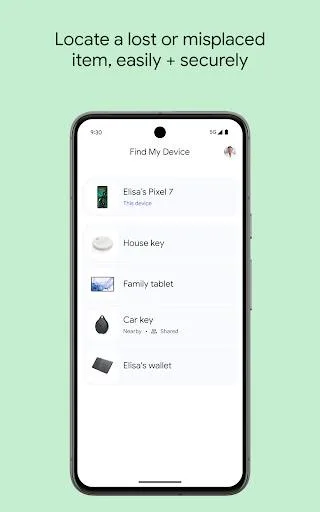
Track Devices on a Map: Pull up a map and see exactly where your Android devices are hanging out—nearby or even if they’re offline. It’s handy when you genuinely can’t remember if your stuff is at home, in the office, or somewhere weird.
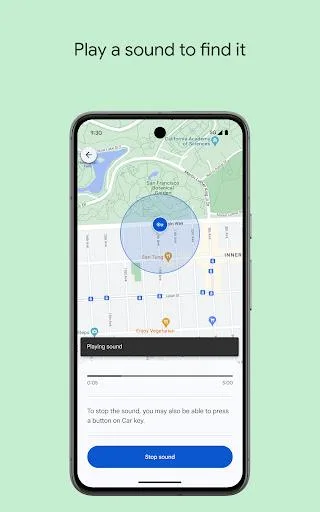
Play a Sound to Find Nearby Devices: Lost your phone under the couch or headphones in your backpack? Make them ring at full volume, even if they’re set to silent mode. Sometimes the old “call your phone” trick isn’t enough, so this really comes in clutch.
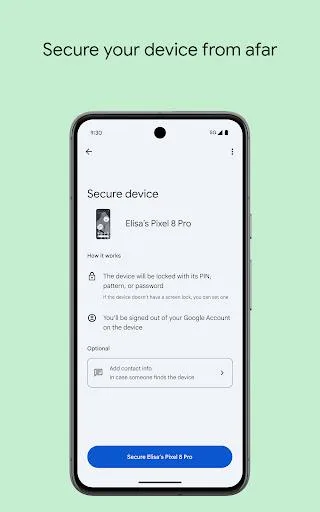
Lock and Secure Remotely: If you’re worried someone might find your lost device before you do, you can lock it straight from the app. Plus, you’re able to leave a custom message on the lock screen—like a phone number or a friendly “Hey, please call me!”
Erase Data for Peace of Mind: For worst-case scenarios, you can wipe your device remotely. This erases everything to protect your private info, just in case your phone or tablet isn’t coming back.
Privacy-First Location Tracking: Location data is totally encrypted; even Google can’t peek. The app requires location services, Bluetooth, and an internet connection, and works on devices with Android 9 or newer.
Highlights:
Real-time location tracking: The service displays the device on Google Maps, switching to the most recent online spot if a live position is unavailable. Indoor maps for large venues such as airports and malls assist with pinpoint navigation.
Loud ringing option: A Play Sound command triggers a high-volume alert, overriding silent or vibrate modes and making the hardware easy to spot in crowded rooms or hidden drawers.
Remote lock and erase: Owners can lock the screen, add a custom recovery message with contact info, or perform a full data wipe to protect privacy when recovery seems unlikely.
Quick navigation: Tapping the location opens standard Google Maps turn-by-turn directions, saving time during the physical search.
Status details: Battery level and network connection appear on the dashboard, hinting at how long the device may stay online.
Useful Tips:
Enable location services: In order for Find My Device to accurately locate your lost device, make sure that location services are enabled on your Android device. This will ensure that the app can pinpoint its location on the map.
Familiarize yourself with the app's features: Take some time to explore the various features offered by this app. Knowing how to play a sound, lock your device, erase data, or display a message can be incredibly helpful in case of loss or theft.
Keep your Google account up-to-date: To make full use of Find My Device's capabilities, it's crucial to keep your Google account information current, including your email address. This will enable you to remotely secure your device and ensure that someone can get in touch with you if found.
FAQs:
Q: How do I register my device on the app?
A: Install the app, register with your phone number or email address, and pair your devices.
Q: Can I use this app to track a device without the user's consent?
A: No, this app requires the explicit consent of all users, ensuring privacy and transparency.
Q: Does the app store my location history?
A: Yes, but it is stored securely and is only accessible to registered users.
Q: Is my data safe with the app?
A: It follows strict GDPR guidelines to protect all personal data.
Q: What should I do if my device is lost or stolen?
A: You can activate Lost Mode to lock the device, play a sound, and view its last known location.
Final words:
Find My Device is a utility app designed to help users locate their lost or misplaced Android devices. This app utilizes a crowdsourced network of millions of Android devices to detect and report the approximate location of missing devices using Bluetooth Low Energy technology. By leveraging this network, users can remotely track their devices even when GPS is not available.Key features of Google Find My Device include the ability to locate devices on a map, remotely lock devices to prevent unauthorized access, and erase data if necessary. The app requires users to have a Google account and must be enabled on the device before it can be tracked. It works effectively as long as the device is turned on and has a stable network connection.








