AndroVid Pro Video Editor is an advanced video editing application. This powerful app is designed to help users create perfect videos and easily share their work on social media. With AndroVid Pro Video Editor, you can quickly process your video footage, using practical basic functions such as trimming, merging, and cutting. You can also customize various filters to your liking. Whether you're a beginner or an experienced user, AndroVid Pro Video Editor is a highly efficient tool. Click to download and experience it now!
Click to load YouTube / 点击加载视频
YouTube ↗Features:
Have fun drawing your own videos
And for those of you who are interested, you can now have fun drawing your own videos in AndroVid Pro Video Editor. Feel free to work with many interesting shapes, brushes, and other color settings to freely customize your creative drawings on the videos. Also, this option will work great if you wish to provide better implications to the certain videos. Have fun drawing in your videos however you want and as many times as you wish.
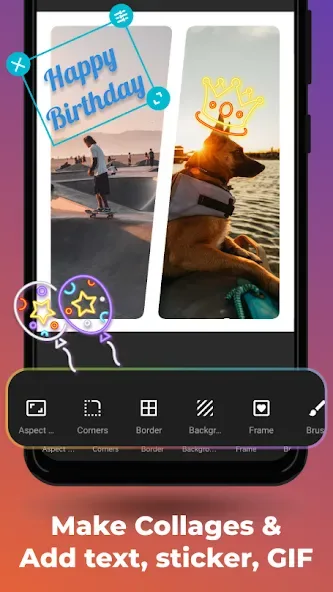
Change the aspect ratios and backgrounds
And to make your videos more suitable to certain platforms, you can now easily change the aspect ratio to better fit the different frames on Instagram, YouTube, TikTok or any other social media. Here, the app will intuitively change the aspect ratio without cropping any parts of the videos off. Also, the interesting background settings with blur and color controls will enable many unique visual elements on your creative works.
Enable interesting slideshows
For those of you who are interested, you can now enable quick and exciting slideshows on your mobile devices, using any available image collection. Feel free to make your slideshow videos and freely edit the images with your own preferences. Also work with the exported slideshow like any other videos to edit and add any effects that you wish. Use the created slideshows for your videos and other creative content.
Enhance your video quality
For those of you who are interested, you can now easily enhance your video quality using the available settings in AndroVid Pro Video Editor. Here, the app will let you adjust the brightness, contrast, saturation, temperature, volume settings, and many other aspects of the videos. Thus, making it extremely easy to enable a quick boost.
Enable many motion effects
Here in AndroVid Pro Video Editor, Android users will also have the option to work with many motion effects, which allow them to freely customize the videos. Feel free to change the playback speed of any videos to create many unique visual impressions.
Interesting reverse effects
Here in AndroVid Pro Video Editor, Android users can have fun working with the interesting reverse effects, which allow them to comfortably enable this unique effect on any parts of the videos as they wish. The changes can be done instantly and the magical effects will make sure that you’re completely satisfied.
Benefits:
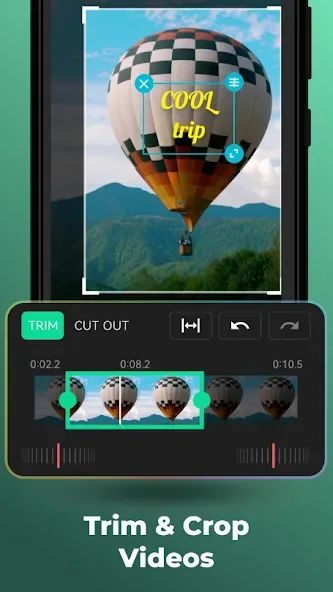
Precise Video Customization: Users have plenty of video cropping options to cut their videos as per their needs. They can customize the duration and arrangement of each photo, and also add lyrics if needed. Hence users can create a video that is most suitable with their intended content and message they want to deliver.
Complex Project Handler: Users can edit multiple tracks at a time for complex video projects. Users can combine multiple videos, audios and images without any in-convenience. This feature is suitable for large projects which in turn facilitate the process of creativity and expressing ideas.
Effortless Clip Arrangement: Drag and drop feature allows users to arrange video clips easy. They can shortly add videos one by one and better organize them for editing.
Efficient Workflow Enabler: Application provides a faster access to the tools which are used frequently. So, user need not spend time on searching for the functions and this increases the performance of editing and user can concentrate more on content creation itself.
Immediate Edit Visualization: Users can see the modifications immediately with this feature. Every edit can be witnessed and accommodated timely. This helps to improve user editing experience and ensure expected quality of final artifact.
Pros & Cons:
Pros
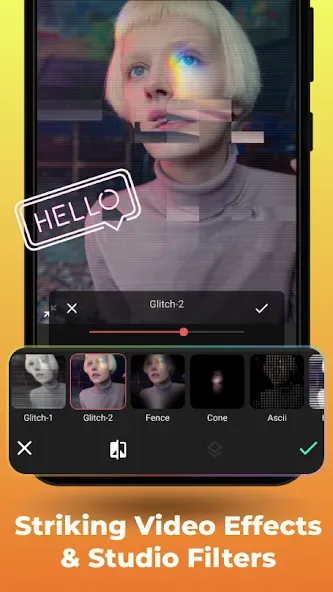
Comprehensive editing tools including frame-accurate trimming and advanced effects
No quality loss with key functions, such as trimming or frame grabbing
One-time purchase with no ongoing subscription fees
Support for many video formats and resolution options
User-friendly interface suitable for beginners and advanced users alike
Cons
Lacks direct saving to external SD card
Rare export bugs may require careful trim point management
Minor filename formatting quirks
Final verdicts:
The expansion of the application also involves the appearance of other features, such as a slideshow, GIF maker, add music, conversion, and much more. Everything is valuable and convenient, making AndroVid an all-in-one video editor with diverse capabilities and can provide many resources or facilities needed for video editing. You can also personalize the entire system and make every feature work how you want to get the best performance while producing high-quality video.