

Purr is an app that helps you adjust your screen resolution. It offers a different adjustment method than traditional apps, allowing you to adjust your device's resolution without root access, while also ensuring device security. Excessively high resolution will increase the burden on the device and power consumption, which can lead to a poor experience for some gamers or users of high-powered applications. This app aims to eliminate this problem, improve the user experience, and give you complete control over your display settings.
Features
Intelligent Resolution Scaling to Reduce GPU Load
High-resolution screens often consume excessive processing power, especially when running fast-paced or highly detailed games. The Purr APK reduces the number of pixels the GPU needs to render, thus lightening its workload and directly translating into higher and more stable frame rates. Instead of forcibly drastically reducing the frame rate, the app encourages users to make controlled adjustments to ensure a clear picture during everyday use. This smarter approach helps devices maintain low temperatures for longer periods and reduces performance degradation caused by overheating and excessive resource consumption.
Intelligent DPI Calculation to Ensure Consistent User Interface Size
Improper DPI management can lead to distorted interfaces when adjusting resolution alone. Purr APK solves this problem by intelligently analyzing the screen's diagonal pixel length and calculating the appropriate DPI value. This ensures that icons, buttons, and text maintain proportions even when the resolution changes. Therefore, your device maintains a familiar visual experience, avoiding issues like oversized icons or undersized text. This balance allows you to enjoy both better performance and a comfortable visual experience.
Automatic Verification System to Prevent Insecure Settings
Before applying any resolution changes, Purr APK checks if the values you enter are suitable for your device's performance. This verification prevents issues such as black screens, screen stretching, or unresponsive touch areas. With this built-in protection, even beginners can try it with confidence, as the app blocks incompatible configurations before they take effect. This layer of security makes Purr APK more reliable than manual methods or tools without any security measures.
Customizable Resolution Input for Precise Performance Control
Every device performs differently, and every user has different preferences. Purr APK allows you to enter precise width and height values to create a performance profile tailored to your needs. You can slightly lower the resolution to balance clarity and speed, or further reduce it in game scenarios where responsiveness is more important than detail. This feature is also highly beneficial for developers who need to test the interface on various screen sizes without switching devices.
Optional Root Integration for Faster Permission Handling
Purr APK runs perfectly without root access, but rooted users can enjoy a smoother experience. With root integration, the app can request necessary permissions directly within the interface without initial ADB setup. This is especially convenient for users who frequently switch resolutions or experiment with different device features.
Broad Compatibility with Android 6.0 and Above
Purr APK supports a wide range of devices, from older phones running Android 6.0 to modern devices with high refresh rate screens. By employing flexible access paths, the app ensures stability across hardware generations. Older devices can significantly improve performance by lowering the resolution, as this reduces the demand on limited GPU resources; while newer devices can enjoy a smoother gaming experience with less stuttering.
Highlights
The app uses clever mathematical methods to calculate DPI. Adjusting the DPI for a new resolution can be tricky because I need to determine the diagonal length (in inches) of each screen. However, I use an alternative method: calculate the number of pixels diagonally across the screen and then divide it by the current DPI to determine a suitable divisor. When applying a new resolution, I divide the new diagonal pixel count by this divisor, resulting in an almost identical DPI.
To ensure compatibility, we perform verification before applying the resolution.
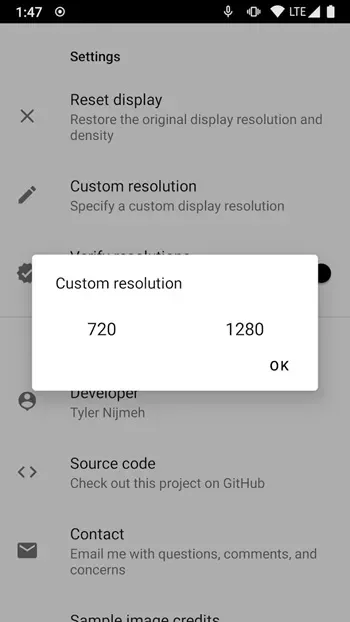
You can specify a custom resolution in the settings menu.
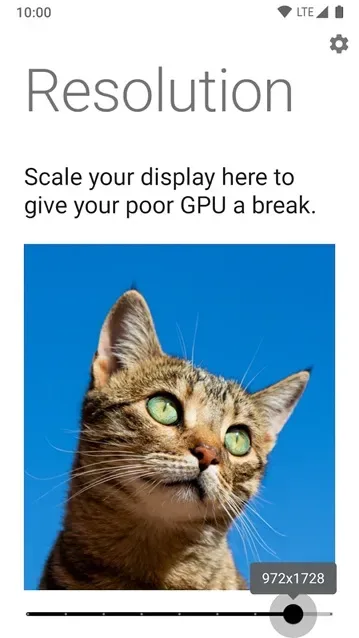
Every time you open the app, you'll see a cute cat icon.
Rooted users can grant Purr permissions without using ADB.
Comparison
There are various methods and tools available for changing screen resolution on Android devices, each with its unique steps and challenges. Purr APK stands out as a reliable non-root solution that simplifies the process while ensuring security and ease of use. Purr APK's advantages and user-friendly design are more prominent compared to traditional screen resolution modification tools.
One of the main differences is whether root access is required. Traditional tools typically require root access to unlock system-level settings, such as adjusting resolution. While root access is powerful, it also carries risks, such as voiding the warranty, malware infection, and bricking the device. This tool utilizes ADB permissions and Android's internal APIs to make setting changes without modifying the system kernel, thus eliminating these risks. This ensures users can achieve their desired resolution settings without compromising device security and functionality.
Advantages and Disadvantages
Advantages:
Changes display resolution without root access
Reduces GPU load, thus improving performance and extending battery life
Helps prevent smudges or scratches on curved or notch screens
Works even after initial ADB setup
Disadvantages:
May disable gesture navigation and fingerprint scanner
Causes visual glitches
Summary
Purr—optimizes Android hardware without root access, ideal for users who want to fine-tune their Android devices without the risks of rooting. While it requires some initial technical setup and may cause some minor UI glitches, its advantages are undeniable. It remains a reliable option for anyone who needs a more flexible and efficient display.








