

WhatsApp is a free global instant messaging application developed by Meta. Users can send text, pictures, audio, video, and files across more than 180 countries and regions free of charge. It supports high-definition one-on-one and group calls, accommodating up to 32 people online simultaneously, making it suitable for family communication, remote work, and other scenarios. All messages and call content use industry-leading encryption technology to ensure that only the sender and recipient can view them, guaranteeing communication privacy and security.
Click to load YouTube / 点击加载视频
YouTube ↗How to use:
Getting started takes only a few steps on most phones, and the basics are easy to learn. For the best experience and new tools, keep the app updated to the WhatsApp latest version. The flow below covers setup and the first things to try.
- First, install the app on your Android phone and open it. Read the prompts on screen so you know what the app will use.
- Next, enter your phone number and verify it with the SMS code sent to you. Add your name and, if you like, a profile photo.
- Then allow contact access so people you know appear in your chat list. You can also grant media and location permissions when you want to share files or your live location.
- After that, open any contact to start a chat and send a message or voice note. Tap the call button to place a voice or video call, and use the Status tab to post a quick update that disappears after a day.
- Finally, go to Settings and open Linked devices to connect a computer or tablet by scanning the QR code for WhatsApp Web or the desktop app. If you use a Wear OS watch, enable notifications and replies in the companion app to manage chats from your wrist.
Function:
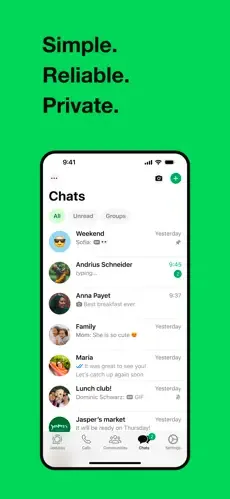
No hidden costs: Once you and your friends download the application, you can use it to chat as much as you want. Send a million messages a day to your friends for free! WhatsApp uses your Internet connection: 3G/EDGE or Wi-Fi when available.
Multimedia: Send Video, Images, and Voice notes to your friends and contacts.
Group Chat: Enjoy group conversations with your contacts. Add or Remove group participants, change group subject and set a group icon.
Personal: Set a profile photo which will be shown to all your contacts
No international charges: Just like there is no added cost to send an international email, there is no cost to send WhatsApp messages internationally. Chat with your friends all over the world as long as they have WhatsApp Messenger installed and avoid those pesky international SMS costs.
Say no to pins and usernames: Why even bother having to remember yet another PIN or username? WhatsApp works with your phone number, just like SMS would, and integrates flawlessly with your existing phone address book.
No need to log in/out: No more confusion about getting logged off from another computer or device. With push notifications WhatsApp is always on and always connected.
No need to add buddies: Your Address Book is used
Highlights:
rivate messaging across the world
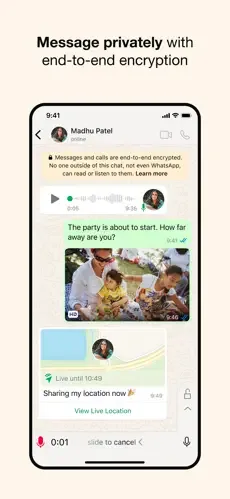
Your personal messages and calls to friends and family are end-to-end encrypted. No one outside of your chats, not even WhatsApp, can read or listen to them.
Simple and secure connections, right away
All you need is your phone number, no user names or logins. You can quickly view your contacts who are on WhatsApp and start messaging.
High quality voice and video calls
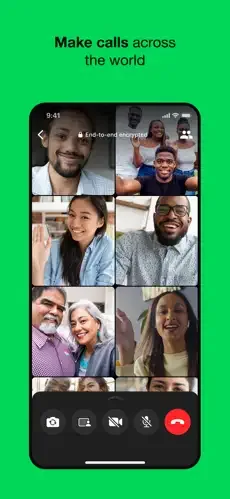
Make secure video and voice calls with up to 32 people for free*. Your calls work across mobile devices using your phone’s Internet service, even on slow connections.
Group chats to keep you in contact
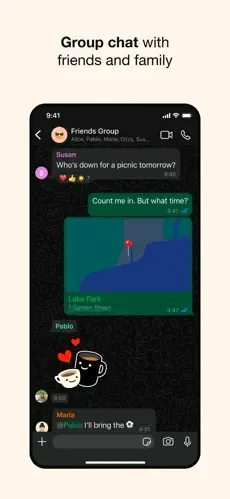
Stay in touch with your friends and family. End-to-end encrypted group chats let you share messages, photos, videos and documents across mobile and desktop.
Stay connected in real time
Share your location with only those in your individual or group chat, and stop sharing at any time. Or record a voice message to connect quickly.
Share daily moments through Status
Status allows you to share text, photos, video and GIF updates that disappear after 24 hours. You can choose to share status posts with all your contacts or just selected ones.
Pros and Cons:
Pros:
Easily connect with your customers and clients
Create a personalized account page
Free to use
Cons:
Requires a mobile number
Not ideal for business owners using a private phone
Conclusion:
GB WhatsApp APK is an advanced version of official WhatsApp. You can use various advanced features in this mod app. Users can easily download this app on their devices from this website and enjoy its improved functions.








