

Brave is a web browser that offers a lightning-fast browsing experience. It features built-in ad-blocking technology to ensure a smooth online experience, and more importantly, enhanced protection against malware and trackers to safeguard your online privacy. Brave provides a mobile-friendly interface, making all functions easily accessible on your phone screen. It also offers features like Tor integration, providing extra protection when visiting certain websites.
Started
Download the Brave APK file from this website and install it on your device. Once installed, open the Brave app.
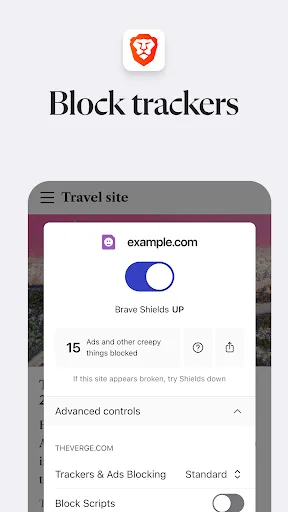
Tap the shield icon in the address bar to confirm that ads, trackers, and third-party cookies have been blocked. Only adjust website settings if a page requires special access permissions.
Next, open "Settings" and select "Search Engines." Set Brave Search as your default search engine to ensure the privacy and independence of your search queries.
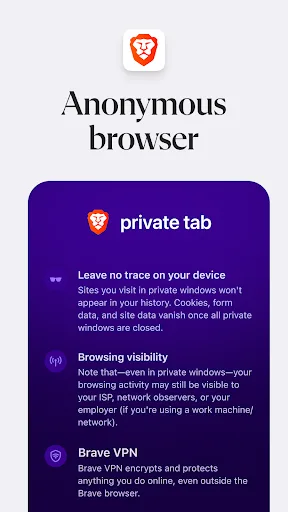
Open the three-dot menu and select Leo to ask questions, summarize page content, or translate text. If you don't want to save your browsing history on your device, try using the privacy tab.
For device-wide protection, go to "Settings" and find "Firewall & VPN." Subscribe to Brave browser and enable it to protect your connections across all your applications.
Features
Private and secure browsing experience: Brave browser blocks ads, trackers, malware, and phishing attacks to protect your data.
Superior performance: Thanks to its efficient resource utilization, Brave loads pages up to 6 times faster than Chrome on mobile devices.
Customizable interface: Users can customize the look and feel of the browser with themes or change privacy/security preferences.
Built-in ad blocker: Brave browser has a built-in ad blocker to help you browse the web without annoying ads taking up your screen space.
Cross-device sync: Sync allows users to access open tabs and bookmarks stored on multiple platforms such as Windows and Mac OS X from other devices running Brave browser.

Pros and Cons
Pros: Loads websites faster than most browsers.
Highly prioritizes user privacy and blocks trackers.
Built-in AI assistant.
Cons: Limited extension support. Strict ad blocking may cause website compatibility issues.
FAQs
Is Brave browser secure?
Brave is one of the most secure browsers on the market. It blocks privacy-invading ads and trackers, prevents third-party data storage, prevents browser fingerprinting, and upgrades all web pages to secure HTTPS connections whenever possible. And all of these features are enabled by default.
It's also built on the open-source Chromium web engine, which powers browsers used by billions of users worldwide. It's safe to say that Brave's source code has undergone more scrutiny from security researchers than any other browser. In short, Brave is not only secure to use, but more secure than almost any other browser. Learn more.
How to download and install the Brave browser?
The Brave browser works on virtually all desktop computers (Windows, macOS, Linux) and almost all mobile devices (Android and iOS). To get started, simply download the Brave browser for desktop, Android, or iOS.
Does the Brave browser have VPN functionality?
Yes! Brave Firewall + VPN protects all your online activities on all your devices, even outside of the Brave browser. One subscription covers up to 5 devices and supports Android, iOS, and desktop systems.
Does Brave browser block YouTube ads?
Yes, Brave browser can block ads on video websites like YouTube. This includes in-page ads, pre-roll ads, mid-roll ads, and post-roll ads. Blocking ads provides a cleaner browsing experience and faster video loading speeds.
Summary
Brave browser is an open-source browser for Android systems, offering fast and convenient internet access. Its interface is perfectly designed, ensuring that browsing your favorite websites won't impact your phone's performance. All of this is built on maximum privacy protection and reliability, which is why Brave browser is so popular worldwide.








