

Skyline Emulator is a game emulator designed for game enthusiasts, allowing players to enjoy all Nintendo games and relive their childhood memories. The software is optimized for mobile devices, providing superior graphics and sound effects while supporting various peripheral controls and customizable key layouts for a more comfortable gaming experience. Users can freely import game files of various formats and manage and quickly browse them through the software. The software also features an open-source community where users can freely upload game files and exchange game tips and tricks.
Click to load YouTube / 点击加载视频
YouTube ↗Features of Skyline Emulator:
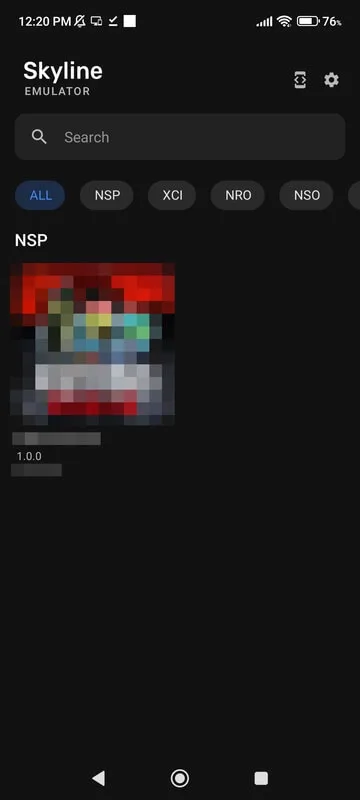
Wide format support and simple library browsing: NSP, XCI, NRO, NSO, and NCA files are recognized, making it easier to keep a mixed library in one place. After you point the app to your Switch games folder, supported files are automatically listed in the “All” tab for quick browsing. This folder-based approach feels natural on Android, especially when moving games between internal storage and an SD card. Tap a title to start it and return to the library at any time. Android 8.0 or higher is required for Skyline Emulator, which helps maintain device compatibility.
On-screen controls designed for handheld play: Touch controls are built into the interface for direct handheld play. Buttons are easy to reach in portrait or landscape, so quick sessions on a commute or couch feel natural. The layout keeps the screen readable while giving you the inputs needed to navigate menus and gameplay. For longer play sessions, graphics tuning helps steady performance without sacrificing control responsiveness. Players who prefer a lightweight setup can launch and play with Skyline Emulator without any extra accessories.
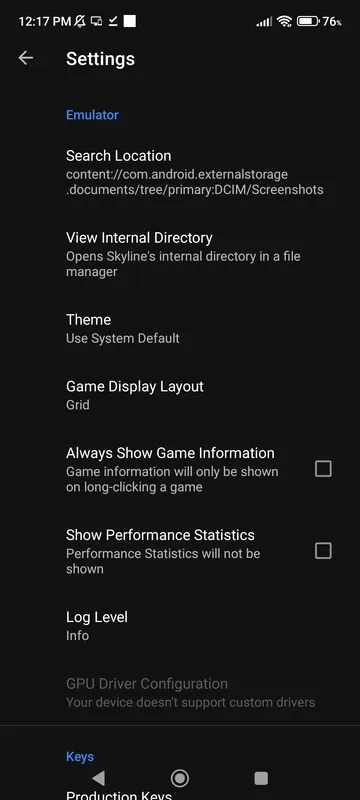
Mobile-optimized GPU emulation and tuning: The emulator focuses on getting the most out of mobile hardware. Graphics settings let you balance image quality and smoothness, so lighter devices can stay playable while newer phones push higher resolution. You can enable an optional Docked mode to target stronger performance profiles for demanding games. Some devices also expose custom GPU drivers in settings, which can help stabilize frame rates. Performance will vary by title and phone, so small adjustments usually make the biggest difference in practice with Skyline Emulator.
Highlights of Skyline Emulator:
Run Multiple Games: It’s all about playing the Nintendo Switch console games on your phone. This app can emulate the environment of the gaming console, and you can play almost all of the amazing games that were made for Nintendo Switch, with games like Sonic Mania, Hollow Knight, Cuphead, Katana Hero, and many others. You just need to have the ROM file of the game, and you are ready to roll.
Controller Support: If you want to have a nostalgic gameplay experience, then you will find this app helpful. With support for the gamepad controller devices, this app helps you play the game and feel like you are playing on the real Nintendo Switch console. You have to use the supported gamepad controller with your device, and you can customize it in the app settings.
Open-Source Project: The best thing about this app is that it’s based on the Open Source project. This means that the entire app code is available online for users and developers for free. Anyone can check out the code, add new features, fix bugs, and do anything with the same as per their needs. This helps the users to have a safe experience as there will be developers working on updating this app.
FAQs of Skyline Emulator:
What is the Skyline emulator?
Skyline emulator is a tool designed for running Nintendo Switch games on Android devices. It focuses on technical performance and compatibility for mobile emulation.
How do I set up the Skyline emulator?
Setup involves downloading the emulator, acquiring necessary game files (ROMs), and configuring hardware settings for optimal performance based on your device's specifications.
What does "shader cache optimization" mean for Skyline?
Shader cache optimization refers to improving the emulator's performance by pre-compiling and storing graphical shaders, reducing stuttering and improving frame rates during gameplay.
Is Skyline emulator still being developed?
The project has transitioned to an open-source legacy, with a focus now on community-driven support and optimizing existing performance for users.
Summary:
Skyline Emulator offers game lovers a convenient way to play classic games on their phones or tablets. Whether you are an old gamer with nostalgia or a new generation gamer, this emulator can meet your gaming needs.








