

ViMusic is a lightweight music player. Designed for Android users who want an alternative way to stream and organize music via YouTube Music, it offers greater control over playback, overcoming the limitations common to official platforms. With ViMusic, you can play unlimited music tracks and quickly find songs you're interested in by simply clicking the search bar. The app also supports background playback; you can drag and drop songs, shuffle, or set a timer to stop playback, which is very useful for sleeping or focused listening. Furthermore, the app even supports skipping silent sections and displaying lyrics during playback, adding a personalized touch.
Highlights:
Discover new music, browse by genres, moods, artists, and more with ViMusic App. You have access to all the YouTube Premium Music content, which includes millions of songs, albums, playlists, and more..
Share your music with your friends and family through social media platforms, such as Facebook, Twitter, Instagram, WhatsApp, and more. You can also copy the link of the song or playlist and paste it anywhere you want.
Use ViMusic App on any Android device that supports YouTube Music API without rooting your android device. You don’t have to modify the system settings or risk damaging your device to use ViMusic App.
Keep listening to your music even when your screen is off or you are using other apps. Vimusic android app allows you to play music in the background without interrupting your music.
Download music for offline listening and enjoy your tunes without an internet connection. You can choose the quality and storage location of your downloads, and manage them easily.
Import playlists from other music services, such as Spotify or Apple Music, and listen to them on ViMusic App. You can also export your playlists from ViMusic App to other music services.
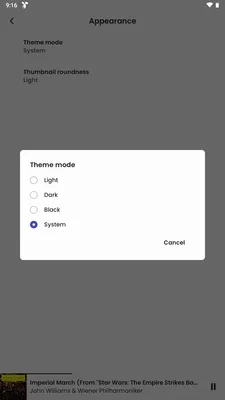
Customize the app with different themes, colors, and fonts. You can choose from dark mode, light mode, or custom mode. You can also change the accent color and the font size of the app.
Control the app with your voice or touch screen while driving by using ViMusic App on Android Auto. You can play, pause, skip, shuffle, repeat, and search for music on ViMusic App with Android Auto.
Features:
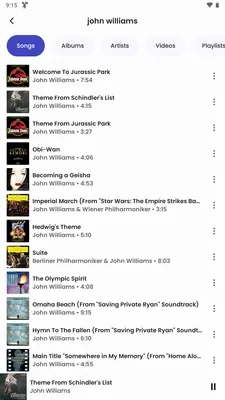
You can search and play any song from YouTube Music.
It allows you to play video clips too.
The App can play music in the background. So, it will continue playing even if you minimize the App or the screen is off.
You can search for a specific song, playlist, or artist.
It also lets you use the Autoplay feature.
There is an Automatic Cache system that saves your played media. And you can play them again without an Internet connection.
It also displays lyrics for your favorite song so you can sing along.
You can also open Youtube links which are the best for listening to podcasts.
The App also lets users import their favorite playlists.
Bookmark your favorite Artists and Albums to access them later quickly.
It also allows you to manage your local playlists.
You can set the sleep timer so it will stop automatically after the set time.
Also, you can manage the Queue by reordering the song in your playlists.
It also allows you to skip the music’s silence, saving time.
The App lets users adjust the loudness of the audio and normalize it.
It is a lightweight App that does not affect much on your processor.
You can customize its appearance, player, Cache, database, and other settings.
Pros & Cons:
Pros
Enjoy a completely ad-free music experience without any interruptions.
Listen to your favorite tracks with high-quality audio streaming.
Play music in the background while using other mobile apps.
Download and cache songs for offline listening at any time.
Search for millions of songs instantly with the fast search feature.
Install this lightweight app without using much phone storage.
Create and manage custom playlists to organize your music library.
View synced lyrics while playing your favorite songs for free.
Use the built-in equalizer to customize the sound to your taste.
Access the entire YouTube Music database without a paid subscription.
Cons
The application is not available on the official Google Play Store.
You must perform a manual installation using an APK file.
A stable internet connection is required for initial music streaming.
Users might experience occasional bugs as it is open-source software.
There is no official customer support team to help with issues.
FAQs:
Is ViMusic offline?
You can play music offline in the App. Al the songs you play online can be later played offline from the Cache.
Can we use ViMusic on Android?
Yes, you can use the App on any Android running on 5.0 and later OS version.
How to install ViMusic?
Download the App from a reliable source and tap on the APK file. Then install it to listen to unlimited music from YouTube Music for free.
Is ViMusic free?
Yes, it is free to use. You don’t need a subscription to use the App. It does not even require a registration. Download and install it and start listening to songs.

Conclusion:
All the songs in your listening list can be rearranged as you wish, or you can choose to shuffle them. You'll also find other features, such as song lyrics display, skipping silences in the tracks, using a dark or light theme, setting a timer to stop playback after a certain amount of time has elapsed, and the option to play YouTube links directly on the app itself. For example, you can listen to any YouTube link in the background, which is ideal for podcasts. So if you're looking for a music player that works with YouTube Music, downloading the ViMusic APK is a sure bet.








