

SuperSU is a powerful tool designed specifically for Android devices. It offers a wealth of new features that allow users to exercise strict control over their devices and ensure stable network connectivity. With SuperSU, users can efficiently manage and control their devices, maximizing performance while ensuring smooth and efficient connections. Additionally, the app includes security management features to protect your device from malware and other threats. Its user-friendly interface and intuitive controls make it easy to manage and control root permissions for your applications.
Highlights:
Comprehensive Device Security: This app offers a range of features to ensure the safety and security of your device. It effectively prevents malware and other threats from accessing your device and stealing your information.
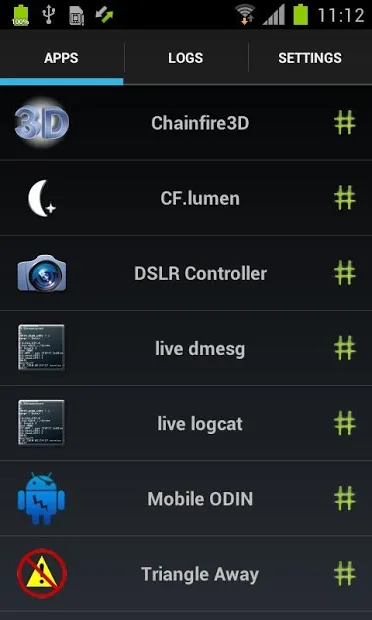
Easy-to-use Interface: This app has a simple and intuitive interface, making it easy for users to navigate and access all the necessary functions. It displays all the categories and symbols you need to manage and control your device effectively.
Optimization and Performance: With this app, you can make your device operate at its full capacity. It allows you to trigger boot, access additional features, and control activities across all apps. This results in a more efficient and responsive device.
Features:
Real-time root access control
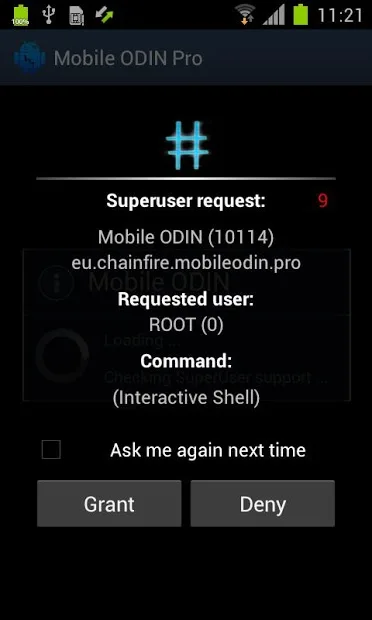
SuperSU shows a prompt when an app requests superuser rights, so you can grant or deny instantly. It logs access events and can display notifications to keep you informed. This helps you track which apps use root and when.
Per-app configuration and security
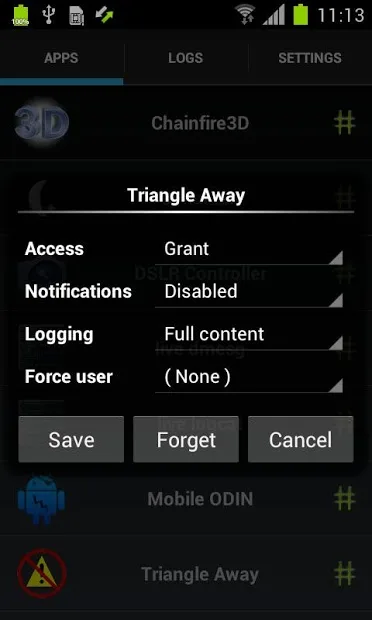
Beyond basic prompts, you can set notification preferences per app for clearer oversight. In the Pro version, enable full command content logging, per app logging rules, user overrides, PIN protection, per app PIN, and time limited grants. These tools provide precise control without changing system wide behavior.
Reliability in recovery and unusual states
For tougher cases, SuperSU works in recovery and when Android is not fully booted. Deep process detection reduces unknown requests, and support for nonstandard shell locations keeps control consistent. Ghost mode and wake on prompt help you make timely decisions.
Unroot and maintenance tools
When maintenance is needed, SuperSU offers temporary unroot and complete unroot options for testing or device handover. It can convert to a system app and includes a backup script intended to survive certain nightly updates. Icon and theme choices are available, and on some phones you can launch the app using dialer codes.
Tips and Tricks:
Prevent Malware: Use this app to prevent malware from accessing your device and protect your important information from being stolen.
Manage App Data: Take advantage of the app's data management tools to check and delete unnecessary information, freeing up storage space and improving device performance.
Stay Updated: Regularly update this app to ensure that you have the latest features and security enhancements.
FAQs:
Can I combine it with other Superuser access management tools?
No, you cannot combine it with other tools. You must choose either it or another tool for managing superuser access.
Are in-app purchases necessary for using it?
No, in-app purchases in it are completely optional and more like donations. They do not unlock any additional functionality.
How do I uninstall it if I no longer want to use it?
To uninstall it, you need to follow a special procedure to ensure you do not lose root access. Simply uninstalling the app will result in losing root.
Conclusion:
SuperSU is the ultimate Superuser access management tool for rooted Android devices. With advanced features, user-friendly interface, deep process detection, and compatibility with various scenarios, it offers a reliable and efficient solution for managing root access permissions. It ensures that users have complete control over the apps that require root access, providing a secure and stable experience.








