

NetCut is a Wi-Fi management tool designed for mobile devices. It helps users discover available Wi-Fi networks and connect to them with a single tap, ensuring a smooth online experience. While in use, the software automatically protects the connected Wi-Fi network, shielding it from various potential cyberattacks so that users can browse with peace of mind. It also offers a wide range of customization options: you can rename connected Wi-Fi networks, monitor the activity of other connected users, and even block specific devices to maintain a stable and efficient network environment. Please note that while the app is free, it requires root access to unlock its full range of features.
Click to load YouTube / 点击加载视频
YouTube ↗Features of NetCut:
Simplified Network Control: The application streamlines the process of managing who can access the internet on your shared Wi-Fi network. Once launched, it presents an intuitive interface displaying all active connections. Users can then effortlessly tap on a specific device from this list to restrict its internet access, offering a straightforward solution for bandwidth optimization or parental control. For example, a user might temporarily block a gaming console to reduce latency for a critical work video call.
Essential Root Access: To unlock the full potential of this platform, including its core functionality of blocking internet access for other devices, the Android device it is installed on must be ‘rooted’. Without root privileges, the application’s capabilities are significantly limited, preventing it from executing the necessary low-level network commands required for such advanced network management. This is a critical prerequisite for users looking to leverage its full power.
Optimizing Bandwidth Allocation: The ability to selectively block internet access for connected devices can significantly enhance network performance for the primary user. By temporarily disconnecting bandwidth-intensive devices, such as those streaming high-definition video or downloading large files, the application helps free up valuable bandwidth. This ensures a smoother, faster internet experience for the devices that truly need it, making it an invaluable utility for managing shared network resources efficiently.
Functions of NetCut:
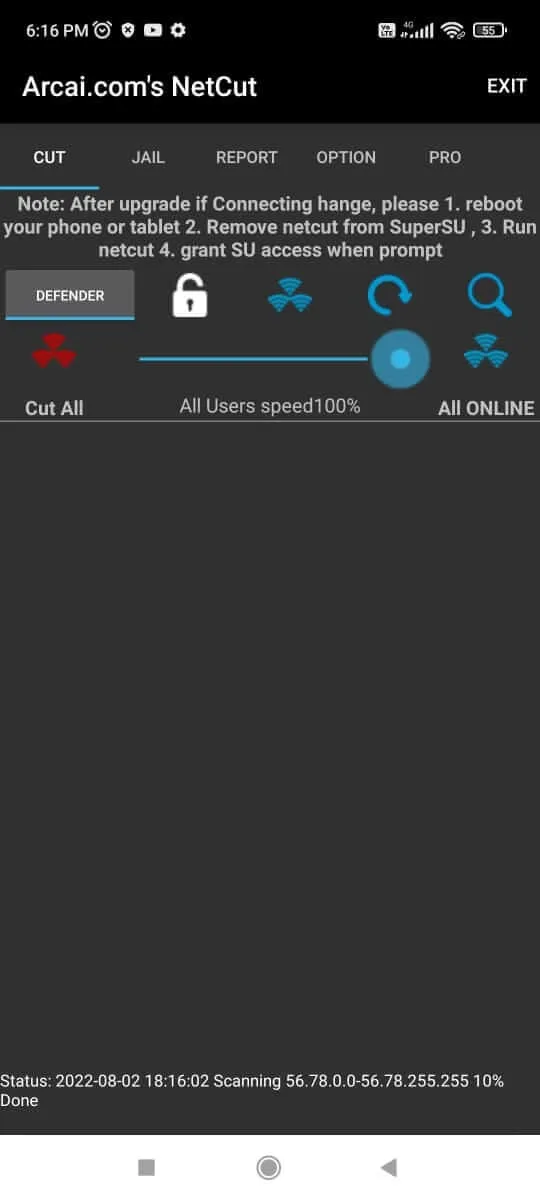
Built-in defender that identifies and blocks ARP spoofing attempts to protect your device on public hotspots.
Remote removal and blocking of unwanted devices, preventing them from reconnecting.
Real-time scanning that lists every gadget linked to your WiFi so you can spot unauthorized users.
Visual bandwidth breakdown that shows how much of the connection each device is using.
Ability to rename connections or devices to help avoid accidentally cutting off the wrong equipment.
User Reviews of NetCut:
I’ve been using NetCut for a while now. My reason for using this site is my family does nothing but streaming Netflix and surfing Facebook watching videos while not even paying attention to what’s on Netflix, effectivly using up all of the bandwidth.
NetCut has the feature to slow down or cut off devices completely from the internet. Well, that’s how it seems anyway. I’m not sure if I need a Pro membership to be able to slow down devices connected to my wifi or not because it seems like the feature is broken for me, it will simply cut them off completely. It seems simple enough to use, you can either use the slider bar to set how much bandwidth a device is allowed to have or cut it off completely.
NetCut also let’s you see the ip address, MAC address and names of any device that is connected or has ever been connected to your wifi network for as long as you’ve used the site. This is very helpful because you can see if your neighbor is leeching off of your internet and slowing you down or not. You’re able to see the name of any device that has been set on that device or you can name it yourself so you know for sure which device is which.
So far I think it’s a fairly okay thing to use, it could use some clarity and maybe some fixes (such as not showing what features are pro membership only and trying to limit bandwidth just cuts it off completely) but if you just want to cut your neighbor off you wifi or want to stop someone from hogging up all the bandwidth, it’s perfect.
FAQs of NetCut:
Change MAC address of a adapter freely ? Clone MAC address from a local network by one click?
Yes. With netCut, it’s do able . and it’s easy/free/fast/safe. I hope this help some users that use netcut for years and had discover other useful than “cut” . Enjoy!Before you click on Change, you must has done following:
- Select a adapter to change.
- Select a PC to clone MAC address from
- Click on “Change Mac ” Button
When you Click on “Change” Button, Following action happen:
- NetCut stop monitor the adapter
- NetCut Stop send packets to the gateway and the been dealed PC.
- NetCut read the MAC address from the input box and write it as the MAC of your current netCut selected network adapter.
- Disable the network adapter.
- re-enable the network adapter.
- netcut resume monitor/sending packets to gateway .
How to use netcut to find a Computer’s IP or its Hostname?
Click on the Find Button , input the hostname or the IP address of the computer you want to locate. and Click on OK. NetCut will find the computer and select it for you.
Inside netcut, How to Copy and paste so I can print ALl the IP addresses , MAC Addresses , Hostname in my LAN ?
Click on the PrintTable Button , the Pop Up window bottom shows the Statics of all the Computer’s IP, MAC addresses , Hostname. which you can do slect all and copy , so you can paste to some where else to print out. or even export to excel.
Use netcut Get all the IP addresses in your LAN?
in short: Just run it , you will get it in less than 3 seconds.Inside netcut do a QUICK SCAN: select the Gateway, and click on [Search LAN].When you start the NetCut. By the time in your LAN any computer who have any kind of traffic pass through your Lan. the computer will appear in the left Computer List Along with their Hostname(some UNIX system may not appear hostname), MAC address you do not see any computer which does exist in your LAN,you could make it to appear by trying to use that computer’s network resource.
Conclusion:
If you download NetCut Android you can also get your hands on NetCut Defender, a built-in tool that will help you to browse safely around public networks as it's capable od detecting and blocking ARP spoofing attacks.








