
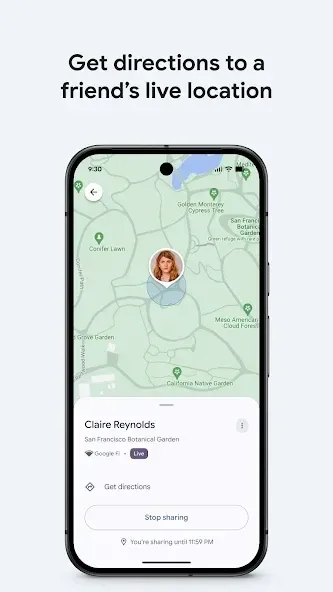
Find My Device helps users quickly locate their various devices, such as smartphones, tablets, and headphones. Through the app, users can trigger a sound on a lost device to make it easier to find, or remotely lock the device and leave a message, allowing whoever finds it to get in touch with you. The app offers excellent compatibility, running seamlessly across a wide range of mobile devices and smartwatches. Furthermore, all data is strictly protected, ensuring a secure experience for users. Beyond this, the app also allows you to share your real-time location with others, making it convenient for friends to meet up with you.
Click to load YouTube / 点击加载视频
YouTube ↗Features of Find my Device:
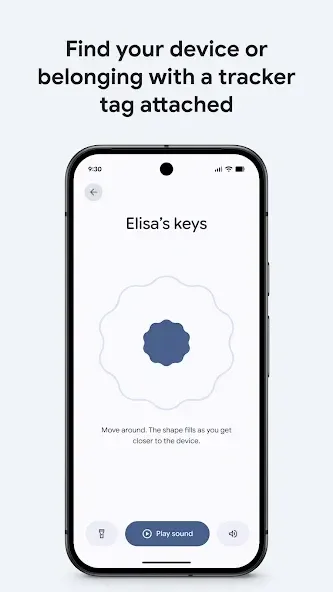
The core functionality of Find My Device revolves around tracking the location of devices on a map. Users can view their devices even if they are offline, provided that they have previously enabled location services and Bluetooth. This capability is particularly useful when a device is within close proximity, as it allows the user to play a sound to help locate it. This sound feature is straightforward and effective, providing a simple auditory cue to find a nearby device.
For those concerned about the security of their information, the app offers robust features to remotely secure or erase a device. If a device is lost, users can initiate a lock to prevent unauthorized access. Additionally, there is an option to erase all data on the device remotely, ensuring that sensitive information does not fall into the wrong hands. Users can also add a custom message to the lock screen, which can be seen by anyone who finds the device. This feature is particularly useful for communicating contact information or instructions for returning the device.
The app employs a secure method for tracking location data. All information within the Find My Device network is encrypted, ensuring that users' location data is protected. Notably, this location data is not accessible even to Google, which adds an extra layer of privacy for users. This commitment to security is essential for individuals who prioritize the protection of their personal information.
Find My Device is designed for Android devices running version 9 or higher. It requires an active internet connection to function effectively, as well as active location services. This ensures that the app can accurately determine the device's location and provide real-time updates. The app is available for download on devices that meet these requirements, making it accessible to a wide range of users.
The interface of Find My Device is user-friendly and intuitive, allowing individuals to navigate the app with ease. Upon opening the app, users are presented with a clean layout that displays their devices and their current locations. This simplicity is beneficial for users of all experience levels, enabling quick access to the features they need.
User Reviews of Find my Device:
I thought this app came pre-loaded on every android phone but it isn't in some cases. For anyone considering to download this or not, I will make that simple for you. YES! This is one of the most important apps you can get for your phone. It helps find lost or stolen phones. It can lock your phone with a custom password until you find it, display a message to the finder, & if everything fails it can factory reset your phone...all remotely. It also plays a siren so you can locate your device.
I lost my phone in a pitch-black area with very tall, dense grass. I downloaded the app on another phone, and the app periodically rang my lost phone, allowing me to follow the sound and find it. I honestly don’t think I would have found it without this app. Very thankful and highly recommend it!
I'm writing this on the 15th of September 2026. Yesterday, on the 14th, a friend of mine had her phone stolen from her office. She blocked it, reported it to the police and basically accepted that it was gone. On the morning of the 15th she went back to the police, showed them the Find Hub app, tracked the phone, and they actually managed to recover the device! Can you believe it?! This app may have limitations, but based on this one experience I think it is absolutely worth having!
When this application is implemented as the default installation on all Android devices, including cars, phones, watches, mini PCs, and phones from all other manufacturers that have an Android OS and so on. Then geolocation will be transmitted much more accurately and possibly directly online. Naturally, this will only happen if Bluetooth is enabled, which will also transmit information without confirmation, as is done in Apple devices. In the meantime, the app lags behind the Apple app.
FAQs of Find my Device:
What Android version is required to use Find my Device?
Android phones with OS 6 and above can use the Find my Device app. You can also access the app in a web browser on laptops and tablets.The Find my Device network requires Android phones with OS 9 and above.
What phones and accessories, like tracking tags, work with Find my Device?
Android accessories like earbuds, headphones, tracking tags, tablets, watches, smart luggages and more may be compatible. Look for the 'Works with Android' badge on accessories that work with Find my Device. See the full list here.
How do I share my device locations with friends and family?
You can add friends and family to shared items like a tablet or house keys with a tag attached. For more info on sharing device locations, head to the Help Centre.
Can I use Find my Device to find my phone (e.g. Pixel, Samsung and/or other Android phones?)
You can find Android devices with OS 9 and up with the Find my Device network. Use the Find my Device app on a friend’s phone or tablet by signing in to the app as a guest.
How do I mark my phone as lost?
You can use the 'Secure device' option to lock your device screen with your PIN, pattern or password. If you don’t have a lock, you can set one. To help someone return your device to you, you can add a message or phone number to the lock screen.
Final Verdict:
Find My Device is, in short, a must-have tool for any Android user looking to keep their device secure. With the ability to remotely locate, ring, lock, and wipe devices, this app provides everything you need to protect your personal data and recover your device if lost. Its intuitive interface, multi-device compatibility, and customization options make Find My Device a comprehensive and reliable solution for the security of your device.








