

Twitter Video Downloader is a popular utility for downloading videos from the social media platform Twitter, helping users easily obtain video files they are interested in from Twitter with simple operations, saving them locally in high quality, allowing you to enjoy your favorite content offline anytime, anywhere. Twitter Video Downloader presents users with an intuitive, easy-to-use, and lightweight video downloader. Users can easily obtain high-quality video content with just a few simple steps, helping you save data and easily manage multimedia content.

Excellent Highlights of Twitter Video Downloader
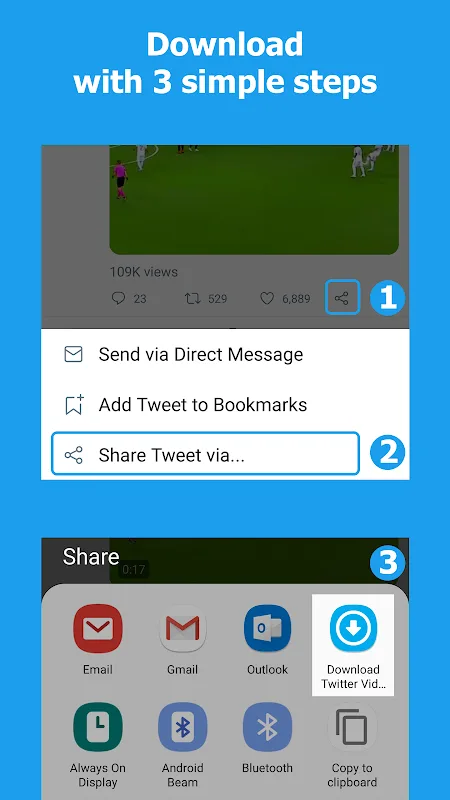
This application features a simple and easy-to-use interface, guiding users through the video download process step by step. First, users can find the video or GIF they want to save in the Twitter app. By clicking the share icon below the content, they can choose to share the tweet through the "Download Twitter Videos" app. This integration significantly simplifies the process, making it easy even for users who are not very tech-savvy.
For users who prefer other methods, the application allows users to copy the URL of the tweet containing the video or GIF. After copying the link, users can choose to open the "Download Twitter Videos" app (which will automatically paste the link), or manually paste the link into the app. Then, users simply click the download icon to start the download. This flexible operation method caters to different user preferences and enhances the application's ease of use.
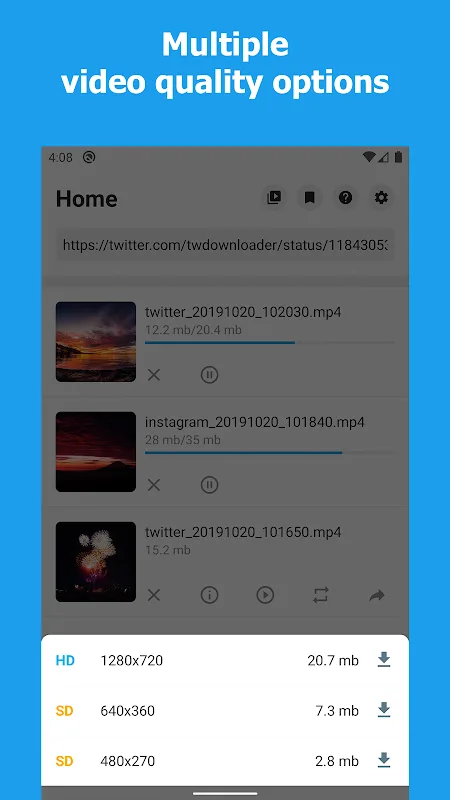
A major highlight of downloading Twitter videos is that if multiple video resolution options are available, users can choose from them. This feature allows users to select the video quality they want to download, providing better control over storage space and video quality. In addition, the application displays the size of each downloadable video, helping users decide which videos to store based on their device's storage capacity.
User's Comments of Twitter Video Downloader
It's quite dependable, and really easy to use. I rarely run into a non-downloadable GIF or MP4. The download speed is also stellar! I can even leave the app for background downloads, with a brief notification at the bottom of my screen, signaling completion. My ad experience has been great. There are only banner ads, which let me use the service freely. I don't feel forced into viewing ads for revenue. The ads are placed for my convenience, and their benefit. It's essential!
I had tried over half a dozen downloaders. They were clumsy, didn't work half the time, and were limited in format and/or resolution. This one will download all formats at the same time at the highest available resolution, AND consistently, dependably actually works every time. Don't waste time with others - this is the best and most functional downloader.
This is hands down the best downloader app out of most apps I have used. This one doesn't bother you with constant ads and pop-ups. And it's extremely fast and seamless. The UI is great. Simple. Straight to the point. My only complaint is that I am suddenly unable to download Instagram videos and am being prompted to log in to Instagram through the app. Which I have done, and despite being logged in and multiple attempts of relogging in, it still prompts me to log in and I am unable to download IG videos.

Wonderful Features of Twitter Video Downloader
Fast Download: Copy the video link and quickly download Twitter videos without logging in.
HD Quality: Download high-definition videos for a better viewing experience.
Offline Playback: Save downloaded videos locally and easily watch them anytime, anywhere.
User-Friendly: Simple operation interface, no ad interference, ensuring a smooth user experience.
Helpful Tips of Twitter Video Downloader
Open the X (Twitter) application and search for the video or GIF you want to download.
Click the share icon below the video.
Select "Share Tweet via...", then select Twitter Video Downloader.
In the application, click the download icon to start the download process.

Final Words
Twitter Video Downloader is a user-friendly application designed to let you easily download videos from the Twitter platform. No login is required; simply copy the Twitter video link to quickly download high-definition videos and watch your favorite content offline anytime, anywhere.








