

Thunder VPN is a VPN application designed to provide users with the best experience. It simplifies the entire process; simply click a button, and it will automatically connect to a VPN server. Of course, if you want to switch servers, it offers multiple options, allowing you to connect to the server of the network you want. Once connected, you can use the internet freely as if you were in your local area. Thunder VPN is completely free to use and requires no login. Just open the application to connect to a VPN server—there are no restrictions!
Usage
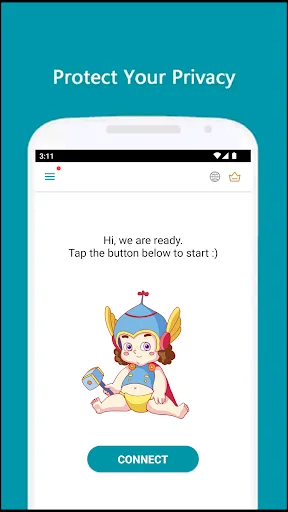
The interface of this tool is designed to simplify the connection process to the extreme, allowing any user, without extensive technical knowledge, to easily get started. To begin connecting, simply click the "Start" button at the bottom of the screen. After clicking, you will automatically connect to the nearest VPN server. It's that simple.
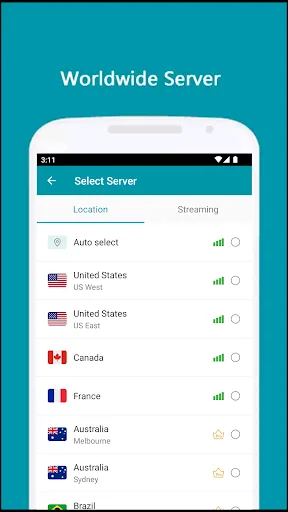
If you want to change your location, this tool offers multiple connection options. For example, if you want to be in the United States or France, simply open the list and select your preferred destination. Once connected, you can browse the web as if you were in that country/region.

Function
Superfast Connection
We’ve tried many VPN apps but never got the connection speed like the Thunder VPN app. The name is justified by the thunder-like speed when connected to the remotest server. Although you may find some latency issues solely due to the distance from the location, there is no reduction in the speed. So, you can easily do internet-intensive things like video streaming.
Numerous Locations
You need access to numerous VPN locations to effectively mask your IP address. Fortunately, there are numerous server locations like the United States of America, the United Kingdom, Germany, India, China and many others. This is very helpful if you want to change the IP and visit geo-restricted websites to specific countries.
Unlimited Browsing
Unlike other VPN apps, the Thunder VPN app has no restriction on internet browsing. The users are not restricted in bandwidth and speed. You can freely access all their servers without any issues. With unlimited bandwidth and uncapped connections to their servers, users can enjoy an unlimited web browsing experience with ease.
Completely Secure
One of the best things about the Thunder VPN app is This app has taken all the security practices to keep your user experience safer than ever. All servers in this app use the proper backend encryption systems to secure all the data. In this way, there is no chance of online threats accessing your browsing activity, as everything is encrypted and completely safe.
Free to use
If you don't want to spend any money on premium VPN apps but still want the same features, then this is the best app for your needs. There is no need to purchase any subscriptions or pay for anything. All server locations are freely available, and there is no restriction on browsing speed, so you can easily stream movies and shows. In short, it's one of the best options among all available VPN apps.
Pros and Cons
Pros: Free unlimited bandwidth
Simple one-click connection
No registration required
Unrestricted content by location
Cons: Unstable speed, occasional disconnections
Lack of transparency in encryption protocol
No advanced features such as split tunneling
Frequent ads in the free version
FAQs
What is the Thunder VPN interface like?
This app boasts a clean interface with quick connect and disconnect buttons, simplifying the VPN connection process. Even beginners can easily get started, requiring minimal technical knowledge.
How to use this VPN securely on an Android device?
To begin connecting, simply tap the "Start" button at the bottom of the screen. Open the main screen and tap the "Start" button at the bottom of the main window.
Can we use it only for anonymous browsing?
Yes, if you simply want to browse the web without protecting your entire device, or if you're using a phone with limited resources or storage, you can try using the Opera browser, which has a built-in VPN and is also excellent for web browsing.
What are the main advantages of Thunder VPN?
It's an excellent option that allows you to browse the web without any censorship or restrictions. You can enjoy extremely fast browsing speeds and won't even realize you're connected to a VPN proxy.
Summary
Thunder VPN has been downloaded hundreds of millions of times on the Google Play Store alone and has received an outstanding rating (4.7/5) from over 100 million users. Thunder VPN is truly a rare find among free apps. What are you waiting for? Download this app now to enhance your online experience!








