

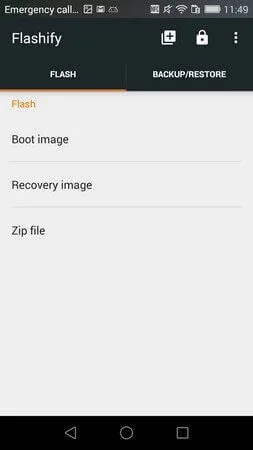
Flashify is a convenient system utility application. Boasting powerful features, it's one of the most popular Android flashing tools, allowing novice Android users to easily flash ROMs and back up data. With Flashify, you can flash various types of image files; almost all supported image files can be flashed onto your smartphone. Furthermore, this application allows you to flash any custom Recovery in seconds, easily supporting TWRP, CWM, Franco, and many other custom Recoverys, ensuring a smooth flashing experience.
Click to load YouTube / 点击加载视频
YouTube ↗Features:
Flash Image Files
Flashing the image files manually is a difficult process. Any issues you encounter while flashing the image files manually will brick your smartphone immediately. That’s why the newbies should refrain from manually flashing the image files. Most of the time, the users need to flash the recovery image, boot image, or the system image on their smartphone. With the Flashify APK old version, you can seamlessly flash the image files without any issues. You can only flash the image files with this app, and not other types of files.
Highly Compatible
Compatibility is the biggest feature of this app. With the Flashify app for Android, you can flash the files on almost any smartphone. There are numerous Android smartphones from different manufacturers, and each smartphone has different procedures for flashing the files. But with the help from Flashify app’s latest version, it becomes easier for you to install the image files. The app supports almost every Android smartphone out in the market. Be it the oldest Android device or the latest Android device; you won’t face any issues while using the Flashify APK download for Android.
Flash Multiple Images
With this app, you can flash the image files. But as some issues require flashing the multiple files, you can do the same with this app. The app supports the Queue feature, which allows you to flash multiple files one after another. All you have to do is to select the files in the appropriate order and then flash the same within the app. The Flashify app will automatically flash the files according to the selected order. You don’t have to worry about flashing order, as you can modify the same before proceeding with the installation.
Cloud Backup
The backup of the data is one of the interesting features. But what makes it exciting is the availability of cloud backup. Flashify APK latest version supports the Cloud backup on the Dropbox. You have to connect the dropbox cloud account in the app, and then you can immediately upload the backup of your smartphone on the cloud. The app will automatically detect the existing backup on the cloud if you stored any, and you can restore the same. As the flashing process can format the entire smartphone, and you may lose the data, it is always better to save the data on the cloud.
100% Free & Safe
Rooting the smartphone is a risky process. If anything goes wrong, then you will lose all the data stored on your device. That is why many of the smartphone users don’t prefer manual rooting and flashing process. But if you are using the Flashify APK no root, then you don’t have to worry a bit. The app is 100% safe to use, and you won’t face any issues at all. You don’t have to worry about data loss or hard bricking the device. You can play safe by installing this app and flashing the image files through it.
Tips for Users:
Flash firmware, boot images, and recovery without entering recovery mode.
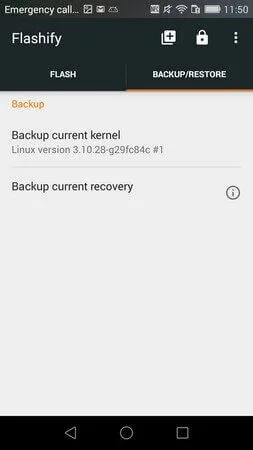
Backup and restore the kernel and recovery, saving it in the device's memory or cloud storage.
Auto-sync backup between different smartphones for seamless data protection.
Flash multiple files at once, creating a firmware queue for convenience.
Flash and restore files from anywhere using your favorite file explorer or email application.
Premium features available for advanced users, with the option to unlock them for additional functionality.
FAQs:
Can we use Flashify without root?
Yes. Flashify can be used without root but only for one time. It provides temporary access for first-time rooting purposes, and you can use it on non-rooted android devices.
Is Flashify suitable for flashing TWRP Recovery?
Yes. Flashify is one of the recommended options to flash the TWRP recovery on Android. With the Flashify, you can flash the recovery image for TWRP and even for CWM recovery.
Is the Flashify app safe to use?
Even though Flashify needs root access, it is one of the safest apps for Android. The app does not interfere with your personal files and only reads the image files, which is convenient.
Final Words:
In addition, Flashify provides a complete NANDroid backup system. Plus, storing files using multiple devices becomes a hassle-free process as the app has automatic cloud synchronization of backups between mobile devices and desktops. Moreover, you can multitask flashing and keeping track of several files with its flash queue feature.








