

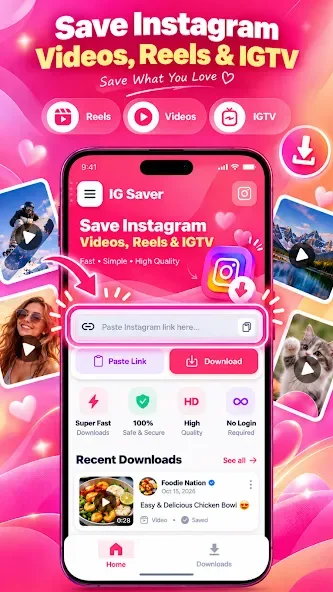
IgSave is a media downloading tool for Android devices that allows you to save public videos from popular media platforms. It is easy to use: simply copy a link, import it into the app, and the content is parsed and downloaded. The app supports downloading video collections, multi-part videos, and photos while preserving original quality, captions, and tags. It captures clean content—free from on-screen text or UI overlays—and enables rapid saving. Completely free and requiring no account registration, the app supports exporting media in various formats.
Features
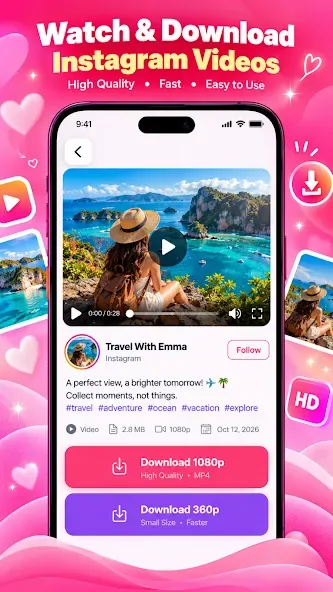
Save public videos, stories, posts and photos from supported social media links
Use copy link or the system share menu for a smoother download flow
Keep multiple videos and photos from supported posts and media collections
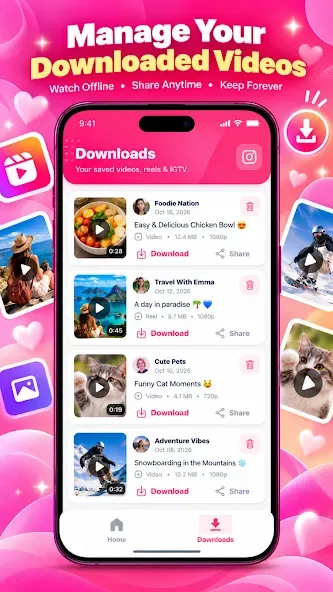
View and organize saved media in your local gallery
Keep available captions and tags when supported
Build a personal collection of clips, ideas, references and memories
Advantages and disadvantages
Pros
Allows saving photos or videos without on-screen text or UI overlays
Supports direct URL pasting and in-app browsing
Offers a guest mode that does not require an Instagram login
Downloaded content is centrally organized in the "Downloads" section
Cons
Ads may obscure the URL input field
Some users report frequent logouts or failures to load profiles
FAQS
Can I save IgSave stories?
Yes — paste a public profile or story link to use the IgSave story saver and download story photos and videos before they expire.
Is the IgSave downloader free?
Yes. Downloading public IgSave videos, reels, photos, and stories is free with no account required.
Does IGSave support private accounts?
No. The downloader is intentionally limited to public IgSave content only.
What types of content can I save?
IgSave videos, reels, stories, photos, video posts, carousel slides, and public profile pictures.
How to Use
Open your Instagram app and find the video, story, or post you want to download.
Click on the options icon and find the share option.
Copy the URL of the post to your clipboard.
Get back to the IgSave Apk, and on the homepage, you’ll blank area to paste the link.
Paste the link and click on Generate button.
Download options and quality preferences list will be available on your screen.
Select your desired quality/formats and hit the download button.
It will download your file within seconds.
Summarize
IgSave is an easy-to-use app designed to help you download and save various types of content from IgSave directly to your Android device. Whether it's a video, story, reel, or photo, IgSaver provides a seamless way to ensure you can keep and enjoy these moments offline. It is an excellent tool for preserving memories, creating personal collections, or simply backing up your favorite IgSave content without hassle.








