
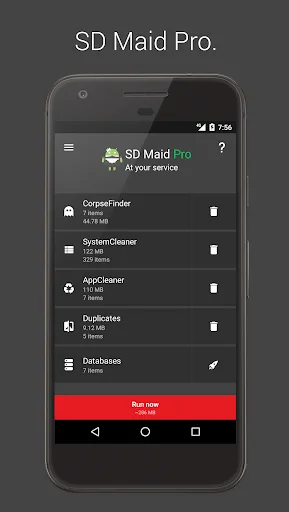
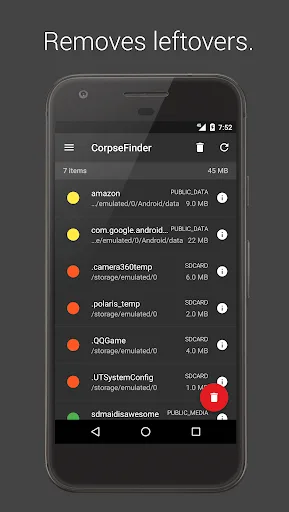
SD Maid 1 Pro is a practical management tool designed to help users manage and clean up their phones. For instance, due to the way the Android system operates, residual files may remain in phone folders after an app is uninstalled; SD Maid 1 Pro easily clears out these leftovers, keeping the device tidy. The app supports quick filtering—such as by date—making it easy to locate specific applications, and it can detect duplicate photos to assist with further management. It also allows users to force-stop specific applications with great ease.
Click to load YouTube / 点击加载视频
YouTube ↗Function
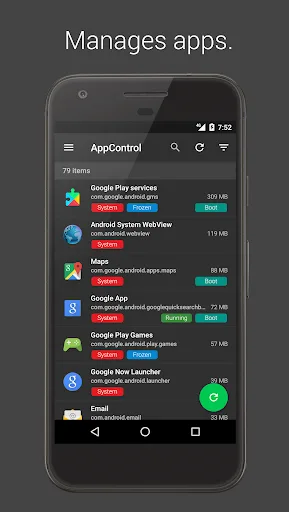
Managing installed applications
Users have the ability to oversee both user-installed and system applications, which can lead to better overall device management. The app assists in detecting files that were left behind by uninstalled applications, ensuring that no remnants clutter the device.
With SD Maid, users can execute searches for files based on various criteria, including name, content, or date. This search capability allows for quick identification of specific files, aiding in efficient file management. The app also provides a detailed overview of the device's storage, which is essential for users who want to keep track of their storage usage and optimize it accordingly.
Database optimization
Users can optimize databases associated with applications to enhance their performance. This tool helps ensure that apps run smoothly by maintaining their database integrity and performance.
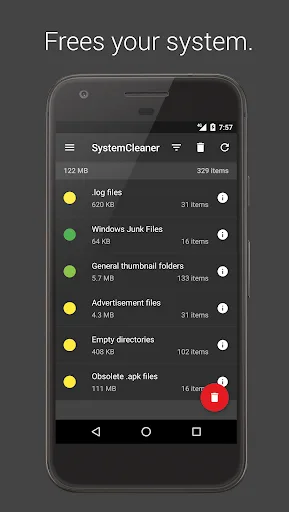
The app goes beyond basic caching by performing actual app cleaning. SD Maid removes expendable files that may not be necessary for the operation of applications, thereby improving device performance. This function is especially useful for users who frequently download and uninstall apps, as it helps eliminate leftover files.
detect duplicate files, including pictures, music, and documents
This functionality works independently of file names or locations, making it easier for users to identify and remove duplicate content from their devices.
For users looking for automation, SD Maid includes the option to run tools automatically on a schedule or via widgets
This feature allows for routine maintenance without requiring manual intervention, thus simplifying the cleaning process for users.
Safe folder for confidential files
The SD Maid MOD APP provided safe and secure folders to manage the confidential and essential files in the system. So no worry because anytime the recovery is possible and duplicates are there. So ultimate level of security to every form of the data in your system is ensured to every story.
Advantages and disadvantages
Pros
Advanced file management tools to clean and optimize device storage
Ability to find and delete unnecessary files, duplicates, and clutter
Manage installed user and system apps efficiently
File explorer feature allows to browse and manipulate system files
Can schedule automatic cleaning tasks
Cons
Paid version requires additional purchase for advanced features
Some features may require root access to fully utilize
User Reviews
I've tried many apps like this. Been using this for years. Works flawlessly, never crashes, does what it says and has never caused a nightmare by deleting something important. User makes final decision as to what will be deleted.... duplicate, empty files, left over junk from deleted apps, etc. Buy the "Pro" add-on. For a change, this one is actually with the money!
If anyone is reading this, this app has sped up my phone and it's my first time using the pro version. This app is definitely worth it and if you absolutely cannot afford it, I'm sure the normal version will still help you out. Before, my Android was very slow, frequently unresponsive, and a hassle to use, but now my photos render instantly, my apps open quickly and it's like how it used to run, definitely worth every penny.
FAQ
How to install SD Maid Pro on android phone?
Once you've downloaded the APK file, click on the downloaded file, then hit the "Install" button.
How to fix problems while installing/opening?
Make sure you have downloaded the file correctly. The downloaded file extension must end with .apk file. If you face any package install error, redownloading the file may fix the issue.
How to update APK without losing the data?
To update APK without losing the data, you don't need to follow anything extra. Click on the downloaded APK file and click the "Install" button. The app will update automatically without loss of data.
I am getting Play Protect warning while installing!
Some mod APK files might get a warning. You can ignore this warning and install the APK file. Follow these simple steps to turn off Play Protect: Open Google Play app > Click Profile Icon > Select Play Protect -> Setting > Turn off both "Scan apps with Play Protect" and "Improve harmful app detection" options.
Why the download speed is slow?
The downloading speed depends on your bandwidth speed. Don't hesitate to contact your ISP to increase the bandwidth speed if you face a slow downloading speed issue.
Conclusion
This app helps users clean up useless and junk files. Its main purpose is to clean up the device system and prevent it from running slowly and lagging. If the problem is simply caused by too many junk files on your phone, it's a serious issue that needs to be addressed immediately. Therefore, we developed this app to provide users with the best support.