VLC for Android is a cross-platform multimedia player. This open-source app plays all types of videos and songs. Users can freely adjust and play any video or audio software to suit their preferences. VLC for Android also includes subtitles, ensuring quick understanding and accurate communication. Users can also adjust the volume and brightness of videos and audio to their liking. Download and experience it now!
Click to load YouTube / 点击加载视频
YouTube ↗Highlights:
Plays all files, in all formats, like the classic VLC.
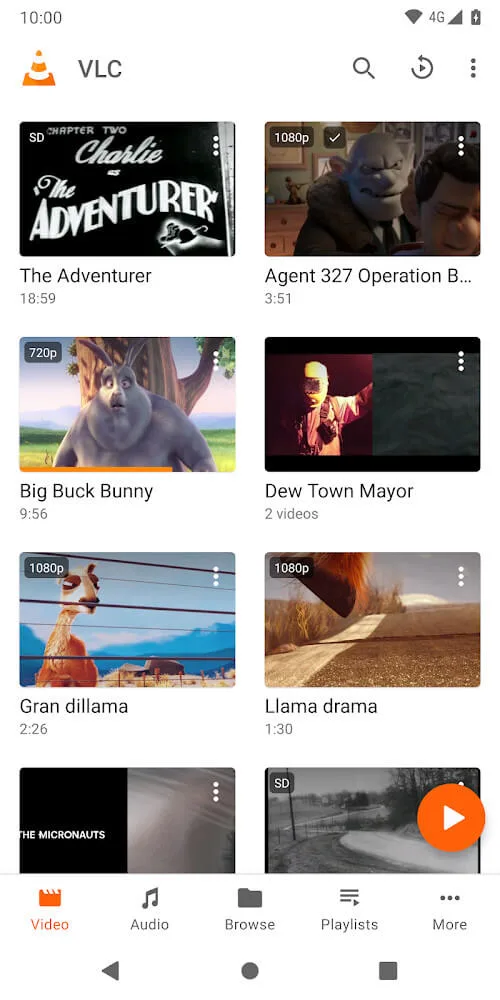
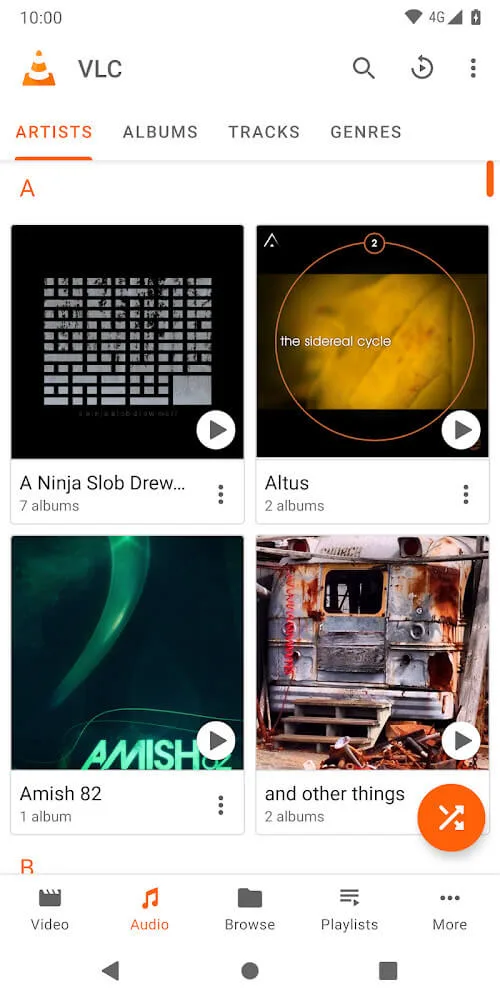
Audio and video media library, with full search and history.
Support for network streams, including HLS and Dash.
Support for NAS and shared drives browsing.
Supports Android Version 2.2 (platform-8) or later for older versions.
Supports Android Version 4.2 (platform-14) or later for current version.
Supports ARMv7, ARMv8 / AArch64, MIPS and x86.
Support Android TV.
Support Chromebooks.
Subtitles support, embedded and external, including ASS and DVD subtitles.
Multi audio or subtitles tracks selection.
Multi-core and full hardware decoding.
Gestures, headphones control.
Audio equalizer and filters.
Supports secondary display.
Supports 360 video and 3D audio.
Features:
Effortless Sofa Control: With this app, you can control your media playback without leaving the comfort of your couch. Adjust volume, skip tracks, play and stop with just a few clicks on your Android device.
Seamless Setup with the Helper: Setting up a remote control can be confusing, but this app streamlines the process with its Helper feature. Set up VLC to work seamlessly with your Android smartphone in just a few clicks and start enjoying your media without technical hiccups.
Comprehensive Browsing Control: The app integrates with your computer's media library, eliminating the need for manual rearranging of folders or file transfers. Access and play any file on your computer right from your Android device, saving you time and frustration.
Mastering DVDs with Ease: The app enhances your DVD viewing experience by providing comprehensive controls. Easily skip chapters, navigate menus, and play DVDs without juggling multiple remotes. Controlling a DVD is as simple as using a remote control.
Fine-Tuned Customization: Take control of your media experience with VLC Remote's innovative features. Adjust volume, location, and track to suit your preferences. Customize subtitles, aspect ratio, audio tracks, and delays to ensure the best viewing experience. Personalize every sound and image to your liking.
Access Beyond Limits: The app allows you to access media from various devices, expanding your entertainment options. Whether it's on an internal hard disk, USB drive, or external hard drive, this app ensures that all your media is always within easy reach.
Tips for Users:
Customize Settings: Explore VLC for Android's settings to adjust aspect ratios, enable gestures for volume and brightness control, and personalize your audio settings for the best listening experience.
Utilize Gestures: Take advantage of gestures like swipe controls to easily navigate through your media playback, making it convenient and intuitive to use VLC for Android.
Organize Your Library: Use the media library feature to categorize and sort your audio and video files for quick access, ensuring you can find and play your favorite content with ease.
Conclusion:
VLC for Android is an application that can play any media in any form. Users can play a video or audio most easily and save a lot of time. A modern and new database system will provide users with useful functions, allowing you to explore, experience, and serve your own needs. VLC for Android always gives users benefits that make them very satisfied and appreciate the service of this application. You can use your voice to search for anything without having to enter text quickly. Besides, the interface of this application is exceptionally harmonious, easy to use, and easy to distinguish each item. Because of its detail has given users the freedom to enjoy every audio video in the best quality.