Offline Music Player is a versatile player designed for offline music lovers. It supports importing multiple audio formats, allowing users to enjoy their personal music library without an internet connection. An intelligent classification system allows users to organize music by song, artist, album, and more, while customizing playlists makes music management more efficient. Lock screen controls and notification bar playback further optimize the user experience. Download and experience it now!
Features:
High-quality sound
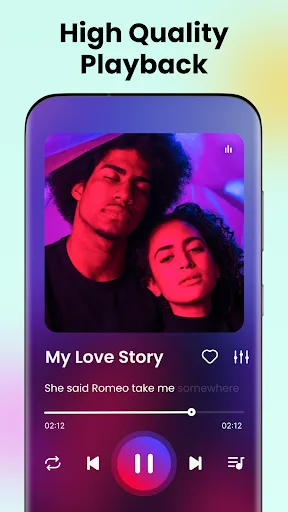
Sound quality is one of the most important factors for any music streaming application. Offline Music Player is no exception. This application comes with HiFi technology that allows the sound to always reach the highest quality. As a result, you can listen to music through the device’s speakers or headphones to feel the best quality of each track.
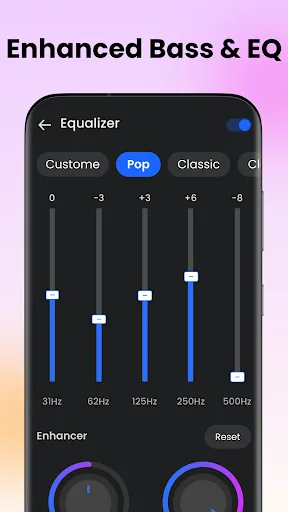
In addition, users can also use the built-in equalizer to adjust the sound to their liking. All the necessary features like Play, Pause, Forward, Previous, repeat songs, and more are also built into this application. Overall, Offline Music Player will completely change the default music player on the device to help you get the best experience.
Support fast music search
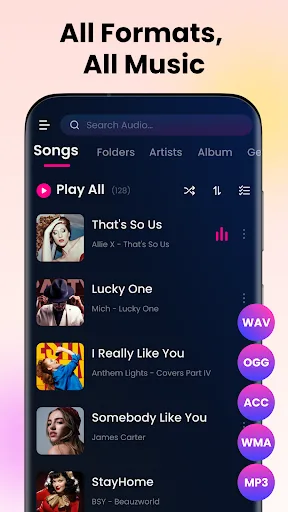
Offline Music Player supports scanning all audio files that appear on the user’s device quickly. Then, information about each specific track will be displayed on the screen for you to grasp easily. After successfully scanning the data, the application will automatically arrange the songs according to the appropriate criteria so that users can easily search. Typically sorting by artist name, by album, by folder, and more.
Smart suggestions
In order to help personalize users’ music listening needs, Offline Music Player has integrated powerful AI technology. It will automatically remember your listening process to suggest suitable tracks for the next use. This means that the more you use the app, the more accurate the recommendations will be. At the same time, AI technology will be regularly updated to bring the best suggestions for each user object.
Look for information
The information search feature in Offline Music Player is also very good with simple and highly effective usage. All you need to do is simply enter the keyword you want to search for, the algorithms available in the application will immediately review and scan the appropriate data. Thanks to that, you can search for information about the song you want to hear through a few simple characters.
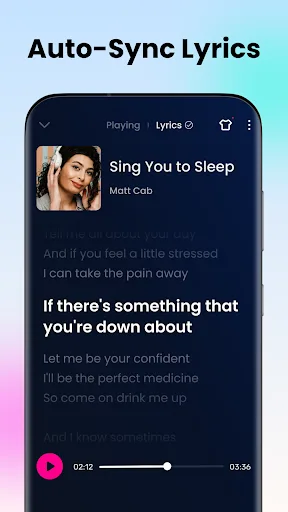
In addition, Offline Music Player also supports displaying lyrics when playing music to help users sing along to the melodies available on the screen. Most of the music in this app comes with a display of the lyrics, in case the original song has lyrics. Moreover, the lyrics will automatically scroll according to the progress of the music, so you can watch freely without having to take any action.
Intuitive and user-friendly interface
We believe that the intuitive interface in this application will make you feel excited from the first time you use it. Offline Music Player provides feature icons right on the main screen, along with a variety of different category banners. This means you only need to touch an available icon to listen to music immediately. Besides, the dominant white tone will make everything displayed on the screen much more intuitive. In general, if you have used music players before, you will certainly not feel unfamiliar with the interface of this application.
Tips for Users:
Create Playlists: Organize your music into playlists to easily access your favorite songs or create mood-based playlists for different occasions.
Customize Equalizer Settings: Experiment with different equalizer settings to fine-tune the sound according to your preferences and enhance your listening experience.
Shuffle Mode: Enable shuffle mode to mix up the playlist and discover new songs or enjoy a random mix of your favorite tracks.
Highlights:
Music Formats Supported: mp3, flac, wav, caf, aac, and more.
Save music for offline access.
Play offline–no internet or WiFi needed.
Import tracks from Google Drive, Dropbox, Box and etc.
Create & manage playlists.
Playlist shuffle and repeat modes.
Background music playback.
Sound Enhancements: Equaliser, Sound effects, Bass boost.
User Interface: Easy navigation, customisable UI, display album art, and various themes.
HD Sound with powerful Equalizer.
Background music playback.
FAQs:
Does Offline Music Player support Bluetooth and headset connectivity?
Yes, this app automatically pauses playback when Bluetooth or a headset is disconnected and lowers the volume during phone calls.
Can I create custom playlists in the app?
Absolutely! You can easily collect your favorite songs and create custom playlists to suit your mood or activities.
Are there intrusive ads in the app?
While the app is not completely ad-free, it does not display intrusive ads on its core features, ensuring a smooth user experience.
Conclusion:
Offline Music Player offers a comprehensive and user-friendly solution for enjoying your offline music collection. With its compatibility with various audio formats, robust equalizer, in-built MP3 cutter, and chic themes, the app provides a seamless and customizable music experience. Whether you're looking to enhance your audio quality, personalize your music library, or discover new features like lyrics display and shuffle options, the Offline Music Player app is the perfect choice for music lovers seeking a premium offline listening experience. Download the app today and elevate your music experience to new heights.