
Raven Dark Icon Pack is a stylish dark-style icon theme app. It features a plethora of high-quality elements, crafted with a minimalist aesthetic, ensuring that all icons included are easy to install. Users will enjoy a beautiful and unique interface, perfect for those who appreciate minimalism and elegant aesthetics. The icons are compatible with any wallpaper (light or dark), while maintaining a smooth and stunning appearance. Download Raven Dark Icon Pack now and experience the minimalist theme on your device!
Click to load YouTube / 点击加载视频
YouTube ↗Features:
Huge icon library
Raven Dark Icon Pack has a huge collection of icons, which gives users more than 4500 different patterns. Each icon is well-serviced with care, showing precision in each stroke and color. You will be able to distinctly see the formality and coordination that Creativepixels spent a lot of time and effort creating when using this set.
To help enrich the phone interface, the application not only provides default icons for popular applications but also adds many other alternative versions. This allows users to customize according to personal preferences, creating a more clear and impressive personalized interface.
In addition, Raven Dark Icon Pack is also optimized to be compatible with many popular Android launchers. With this support, you can easily change and synchronize icons without encountering any difficulties. The massive and diverse library of this application will surely satisfy those who love creativity and innovation in every smallest detail.
Simple installation
It is very easy to install this icon pack even for beginners, compatible with any Android user. First, you need to install an external launcher-compatible launcher. When installed, then just open Raven Dark Icon Pack, select the icon pack and press “Apply” to update the interface.
If your launcher is not on the direct support list, you can still use the icon through the launcher settings. This method is the simplest, just a couple of simple steps in the interface settings area.
For Samsung users, the only point to note is that the phone should be upgraded to Android 12 with Samsung One UI 4.0 interface or newer. In addition, you need to download the free Theme Park application from Samsung’s GOOD LOCK store. After installing Theme Park, you can easily combine Raven Dark Icon Pack with the phone interface without any problems.
Compatible with a variety of launchers
It can be seen that Raven Dark Icon Pack shows very flexible compatibility with many different launchers on Android. The instant you install it, you can use this icon set in mainstream launchers such as Nova Launcher, Action Launcher, Apex Launcher or ADW Launcher. They are widely used because of their stability and robustness of features and configuration options.
Apart from this, the app also supports a wide range of other launchers such as Atom Launcher, GO Launcher, Holo Launcher, LG Home and Lucid Launcher. This helps users easily combine the icon set with their favorite interface style without difficulty.
In addition to the launchers that can be applied directly from the application, some other launchers such as Arrow Launcher, Cobo Launcher, or Poco Launcher can still use this application through separate settings in the settings section of each launcher. Thanks to that, users have more flexible options when they want to personalize their phones.
Many attractive features
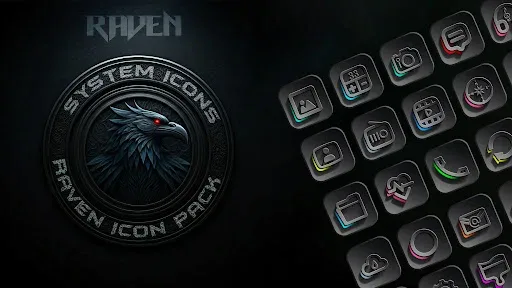
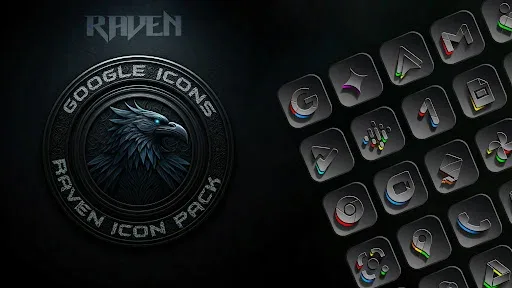
In addition to the above features, Raven Dark Icon Pack also brings many attractive features to help enhance the Android phone interface. First of all, this icon set impresses with its dark and gloomy aesthetic style, using deep black, dark gray tones and subtle bright accents. This color combination creates a mysterious, luxurious and attractive overall look for the screen.
In addition, the design of this application is oriented towards minimalism. Each icon is carefully crafted to maintain a modern beauty while ensuring neatness and ease of viewing during use. The interface thus becomes cleaner, bringing a harmonious visual experience to users.
In terms of utility, Raven Dark Icon Pack is also regularly updated based on new icon requests from users. This helps ensure that the collection is always diverse, keeping up with the constant changes in the Android app store.
Benefits:
Hundreds of Unique Icons: Enjoy a vast (4500++) library of exquisitely designed icons, precisely crafted to complement a wide range of popular launchers. Includes alternate Icons for popular apps.
Dark and Moody Aesthetic: Embrace the allure of the night with a colour palette dominated by deep blacks, greys, and subtle hints of vibrant colour accents.
Minimalist Design: Experience a clean and uncluttered look that prioritizes functionality and visual harmony.
Regular Updates: Updates includes each and every icon request by the Users.
Cloud-Based Wallpapers: Access a curated selection of stunning 15 dark wallpapers to perfectly complement the icon pack's aesthetic.
Icon Request Tool: Easily request icons for apps not yet included in the pack.
FAQs:
Does this icon pack work with Nova Launcher?
Yes, Raven Dark Icon Pack is fully compatible with Nova Launcher and is recommended for best performance.
How can I apply the icon pack to Samsung phones?
You need Android 12 and Samsung One UI 4.0 or higher. Use the Theme Park app from the Samsung Store (via Good Lock) to apply icons.
Are updates provided regularly?
Yes, updates are frequently released, including new icons based on user requests.
What should I do if my launcher is not listed?
You can try applying the icon pack from your launcher settings or check if your launcher supports custom icon packs.
Can I request icons for missing apps?
Absolutely! The app includes a built-in icon request tool that allows you to request new icons directly.
Conclusion:
Raven Dark Icon Pack will bring you extremely attractive and interesting interfaces without having to look at boring default interfaces every day. When coming to the application, you will own an extremely unique and quality icon library. You also have advanced features and tools, so you can customize and decorate your phone more easily. Coming to this application, you will come across icons with an extremely elegant and mysterious modern quality. These icons will bring you interfaces with the most perfect and wonderful themes and styles.








