

Sanag is a mobile assistant tool designed specifically for Sanag headphone users. Through the software, users can personalize and update their Sanag headphones, further adjusting the volume, button settings, and audio according to their preferences, making the user's listening experience more comfortable. The software is also constantly updated and the headphone algorithms are iterated. Users can update at any time through the software to obtain a better user experience.
Click to load YouTube / 点击加载视频
YouTube ↗Features:
Comfort: Experience ultimate comfort with Sanag open-ear Bluetooth headphones. Enjoy high-quality sound without pressure, perfect for all-day wear.
HiFi Sound: Enjoy exceptional HiFi sound with Sanag open-ear Bluetooth headphones. Experience crystal-clear audio and deep bass, all while keeping your ears comfortable and relaxed.
Less Leakage: Sanag open-ear Bluetooth headphones deliver excellent sound with 89% reduced leakage. Enjoy your music privately without compromising on comfort or audio quality.
Long Battery Life: With Sanag open-ear Bluetooth headphones, enjoy your favorite tunes all day long. Long-lasting battery life keeps you entertained for hours on a single charge.
EQ settings: Sanag provides a variety of EQ sound settings for device specification, and users can set them according to personal preferences to make the music more in line with your taste;
Personalized settings for headphones: such as defining the functions of double-clicking and triple-clicking headphones, headphone modes, etc. according to your own usage habits;
How to Use:
Account Registration
Open the app and select “Log on.”
Enter your email address and Click send code.(Note: when you click “send code” successfully, that button will start counting 59s)
Verify your account via the email confirmation code.
Input the code to log in
sanag Account Registration
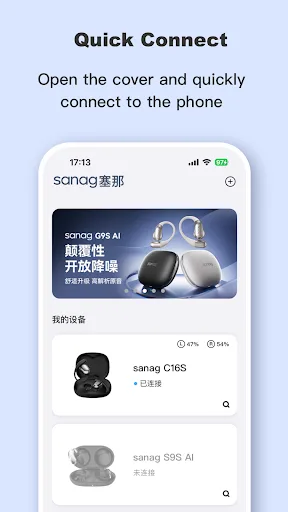
sanag app connect device
Connecting Devices
1 Bluetooth Pairing
Turn on your device and ensure it is in pairing mode.
Open the Sanag app and select “Add Device.”
Follow the on-screen instructions to complete the pairing process.
2 Troubleshooting
If the device cannot connect:
Ensure Bluetooth is enabled on your phone.
Restart the Sanag device and try again
Conclusion:
Sanag is a dedicated application designed specifically for users of Sanag headphones, aimed at enhancing the audio experience and providing innovative music enjoyment. This free utility app is available on the Android platform and offers a range of features tailored for efficient device management.Key functionalities include quick device connectivity, allowing users to easily connect and manage their Sanag devices based on the product type. The app also offers customizable EQ settings, enabling users to adjust audio preferences to suit their tastes. Additionally, users can personalize headphone settings, such as defining functions for double and triple taps, along with syncing device status information and supporting device functionalities.








