

MacroDroid Device Automation is a powerful mobile tool designed to help users easily automate various phone functions, making it easier for users to use their phones. The software features a simple interface, and a detailed tutorial allows users to quickly master its functions. The software offers a variety of themes, wallpapers, and modes. Download your favorite HD wallpapers and themes to personalize your phone. The software also automatically backs up user data and information and employs various measures to protect user accounts, providing peace of mind.
Click to load YouTube / 点击加载视频
YouTube ↗Features:
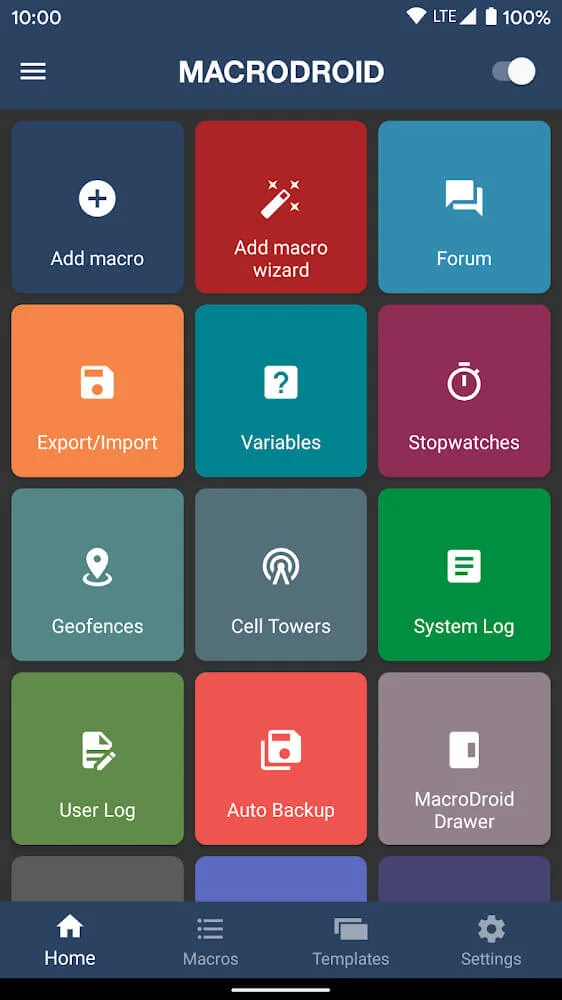
Task Scheduler: MacroDroid - Automation allows you to schedule various tasks on your Android device with ease. You can automate actions such as enabling WiFi connection, responding to SMS messages, and adjusting volume levels.
User-Friendly Interface: With a friendly interface, this app makes it effortless for users to navigate and set up automation tasks. It provides simplicity in use, making it accessible to all users of the Android system.
NFC Tag Integration: MacroDroid - Automation enables you to control your mobile devices using NFC tags. You can easily turn on Bluetooth or perform other actions by simply tapping your device on the tag.
Customizable Actions: From pronouncing the current time to launching specific applications, this app offers a wide array of customizable actions. You can tailor it to suit your preferences and needs.
Extensive Functionality: With MacroDroid - Automation, you can unlock the full potential of your smartphone. It offers numerous irreplaceable features that enhance the functionality of your device.
Simplifies Complex Tasks: This application transforms complex and sometimes incomprehensible actions into easy and effortless tasks. It simplifies using the system by automating various functions.
Highlights:
Battery Optimization: Automatically turn off Wi-Fi, Bluetooth, and mobile data when your phone screen is off and battery drops below a certain level. You can also dim the screen or enable power-saving modes during nighttime or idle periods.
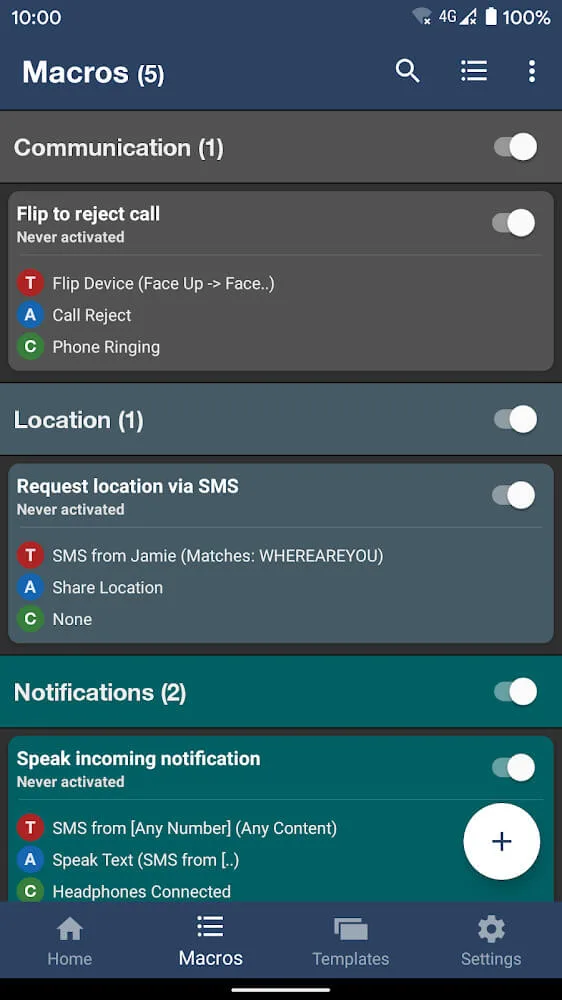
Smart Messaging: Send auto-replies when you're driving, sleeping, or in a meeting. For instance, if the phone detects driving speed using GPS, it can mute notifications and send a predefined text message in response to missed calls.
Location-Based Actions: Automatically launch Google Maps when you enter your car’s Bluetooth range. Or, mute your phone when you arrive at the office and increase volume when you reach home.
Daily Routine Automation: Set your device to read out the weather forecast every morning at 7 AM, start your favorite news app, and remind you to drink water every two hours.
Parental Controls: If you're a parent, you can automate certain controls on your child’s phone. For example, restrict access to games after 9 PM or limit social media usage based on screen-on time.
App Launch Automation: Launch a set of apps automatically when you connect to a specific Wi-Fi network. For instance, launch Netflix, YouTube, and a media controller when your device connects to your home network.
Functions:
Simple Yet Robust Workflow: MacroDroid’s 3-step workflow to create automation is straightforward enough for beginners yet provides advanced customization for power users.
Highly Intuitive Drag & Drop UI: The drag-and-drop interface allows anyone, regardless of technical skill, to build automation. No coding is required!
No Prior Knowledge Needed: Building effective automation requires no coding experience or knowledge about automation. It’s that easy!
Massive Range of Trigger Options: With over 70 trigger options like location, sensors, battery level, notifications, and more, you can precisely control when automation activate.
Customizable Triggers For Your Needs: Location triggers can use GPS, WiFi networks, or cell towers. Fine-tune geo-fences and contextual conditions specifically for your unique needs.
Quick Access Via Home Screen: Easily access and launch your automations anytime through handy shortcuts right on your home screen.
Strategies:
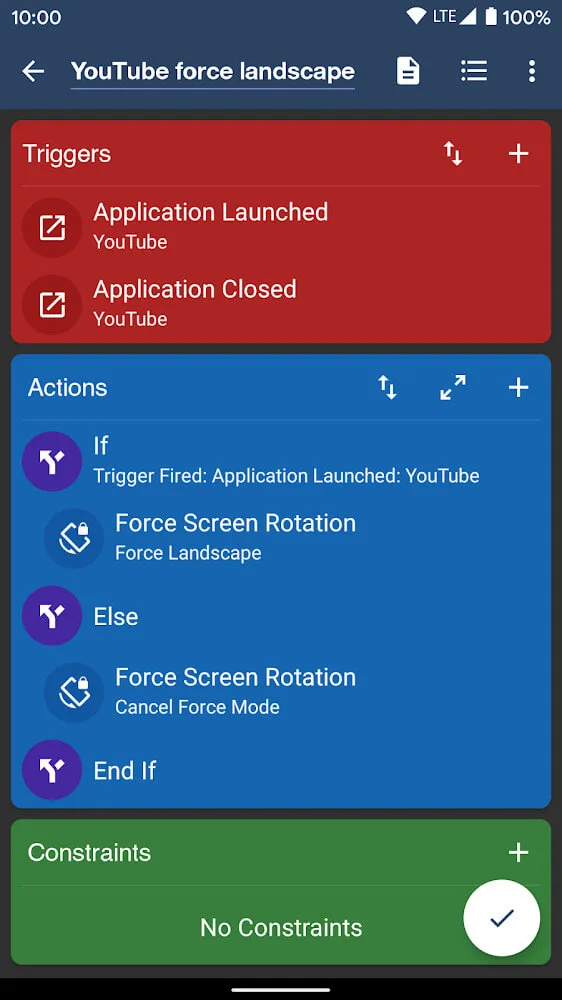
Explore the various triggers and actions available: Take some time to familiarize yourself with the different triggers and actions offered by MacroDroid. This will allow you to create more personalized and useful macros.
Experiment with constraints: Constraints can add an extra layer of customization to your macros. Try adding different constraints to see how they affect the execution of your macros.
Use the sidebar for quick access: The customizable sidebar in MacroDroid allows you to quickly access your favorite macros and trigger them with a single tap. Take advantage of this feature for easy automation on the go.
Update:
Added Record Video action.
Added Encrypt/Decrypt Text action.
Updated HTTP Request action to add support for mTLS client certificates.
Updated Play Sound action to support dynamic file names.
Updated Calender - Add Event action to allow a fix date (with magic text support).
Updated Animation Overlay action to add support for opacity value.
Updated Edge Lighting Action to support additional colours (or single colour), feather effect and opacity.
Conclusion:
MacroDroid - Device Automation is a utility from ArloSoft. This app lets you create free macros, or custom instructions, for your device. Automate tasks and device responses based on a preprogrammed library, or create your own. With this tool, you can automatically turn your data connection on and off at certain times of the day, or dim your display when running certain apps.Its built-in library of full macros, plus customizable triggers and outcomes, make MacroDroid - Device Automation a popular app among users looking to streamline their experience. You can also check out AutomateIt - Automate tasks save battery and more.








