USB Camera Pro is a powerful video capture tool. With its ability to handle high-definition video formats and real-time streaming, it's perfect for both casual users and professionals. It supports a variety of USB video devices, including webcams, video capture cards, and EasyCaps, making it ideal for live streaming and recording. Users can turn their smartphones or tablets into powerful video shooting tools and seamlessly connect to various USB video devices. Download and experience it now!
Click to load YouTube / 点击加载视频
YouTube ↗Highlights:
High-Definition Video Support: This camera captures video in up to 4K resolution and supports H.264, H.265, HEVC, and MJPG formats.
RTSP Real-Time Streaming: Stream video in real-time using the RTSP protocol for live broadcasts and surveillance.
RTMP Live Streaming: Broadcast live video content to platforms like YouTube and Facebook with RTMP support.
Picture-in-Picture Mode: View your video feed in a small overlay while using other apps, allowing multitasking.
VR/FPV View: Offers a virtual reality or first-person view mode for an immersive experience.
Display Video on Lock Screen: Keep video playback visible even when your device is locked.
External Audio Input: Integrates audio from USB microphones or other audio input devices.
Customizable Settings: Adjust settings for video quality, resolution, and more to suit your needs.
Pro Version Extras: Enjoy additional features and settings with the Pro version, enhancing your user experience.
Features:
High-Definition Video Support: This camera captures video in up to 4K resolution and supports H.264, H.265, HEVC, and MJPG formats.
RTSP Real-Time Streaming: Stream video in real-time using the RTSP protocol for live broadcasts and surveillance.
RTMP Live Streaming: Broadcast live video content to platforms like YouTube and Facebook with RTMP support.
Picture-in-Picture Mode: View your video feed in a small overlay while using other apps, allowing multitasking.
VR/FPV View: Offers a virtual reality or first-person view mode for an immersive experience.
Display Video on Lock Screen: Keep video playback visible even when your device is locked.
External Audio Input: Integrates audio from USB microphones or other audio input devices.
Customizable Settings: Adjust settings for video quality, resolution, and more to suit your needs.
Pro Version Extras: Enjoy additional features and settings with the Pro version, enhancing your user experience.
Tips:
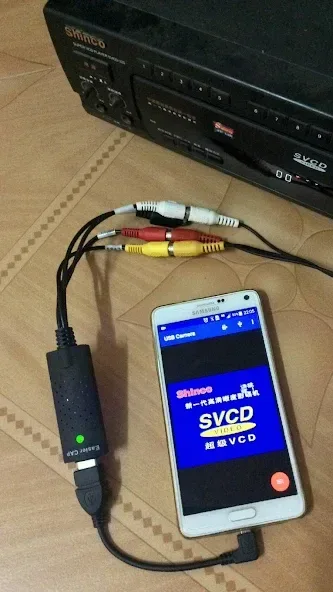
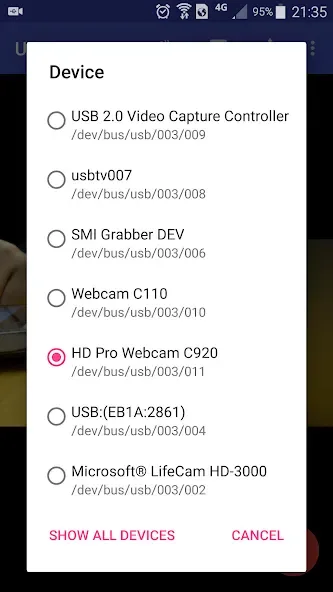
Supports following devices:
- UVC WebCam with microphone or external USB Audio input (Supports H.264, H.265, HEVC, MJPG, YUY2, P010, NV12 and so on)
- UVC video grabber with audio input or external USB Audio input (Up to 4K via HDMI, Supports H.264, H.265, HEVC, MJPG, YUY2, P010, NV12 and so on, Supports progressive and interlaced video)
- Windows Hello Camera and IR Camera
- Geek szitman supercamera(2ce3:3828)non-UVC devices, e.g. USB Endoscope
- EasyCap including audio with UTV007 / HTV600 / HTV800 chipsets (VID_1B71&PID_3002)
- EasyCap including audio with STK1160 + SAA7113/GM7113 + AC97 chipsets (Audio 48kHz stereo version VID_05E1&PID_0408)
- EasyCap including audio with STK1160 + SAA7113/GM7113 (Audio 8kHz mono version VID_05E1&PID_0408)
- EasyCap including audio with EM2860 + SAA7113/GM7113 + AC97 chipsets (VID_EB1A&PID_2861)
- EasyCap including audio with SMI2021 + SAA7113/GM7113 + ES7240/CS5340 chipsets (VID_1C88&PID_0007, PID_003C, PID_003D, PID_003E, PID_003F, PID_1001)
Changelog:
Now you can overlay the screen onto USB video
Supports mix the system audio output with USB audio or Built-in microphone
Some UVC devices may containing multiple cameras now can be accessed correctly, e.g. Windows Hello Camera and IR Camera
Supports 'Geek szitman supercamera' (ID 2ce3:3828) devices, which are commonly used in USB endoscopes
Users' Comments:
Great app! I’ve tested streaming into Facebook with canon r5c connected directly to it. I bought an adapter where I can feed 3.5mm audio jack into it and the app does recognize the input. Feature Request: Please add audio level gain control into the app. This would allow to increase a low level audio input. For some reason the audio I feed into the app is crisp and clear but the app has the level too low. It would be great to have control to increase and decease the level as necessary. Thanks!
This app works great for recording analog video for FPV tiny whoops with the proper hardware. It’s difficult to find No Frills applications they just get the job done. Couldn’t be happier to pay two dollars to remove the ads.
Just installed on iPad Pro M2 and HMD Skylight android phone. Works perfectly on both, supporting multiple high resolutions. Using as monitor for Panasonic G9 camera which supports 4:2:2 10 bit output. All seems to work perfectly. Would like to be able to disable microphone input (choose source works, but want no audio). And please release a version for iPhone 15/16 with USB-C input! The id have the same app on all my portable devices!
Conclusion:
USB Camera Pro is a cutting-edge mobile app that allows you to connect your Android device to a USB WebCam or video capture card via USB-OTG. With its seamless integration, you can effortlessly record high-quality videos, capture snapshots, and even turn your phone into a wireless IP Camera for advanced security monitoring.