

ExaGear Windows Emulator is designed to help users enjoy a wide range of PC games and classic titles on their mobile phones. With just a few simple steps, users can access a vast library of games to meet their personalized gaming needs. It boasts strong compatibility, running smoothly on most mobile phone models without any ads or pop-ups interfering with gameplay. It also supports various control methods such as gamepads and keyboards, allowing users to customize the key bindings to their preferred operating habits.
Click to load YouTube / 点击加载视频
YouTube ↗Features:
Supports Running Windows Applications: ExaGear Windows Emulator allows you to run Windows applications on ARM Android devices, providing users with more software options and functionality. You can use the applications you typically use on
your PC on your phone, tablet, or Chromebook, whether for office tools, entertainment software, or games.
Fast and Stable Performance: ExaGear features advanced technology to ensure Windows applications run quickly and stably on Android devices. Whether performing CPU-intensive tasks or playing games, you can enjoy a smooth experience without stuttering or delays.
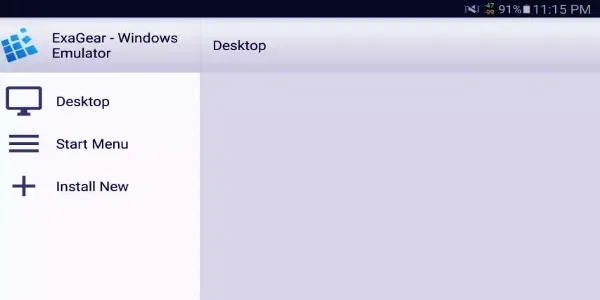
User-Friendly Interface: ExaGear uses an intuitive and straightforward interface design, making it easy for users to operate. You can quickly install and launch Windows applications and make necessary settings and adjustments without needing to understand technical details.
Comprehensive Compatibility Support: ExaGear Windows Emulator supports various Windows applications, including the Microsoft Office suite, Adobe software, games, and more. Whether you need to do office work or enjoy entertainment activities on your mobile device, ExaGear can meet your needs.
Highlights:
Built-in touch controls and external controllers: To make it easier for Android users to experience the virtual Windows machine on their touchscreen devices, ExaGear: Windows Emulator will feature different control options for you to enjoy. Here, you can make uses of the built-in touch controls with fully functional mouse and keyboards. Or connect to external controllers to further enjoy the Windows emulator.
Different screen settings to match your preferences: Also, you can now freely customize the different screen settings in ExaGear: Windows Emulator to further improve your in-app experiences. Feel free to choose a different screen ratio to match your games and software, or allow it to fit with the other on-screen elements.
Enjoy the offline application at anytime: To make the app more accessible, Eltechs also enabled the offline application of ExaGear: Windows Emulator for all Android users. As a result, there is no need to turn on your mobile data or connect to Wi-Fi connections whenever you wish to work with the app.
Have access to our modded app: Thanks to the free and unlocked version of the app on our website, Android users can now enjoy ExaGear: Windows Emulator to the fullest without having to pay for its features. All it takes is for you to download the ExaGear: Windows Emulator Mod APK, follow the given instructions, and start having fun with the mobile app.
FAQs:
What is ExaGear Windows Emulator?
One of the key features of ExaGear is its compatibility with a wide range of Windows applications, including games, productivity software, and utilities. It provides an effective solution for users who require certain Windows applications but prefer or need to work on a different operating system. The emulator is noted for its ease of use and installation process, making it accessible even to those who are not highly tech-savvy. While it's not a complete replacement for a native Windows environment, ExaGear offers a viable alternative for running essential Windows applications in a non-Windows setting.
How to use ExaGear Windows Emulator?
Install the APK and run it. You'll encounter an error message about the cache not being found. Then, place the .obb file in the /sdcard directory or, in some cases, /sdcard/Android/obb/applicationname. Wait for the cache to be unpacked in the application.
After unpacking the cache, create a container with the desired resolution and 32-bit color depth. Launch the TFM (translation file manager) from your desktop, choosing the one that suits your device. You can launch the container from the "Menu->Container Management" and then press the three dots next to the name of the container to "Run.”
Does ExaGear support 64 bit?
ExaGear Windows Emulator does not support 64-bit operations for the original ExaGear version developed by Eltechs. This means users cannot run 64-bit Windows applications using this emulator and are limited to 32-bit applications. This limitation excludes many modern and famous titles and apps available on Windows devices.
Conclusion:
Exagear APK is a mobile utility app that flips the usual emulator script—designed specifically for Android devices, it lets you run classic Windows software and games that were originally built for x86 PCs. Think of it as a translator for old-school PC programs, bridging the gap between legacy Windows tools and your Android phone’s ARM-based system. It’s not a full emulator in the traditional sense—it uses a compatibility layer to interpret and run 32-bit Windows applications, meaning smoother performance and way less battery stress compared to typical virtual machines.








