

Ubiquiti Device Discovery Tool is a valuable and practical tool. Download the latest Android version for free and experience the convenience of local network management instantly. Ubiquiti Device Discovery Tool presents users with a user-friendly and powerful Ubiquiti device management service. Use Ubiquiti Device Discovery Tool now for a more convenient and efficient device management experience!
Click to load YouTube / 点击加载视频
YouTube ↗Excellent Function
The UISP app provides users with a unified tool for device installation and management, applicable to the entire Ubiquiti ISP-class product line. Through this app, you can:
Integrate your ISP devices into the UISP controller.
Quickly and easily set up ISP devices and connect links via Bluetooth or a dedicated management radio.
Manage and monitor all aspects of your ISP network through a single application.
Attractive Features
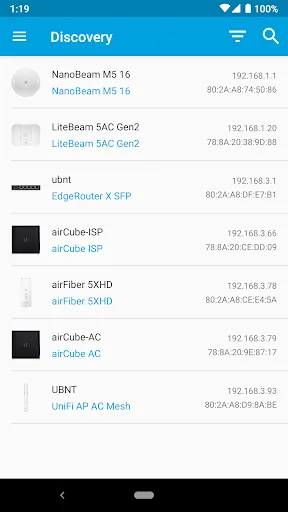
Easily Discover Devices: This app simplifies the process of finding and identifying Ubiquiti devices on your local network. Quickly locate all devices connected to your network with just a few taps.
Convenient Filtering Options: This app offers the ability to filter discovered devices by type, whether it's UniFi, AirMAX, EdgeMAX, or other Ubiquiti devices. This feature allows you to focus on specific devices or product lines that you want to manage or monitor.
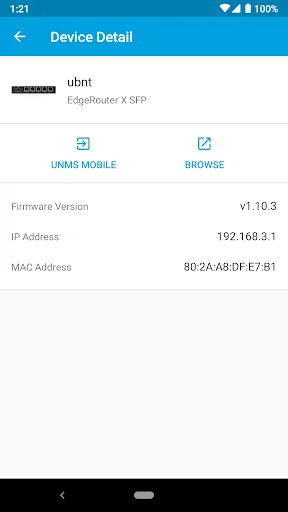
Detailed Device Information: In addition to discovering devices, the app provides key information for each detected Ubiquiti device. You can view important information such as IP address, MAC address, and firmware version, making it easier to track and manage your network infrastructure.
User-Friendly Interface: The Ubiquiti Device Discovery Tool has a user-friendly interface that is simple and intuitive to use. Whether you are a network expert or a beginner, you will find this app easy to use and understand.
Frequently Asked Questions
Can I use this app to discover Ubiquiti devices managed by the UniFi Controller?
No, the Ubiquiti Device Discovery Tool cannot discover devices managed by the UniFi Controller. Please use the UniFi Controller software to manage and discover these devices.
How long does it take to discover devices on my network?
The time required to discover devices on the network may vary depending on factors such as network size and device availability. In most cases, the application can quickly find all Ubiquiti devices within seconds.
Can I customize my search or filtering options?
Yes, the application offers a search function, allowing you to enter keywords to find specific Ubiquiti devices. Additionally, you can filter devices by type, narrowing search results to your desired product series or category.
Is the application compatible with all Ubiquiti device models?
Yes, this application is designed to be compatible with a wide range of Ubiquiti devices. Whether you are using UniFi, AirMAX, EdgeMAX, or other Ubiquiti devices, you can use this application for device discovery and information retrieval.
Final Verdict
The Ubiquiti Device Discovery Tool app is ideal for easily discovering and managing Ubiquiti devices on your local network. With its filtering options, quick search function, and detailed device information, this user-friendly application ensures easy navigation and a convenient user experience. However, please note that devices managed by the UniFi® Controller are not compatible with this application. Click the download button now and experience the convenience this application offers!








