
Motion Ninja is a powerful video editing application that lets you create satisfying works without professional equipment. Whether it's editing clips or adding effects, Motion Ninja offers a wealth of assistance. Explore it further, and you'll discover even more amazing content. It doesn't just add filters to your videos; it truly and deeply enhances your creative work. The app provides a community and search function. If you encounter any problems, ask questions in the community or search for tutorials to help you solve them. Motion Ninja is rich in content and practical, giving wings to your creativity!
Click to load YouTube / 点击加载视频
YouTube ↗Tips
Start with small projects: If you're new to the app, start with small, simple projects and gradually move on to more complex edits. Learn slowly and familiarize yourself with the app's functions.
Save frequently: Save your project frequently during editing to avoid losing your work in case of crashes or unexpected app closures.
Smooth animation: Use effects and movements reasonably and smoothly to avoid making your video look overly cluttered or dazzling.
Ensure audio balance: If you add audio or background music to your video, ensure that the audio does not drown out the video content or is too loud.
Test on Multiple Devices: If possible, view your video on various devices and screens to ensure it looks correct and appealing on all types of devices.
Optimize Sharing: When exporting your video, choose the correct export format and options to ensure it can be easily shared on social networks or other platforms.
Learn How to Use the Tools: Utilize the app's documentation, video tutorials, or support website to better understand how to use its tools and features.
Explore New Features: Regularly check for app updates to learn about new features and improvements. Exploring these new features can inspire your creativity.
Unleash Your Creativity: Be bold, unleash your creativity, and create unique videos. Try new effects, develop your own style, and don't be afraid to experiment with unique ideas to create fun and personalized video content.
Watch Tutorials and Learn from Others: If you encounter problems while using the app, search for tutorials or ask others in the video editing community.
Features
Keyframe Animation
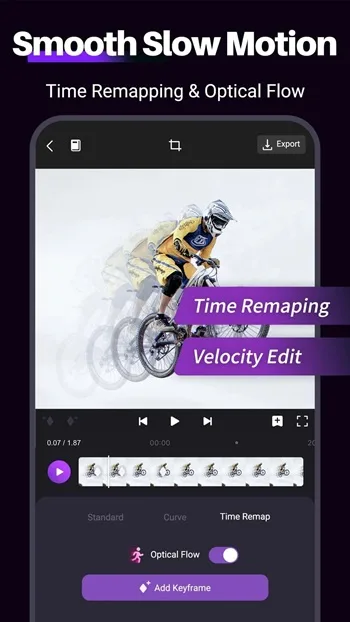
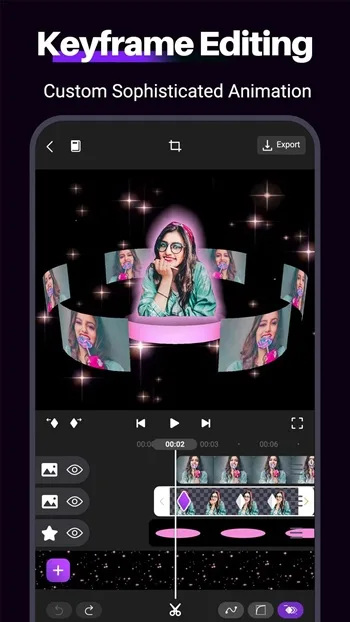
Keyframe animation is difficult and time-consuming to create. Manual creation can be very time-consuming. Motion Ninja's keyframe animation feature makes it easy for you to get started. It provides users who want to complete keyframe animation projects with a variety of options. You can edit keyframes just like you would edit regular videos and clips using this feature. All editing functions apply to keyframe animated videos.
Filters and Effects
Filters and effects are essential for any video editing project. With filters and effects, you can easily enhance your videos and frames. As a video editor with Motion Ninja, you have easy access to a vast library of beautiful filters and effects. Simply access the filter panel while editing your video and drag and drop it onto the desired frame. You can adjust various aspects of the filter, such as brightness, size, and even speed.
Chroma Key
Motion Ninja is an advanced application with many powerful features. The chroma key feature allows you to easily use green screen effects. If you want to create stunning videos using chroma key and visual effects, Motion Ninja provides full access to effects. You can easily create your videos simply by preparing your video and clips shot with a green screen. Chroma key users can also add effects, animations, and backgrounds as desired using a variety of options.
Full Audio Control
Audio synchronization is crucial for video. Without audio synchronization, managing the audio portion becomes extremely difficult. In addition to the video timeline, the app also provides an audio timeline, supporting automatic and manual audio synchronization. You can add more audio effects to make the video sound clearer. The app has a built-in, very useful audio library containing many audio effects you'll use during video editing.
Pros and Cons
Pros
Advanced keyframe animation and motion graphics tools
Rich library of animation effects and overlays
User-friendly interface suitable for users of all skill levels
Layer-based and multitrack editing
Direct social sharing and flexible export options
Cons
Device storage limitations for large projects
Performance may vary on entry-level devices
Some advanced features are only available through in-app purchases.
FAQS
What is Motion Ninja?
Motion Ninja is a mobile video editing app designed for Android users, aiming to provide users with more powerful video control, effects, and creative flexibility.
Is Motion Ninja free to use?
Yes, Motion Ninja can be downloaded and used for free, but some advanced features and tools are only available in the premium version.
Can Motion Ninja work without an internet connection?
Absolutely. Most editing tools and features support offline use, so you can continue creating without a constant Wi-Fi or mobile data connection.
Is Motion Ninja easy for beginners to use?
Absolutely. The interface is very intuitive, and even if you've never edited before, its clean layout and helpful tips will make it easy to get started.
What are the advantages of Motion Ninja for content creators?
Motion Ninja offers powerful editing tools such as chroma keying, keyframes, motion blur, and layered timelines—perfect for short videos and social media content.
Summary
In an era saturated with numerous superficial and featureless apps, Motion Ninja truly lives up to its name. It's built for the present—smooth editing, visually appealing effects easy to share on social media, and effects that will make your content stand out without needing to install five or six plugins. If you love creating distinctive content, this app is not only practical but also a lot of fun.








