

AfterFocus Pro is a camera and photo editing app where you can achieve depth-of-field effects without any additional equipment. It features realistic background blur, or you can enhance your photos with motion blur as needed. Want to edit photos but lack post-processing skills? No problem! AfterFocus Pro has various built-in functions that allow you to create beautiful photos without post-processing adjustments! AfterFocus Pro is suitable for everyday use and creating clean backgrounds. If you have these needs, it will give you the best photography experience!
Click to load YouTube / 点击加载视频
YouTube ↗Features
Intelligent Focus Area Selection
Draw a few guide lines within the subject and background. AfterFocus automatically detects the focus area, easily handling even complex shapes. For precise edges, you can manually blend with your finger. This helps you work faster on your phone.
Realistic Background Blur
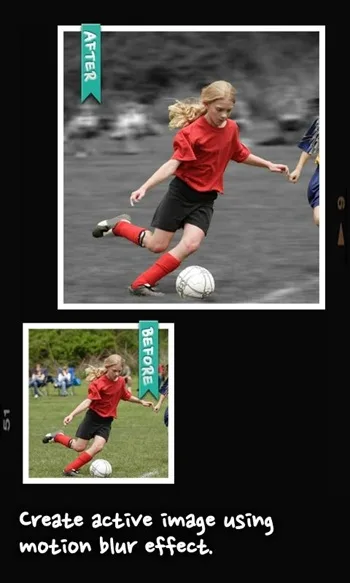
After focusing, you can choose different aperture styles to create a bokeh effect similar to that of a DSLR camera. The transition between the subject and background is natural and smooth, avoiding harsh divisions. You can also apply motion blur to create a sense of motion, especially where needed.
Filters and Bokeh Tools
Besides bokeh effects, you can apply a variety of filters, from basic corrections to cross-printing. The app avoids unnatural-looking images by maintaining a balanced effect. Bokeh control helps you highlight background highlights, making the overall image feel more harmonious.
Quick Sharing Options
After editing, you can share photos via email or social networks. The sharing process is very simple, sending the results without any extra steps.

Highlights
Natural, DSLR-style bokeh
Auto and manual focus detection
High-quality filter effects
Smart tools to reduce editing time
Realistic bokeh and motion blur
Simple operation, suitable for beginners and experts
Pros and Cons
Pros: Easy to use; Abundant options and features; Works with both rear and front cameras.
Cons: No dedicated pro mode

FAQs
What is AfterFocus Pro?
AfterFocus Pro is a mobile photography app for Android that helps users create photographs with sharp subjects and soft background blur.
How does AfterFocus Pro create background blur?
It uses manual or smart subject selection to isolate the main subject, then applies an adjustable blur effect to the rest of the image.
Can AfterFocus Pro run on older Android phones?
Yes, but some more complex effects may process slowly on devices with limited performance.
Is AfterFocus Pro suitable for beginners?
Yes, the interface is clean and the tools are easy to understand, making it easy for even first-time users of editing software to get started.
Can AfterFocus Pro handle motion blur effects?
Yes, it includes motion blur functionality, allowing you to add dynamic effects to your photos without advanced camera knowledge.
Summary
AfterFocus Pro is ideal for users who want to improve the quality of their portrait photos, social media content creators, mobile photography enthusiasts, and anyone who wants a simple depth-of-field effect without mastering post-editing skills. It's suitable for everyday use as well as creative projects that require clean background separation.








