CamScanner is a mobile application for document scanning. It helps you easily achieve a paperless office, eliminating the need for messy paper documents. From PDF scanning to paper document recognition, you no longer need to search through piles of paper documents for the content you need. More than just scanning, CamScanner also helps you easily organize your files, eliminating the tedious process of filing and searching. It offers a variety of document tools and supports multiple formats, including PDF and JPG!
Use
Open CamScanner and tap the camera icon to start a new scan.
Place the document on a flat surface, align it with the viewfinder, and capture the page when the edges are detected.
Afterward, adjust the borders as needed, apply filters, and use the page flattening function to remove curves or shadows.
If needed, tap OCR to extract text and select the correct language for improved accuracy.
You can save and export as PDF or JPG, share via link or email, print wirelessly, or send a fax. You can also add tags and move files to the correct folders.
Features
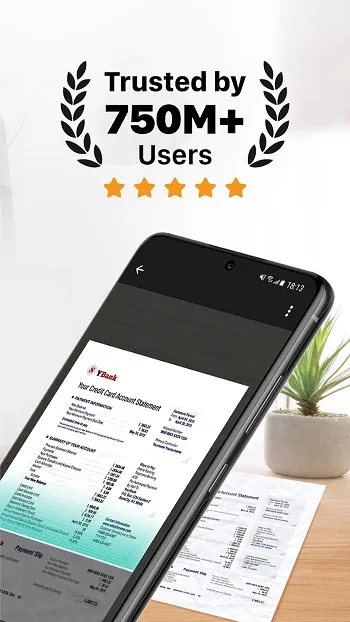
Scan images easily with automation and AI tools!
CamScanner Apk excels at converting faded or dull images into crisp digital documents.
Users can easily capture images directly with their camera or import them from their gallery, then use the automatic scanning function to convert them into beautiful scanned documents. These features include shadowless, brightening, magic color, and black and white modes, all complemented by the application's automatic cropping function.
Streamline your business or personal workflow with image-to-text converter tools!
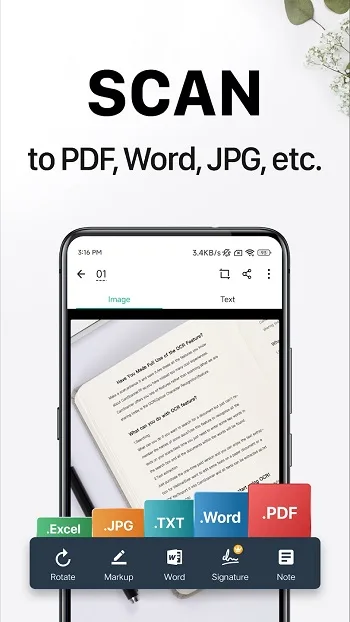
CamScanner's application features a rich set of Optical Character Recognition (OCR) tools to meet the needs of both student and industrial applications. Users can easily extract text from images using the application's powerful language recognition capabilities (supporting multiple languages including English, Korean, and Chinese). After OCR scanning, users can flexibly copy, paste, or convert the extracted text to PDF format for sharing.
Digitize ID cards and passports!
Now, scan important documents such as driver's licenses, vehicle registration certificates, and passports without a duplex printer. CamScanner Apk boasts superior scanning capabilities, instantly scanning various double-sided documents with automatic quality enhancement. The app has considered the effective sizes of documents from different countries and types, ensuring comprehensive coverage and compatibility.
Wireless Printing and Global Fax Functionality!
The CamScanner app provides users with wireless printing capabilities, allowing them to print wirelessly from any wireless device connected to their local network. Additionally, you can fax scanned documents to supported countries worldwide through the app.
Cloud Storage Integration!
CamScanner Apk allows users to save scanned documents directly to popular cloud services such as Google Drive and Dropbox. This feature allows users to access their documents from anywhere in the world.
Compatible Systems
CamScanner is widely available across platforms. Android users can download it from the Google Play Store, and iOS users can download it from the App Store, making it compatible with most smartphones and tablets. This means you can enjoy the same reliable functionality whether you're using a Samsung Galaxy, iPhone, iPad, or other device.
In addition to the mobile version, CamScanner also offers a web version. If you prefer working on a large screen or need to process multiple documents on your computer, the web version is especially useful. You can log into your account via a browser on Windows or macOS to view and manage scans taken on your phone directly.
Another major advantage is its cloud sync functionality. If you scan something with your phone during a client meeting, you can immediately see the scan results on your computer after logging into CamScanner. This cross-device support makes it ideal for users who need to switch between mobile devices and desktop computers throughout the day.
FAQs
What is CamScanner?
CamScanner is a mobile application that turns your phone into a smart scanner, allowing you to digitize documents, edit, share, and save them as PDF, JPG, or Word documents.
Is CamScanner free to use?
Yes, CamScanner offers a free version that includes core features such as scanning, editing, and sharing. The premium version adds OCR recognition, cloud storage, and many more advanced tools.
Can I scan handwritten notes with CamScanner?
Absolutely. CamScanner's OCR function can recognize and extract text from handwritten notes with clarity, making them searchable and editable.
Can CamScanner be used offline?
Yes, you can scan and edit documents offline. However, features such as cloud sync, online fax, and certain sharing options require an internet connection.
Can CamScanner be used securely to store confidential documents?
CamScanner includes password protection options and encrypted links, making it a secure choice for storing or sending private and sensitive documents.
Summary
So, who is it suitable for? Frankly, it's suitable for almost everyone, from freelancers managing contracts to college students organizing class notes. It's designed to reduce tedious work and streamline document processing—no desk, scanner, or filing cabinet needed. All you need is a mobile phone and about 30 seconds.