
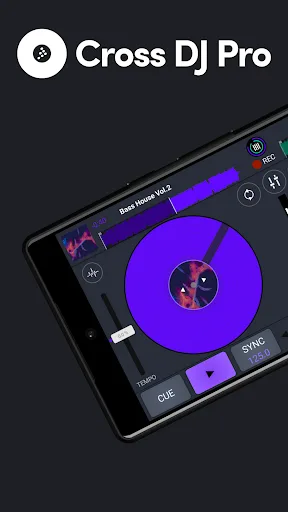
Cross DJ Pro is a mobile music application with functions similar to professional DJ mixing software, providing you with an excellent music experience. The application is simple and easy to use, allowing you to use two turntables simultaneously, letting you experience your creations. You can switch panels using sliding tabs, and all synchronization is automatically matched to the music beat. In addition, the application supports numerous professional music functions, including music detection, track synchronization, and music element correction, aiming to bring you the best music experience.
Usage
Download the Cross DJ Pro APK from the top of the website.
In Cross DJ Pro, you can work on two tracks simultaneously. Press the "+" button in the upper left corner to add or browse music from your device. A list of music or audio files will then be displayed. After selecting the desired audio file, it will be automatically loaded onto the left turntable. To load audio onto the right turntable, you need to follow the same steps as adding a file to the left turntable.
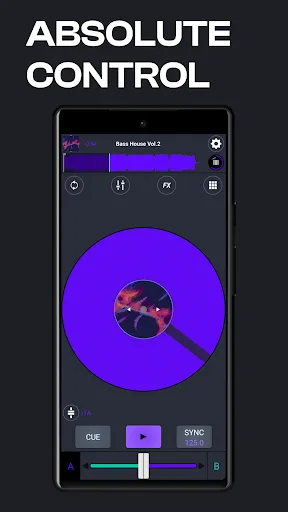
Now, after adding your favorite music to your playlist, it's time to get creative and mix! Tap the play button between the two buttons at the bottom of the screen to play the music.
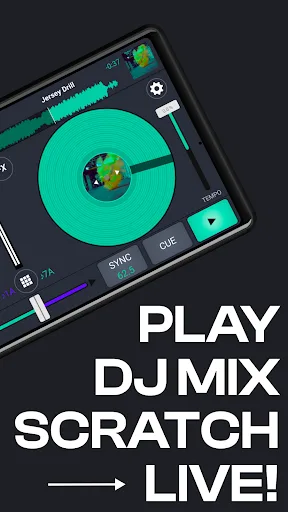
If you want to synchronize two songs playing on the player, you can use the sync function next to the play button at the bottom of the screen.
You can also control the tempo of the music on the turntable using the dedicated draggable button next to the turntable.
You can control the volume of each track using the horizontal draggable button located in the center of the bottom of the screen.
We've designed a separate equalizer for Cross DJ. To use this equalizer, press the button in the center of the screen, between the fx and repeat buttons.
Cross DJ Pro has approximately 16 built-in effects of varying quality, perfect for your various work needs.
Okay! Everything is ready. Now how do you record your work on the recording console? We can use the built-in recorder to record your music and export it elsewhere.
Here's a special feature to add more creativity to your music. That's right, there's a button at the bottom of the equalizer buttons. Clicking it will bring up a short menu on both tracks. You can call these special effects; they're very useful and can be added to your music library.
Features
DJ-Friendly Interface
Cross DJ Pro's user-friendly interface allows you to easily focus on music creation. The main interface includes key functions such as DJ, Gallery, Sample Sets, Loop, and Effects. Cross DJ Pro's interface allows you to view and adjust music playback information such as BPM, volume, mute, solo, and preview. The Gallery interface displays song titles, artists, durations, BPM, favorites, and album art in an intuitive way.
Massive Audio Sample Library
The sound sampler is a key feature of Cross DJ Pro. It includes many sound effects commonly used by professional DJs. In addition to the default effects, you can also use many more unique and professional effects. The audio sampler includes various audio effects such as frequency resolution, audio filters, compression, harmonization, and delay. These effects can help you create unique sound effects suitable for various song genres.
You can use Cross DJ Pro's samplers to create unique musical compositions. Furthermore, the application allows you to customize sound effects to your liking, aiming to create distinctive and high-quality musical works.
In addition to basic sound effects, Cross DJ Pro's audio sampler offers a wealth of other effects, such as a bit shredder, resolver, mixer, 1dB filter, wah, and flanger. These effects help you create music that suits different tastes and musical styles.
Modifying Song Elements
A major highlight of Cross DJ Pro is its ability to edit song elements and create DJ effects at will. Here are a few ways to change DJ effects for your songs using the app:
Adjusting the Equalizer: Cross DJ Pro allows you to control the equalizer of your songs. You can adjust the bass, midrange, and treble to create the perfect mix for your work.
Filters: The app also offers audio filters such as high-pass, low-pass, band-pass, and notch filters to adjust the sound of tracks.
Beat Grid and Slicer: Cross DJ Pro's beat grid and slicer features allow you to precisely cut and arrange songs, adjust timing, and create new tempos and sequences.
Loop Playback: You can easily create loop playback using the app's repeat playback feature. Cross DJ Pro offers multiple repeat playback options, allowing you to choose the loop length and start and end times.
Creative Features: The app includes a variety of creative tools. For example, you can use the app's mixing pads to create the rhythms and melodies you want.
Social Connectivity: Cross DJ Pro connects to popular social networks like Facebook, Twitter, or SoundCloud, making it an excellent tool for creating high-quality content on these platforms. Let your friends see your musical talent!
Highlights
Leading Hardware Support: The app supports both hardware and software, ensuring the sound quality meets user requirements.
Haptic Controls: The adjustment buttons function differently, but they are interconnected and work together to create excellent sound. Users need to fully understand the functions of these buttons to achieve perfect sound adjustments.
Hardware Control: This app also includes volume adjusters, volume up/down controls, and volume suppressors to meet the needs of music mixing.
Hardware Sampling: The Night Pad helps you record and create musical rhythms. Users need to activate this pad to make the harmonies more rhythmic.
Pros and Cons
Pros: One of the most professional virtual mixers on the market.
Cross DJ Pro responds instantly to any audio adjustments made by the user.
Cons: Some users have reported hearing significant static noise during playback.
Does not support smartphones with screens smaller than four inches.
Summary
Cross DJ Pro—one of the best DJ apps on the Android platform. This excellent app perfectly simulates a DJ turntable and boasts superior optimization and responsiveness. You can freely mix and sync tracks and enjoy a smooth experience from its powerful audio engine.








