

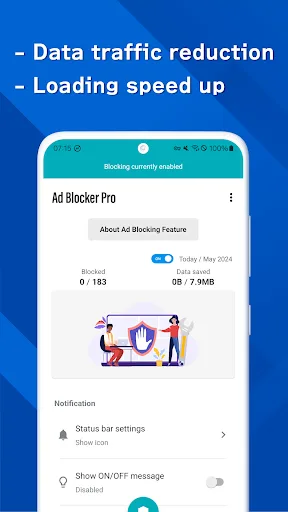
With increasing internet usage, more and more advertisements are flooding the internet. Ad Blocker Pro is an ad-blocking application. It uses the most reliable filters to block most ads, whether they are text/image, video, or pop-up ads, allowing you to enjoy a clean internet experience. Ad Blocker Pro can also identify and remove factors that slow down your internet speed, optimizing your network bandwidth and improving website access speed. Furthermore, you don't need to worry about information security; Ad Blocker Pro will block malware before it reaches your computer network, giving you a clean and safe online environment!
Usage
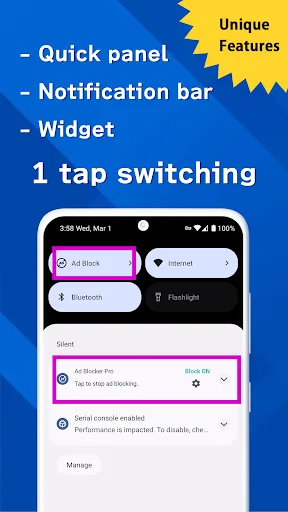
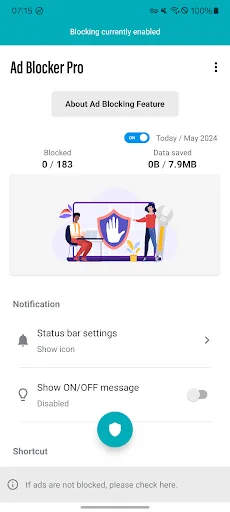
It features different tabs, providing application settings and customization options—you can set which applications' ads the program blocks, and you can also customize the application's interface. This means that with Ad Blocker Pro, you can choose to block all ads in all applications, or only ads in certain applications. Additionally, you can block ads only when using specific types of network connections.
Features
Powerful Ad Blocking Functionality
The proliferation of ads in cyberspace often causes considerable annoyance. While mainstream ads are acceptable, media companies, sensitive services, and other unofficial services also flood the internet, causing discomfort for most users. Ad Blocker Pro uses the most reliable filters to block most types of ads, from image ads to video ads, and even pop-up ads. These ads have long bothered us, but don't worry, they're coming to an end. With this feature, you can enjoy a clean online environment, free from annoying ad messages.
Optimize Webpage Loading Speed
In addition to blocking ads, Ad Blocker Pro can identify and remove other factors that slow down page loading, such as tracking scripts, social media rankings, and other unnecessary content. This helps reduce the amount of data that needs to be loaded, significantly improving page loading speed.
Furthermore, Ad Blocker Pro can optimize network bandwidth usage, especially on connections with limited bandwidth. It removes unnecessary data (such as ads) and factors that slow down page loading, reducing the amount of data required to download and improving website access speed.
Ad Blocker Pro also integrates fast page loading technologies such as AJAX and preloading to optimize the user experience. Webpages can be preloaded by the engine, reducing waiting time and making browsing smoother.
Protect Your Personal Information
Ad Blocker Pro helps you block ads and scans for and blocks ads containing malicious code. Ads containing JavaScript code or malware are completely blocked before they have a chance to connect to your network, protecting you from the risk of personal information leakage.
In addition to blocking ads, Ad Blocker Pro also removes tracking elements such as cookies, tracking pixels, and other tracking codes. With this protection, you no longer need to worry about your personal information being tracked or stolen.
Furthermore, Ad Blocker Pro offers an automatic security mode that automatically blocks ads and harmful elements without user intervention. This mode ensures you are protected from potential threats.
Control Your Security Level
Ad Blocker Pro provides security level controls, allowing you to customize and manage your personal security settings to your needs, giving you complete control. Ad Blocker Pro also allows users to flexibly choose whether to block or allow tracking elements when visiting websites. This means the application does not always block all ad sources. You can choose whether to share personal information with these third parties.
Ad Blocker Pro does not force users to use all security features. You can enable or disable features according to your needs. Everything is up to you, but you are responsible for any consequences arising from it.
Comments
Thank you! Goodbye malware, ads, and lag. Hello usable mobile web browsing.
This is awesome. It is the best ad blocker I have ever used.
I installed this app and the ads were gone; it feels awesome to see only what I want to see!
FAQs
What is the difference between AdGuard for Android and AdGuard Content Blocker?
Content blockers are usually browser-specific, and their ad-blocking capabilities are far inferior to AdGuard for Android. AdGuard for Android is a standalone app that blocks ads and trackers in browsers and apps, offering better filtering.
Why can't I find AdGuard for Android on Google Play?
Google Play does not allow apps that can block ads across all devices. This policy only allows browser-specific content blockers. Therefore, the fully-featured Android ad blocker AdGuard has been removed from the app store.
What is the difference between the free and paid versions of AdGuard for Android?
The free version performs well in removing browser ads, but it cannot filter apps and lacks features like browsing security, tracking protection, and user scripts. For advanced features to block trackers and dangerous websites, please purchase the paid version.
Do I need root access?
No, you don't. Unlike many other ad blockers, AdGuard uses a so-called local VPN to block ads on unrooted devices.
Can I use a VPN with the Android version of AdGuard?
You can easily use AdGuard with AdGuard VPN. Their integration is automatically enabled once both apps are launched and running.
As for third-party VPN apps, there may be some issues. AdGuard ad blocker runs a local VPN on your device for effective filtering. Android doesn't allow two VPNs to run simultaneously, but there are some workarounds. For rooted devices, we recommend switching AdGuard's proxy mode to automatic proxy. This allows your device to use other VPN apps.
Additionally, VPNs like PIA VPN or Nord VPN allow you to use an upstream proxy—check if your VPN has this option.
Summary
Ad Blocker Pro focuses on speed and security, improving the browsing experience by reducing data usage and blocking malware and trackers. It's ideal for users who frequently visit ad-intensive websites, prioritize security, and value a user-friendly interface. Notably, the app does not collect any personal information, demonstrating its commitment to user privacy.








