

Auto Clicker Macro: Clickmate is an excellent automation application. It employs innovative features designed to simplify repetitive tasks on mobile devices, allowing users to record and replay complex actions such as touch interactions. With Auto Clicker Macro: Clickmate, you can customize touch sequences and automate complex operations, ensuring a smoother, more efficient user experience. You can capture detailed touch input sequences, including swipes and clicks, and replay them as needed. Whether you're dealing with repetitive swipes, clicks, or specific touch sequences, this application provides a powerful set of tools to optimize your mobile interactions.
Highlights:
One of the primary functionalities of Clickmate is its ability to record touch inputs. This feature enables users to capture their tapping actions, which can then be replayed automatically. By recording specific sequences, users can save time during activities that require frequent tapping, such as mobile games or other applications that demand repetitive actions. The recorded macros can be customized to fit individual needs, allowing for a tailored automation experience.
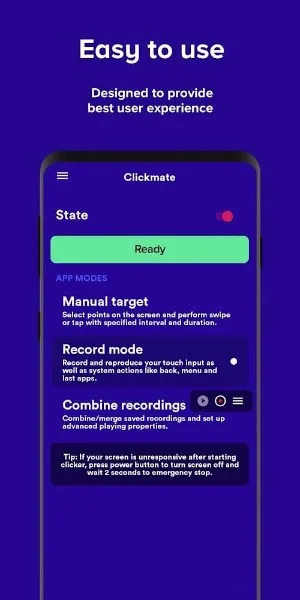
The app offers a user-friendly interface that simplifies the process of setting up automation tasks. Users can quickly navigate through the various options without needing advanced technical skills. This accessibility makes Clickmate suitable for a wide range of users, from those who may be new to automation applications to seasoned individuals looking for effective tools to enhance their productivity.
Clickmate supports multiple tap types, including single taps and double taps. Users can specify the exact locations on the screen where these taps should occur, ensuring precise control over the automation process. Additionally, the app allows for the customization of tap intervals, enabling users to adjust the speed at which the taps are executed. This flexibility is particularly useful in gaming scenarios, where timing can be crucial.
Features:
Effortless Automation: The app allows users to automate repetitive tasks, both basic and advanced, making it easier and more convenient to use their device.
Touch Input Recording: Users can record taps and swipes, which can interact with the device's system features, providing a seamless experience.
No Root Required: The application does not require rooting the device, ensuring a hassle-free experience without compromising the device's integrity.
Enhanced Efficiency: With precise settings and linked recordings, users can customize their automation process to optimize control and enhance efficiency.

Tips and Tricks:
Start with simple tasks: Begin by automating simple actions like tapping buttons or swiping in specific directions to familiarize yourself with the app’s interface and features.
Set appropriate intervals: When creating a macro, adjust the click intervals to match the natural pace of the task you're automating, ensuring smooth operation without overloading the system.
Use the repeat feature: For tasks that require repetition, use the repeat feature to set the number of cycles, so you don’t have to manually start each cycle.
Test macros before use: Always test your macros in a safe environment (such as an app demo or game test mode) to ensure they work as expected and avoid accidental actions.
Enable or disable background operation: Depending on your need, you can toggle whether Clickmate runs in the background, enabling multitasking while keeping automation active.
Pros & Cons:
Pros
Offers Recording Mode, Manual Mode, and a combined system mode for flexible automation
Can record touch input along with system actions like back, menu, recent apps, and screenshots (on supported Android versions)
Highly customizable tap and swipe behavior with control over duration, intervals, and repeat counts
Randomized coordinates feature helps avoid perfectly identical tap locations
Lightweight and works without root access
Free core functionality with optional in-app purchases
Supports Android 7.0 and higher, with extra features for Android 9 and above
Cons
Some advanced features require payment through in-app purchases
Screenshot recording only available on Android 9 and newer
Interface buttons are relatively small, which can lead to accidental recordings
May feel a bit slow at times when running over other apps
Reports of crashes during longer usage sessions, even after reinstalling
No straightforward way to assign precise per-step delays without recording them live, which makes long-interval macros cumbersome
User support can be slow to respond according to some feedback
Conclusion:
Clickmate is a handy way of leveling up or collecting more items in famous clicker games where the only thing you have to do is tap on the screen and is also a great way of speeding up boring processes that you have to do but don't want to. This app's functions will make your life even easier without you even realizing it.








