Lumii is a practical photo editing tool for Android users. It offers ease of use with over 100 preset filters and effects for users to choose from. Whether you're a beginner or experienced user, the software provides guidance, tips, and inspiration. The interface is simple and user-friendly, without unnecessary clutter, allowing users to easily find the functions they need. It also allows for image review, color customization, and more. Based on the user's creative needs, it will generate an ideal photo.
Click to load YouTube / 点击加载视频
YouTube ↗Features of Lumii:
AI Avatar: Anime avatar maker & 3D Cartoon photo editor
Quick Erase: Remove unwanted objects with offline convenience
AI Remove: Automatically detect and remove unwanted objects
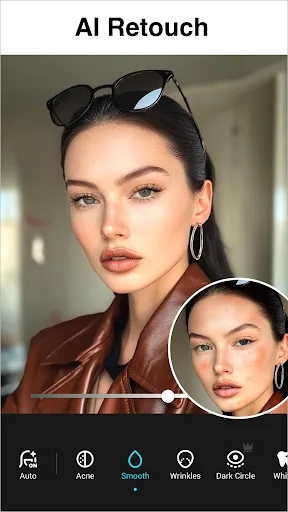
AI Retouch: Skin smoother, blemish remover, wrinkle remover photo editor; teeth whitening app free, perfect your look instantly
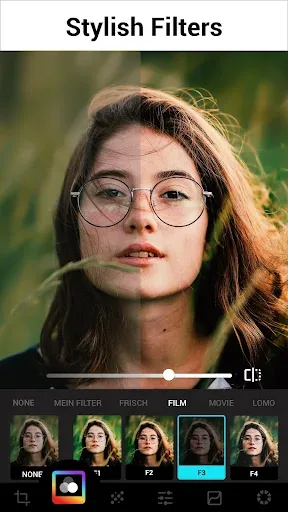
Photo Filters and Effects
Exquisitely designed filters for pictures, presets for Instagram, make your photos stand out.
Apply effects and filters for pictures, such as Film, LOMO, Retro, etc.
Amazing Glitch photo effects to enhance your photos, such as VHS, vaporwave, etc.
Auto Background Eraser
Handy background eraser, easy to make ID photos with AI photo cutout
Remove BG and change the BG with preset pics
Free HSL Color & Curves
Easily control Hue, Saturation, Luminance with HSL editor
Totally FREE and advanced Curves photo editor
Text, Stickers, Doodles
Add text on photo, with lots of Fonts and Stylish Text Presets for selecting
Enhance your images with diverse text styles and fun stickers
Freely Doodle on your photos with unique designs
Highlights of Lumii:
In Lumii, there are currently more than 100 photo filters and preset effects, and dozens of impressive image templates selected from unique image designs from world photography artists. Thanks to the bundled feature set, users can completely actively create images based on available templates or design images from scratch according to their own preferences without any difficulty.
So when using Lumii, whether you are an expert or a beginner, this application can provide the necessary guidance, suggestions or inspiration for creativity. Smart, neat interface, a series of detailed operations but presented in a minimalist, intuitive way will help you complete a creative idea in the shortest time.
Create images with advanced and detailed editing tools
For those who want to actively create images that do not follow a standard or inherent way, Lumii supports all the necessary detailed tools. The application currently has more than a hundred image filters and effects specially designed to appear on major social networks such as Instagram, Facebook, Twitter. Because it was designed specifically from the ground up, after the editing process, the composite effect of the photo becomes very impressive on social networks, ensuring you have a memorable image.
These filters and effects such as Glitch, LOMO, Retro, you must have seen from other applications, but they have been designed specifically for Lumii to bring a rare aesthetic to images despite the same usual style. These filters when used can also be customized to better suit the preferences of each person.
Along with the image correction process with filters and effects, you can fine-tune the light intensity. Don’t forget the background eraser, background retouch tools. Moreover, you can easily blend and crop existing details or adjust the sharpness of the image or customize the HSL color mode, create a perfect color curve for the image. All the tools can be customized to the degree of automaticity. This will once again help you to get the picture according to your creative ideas with just a simple touch and drag on the screen
Particularly with HSL color correction mode, Lumii allows users to easily control hue, brightness, saturation to help make the color correction process more detailed and natural.
With the image curve customization tool, you can use Lumii to create a strong or gentle color curve rarely seen with 4 color options for your image while maintaining the smoothness and original shade of the figure. This is also a tool state that few orthopedic applications can do.
Templates are available with dozens of impressive options
Lumii will impress even users who have a lot of experience in photo editing. There are dozens of free templates in Lumii and more will be added in the future. These templates have been fully edited, set up a series of standard effects based on beautiful photos from famous photographers and photo editing experts around the world.
With each template, after choosing, you just need to upload the image you want to edit, so you have the finished product right away without tweaking every little detail. This method both saves time and effort and creates highly aesthetic and attractive photos. Many young people today are very fond of this method, so Lumii with a significant number of templates will help a lot.
User Reviews of Lumii:
1.Was ok, not spectacular. Just tried a simple test. Tried a complete color change on a shirt someone was wearing. Not user-friendly. Tried changing colors and it was difficult, not expected results, and for some reason photo stuck with said changes without any "Undo" feature. I understand there's a paid for more features. But too expensive for an app not user-friendly for a simple shirt color change. Uninstalled
2.Not too shabby. Of course one always wishes for more features to be available without a subscription, but this offers a fair amount. There are ads but they are less intrusive than many apps. Depending on what you're looking for, this might be a five-star app for you. I'm mostly looking to fine-tune pics and actually don't desire to do a lot of editing, so I don't use some of the features as often as others might. My needs: four stars. Comparison to many other free apps: five stars.
3.That's really coming handy more than once It definitely has the option of several capabilities that I haven't found on other apps yet where you get the selection of backgrounds and what not laid out right in front of you so you can visualize it better I'm a happy with it so far no annoying ads so that's the truth I hope it helps. I haven't got an idea of how the billing goes or how it doesn't go yet so that's pending
4.I'm a premium member, but the app periodically claims I'm not, and it forces me to remove all Google accounts in order to restore. This is unacceptable and needs to be fixed or give me my money back! Following up, the developer is blaming Google for not providing the appropriate hooks even though many ot
Conclusion:
Lumii will impress even users who have a lot of experience in photo editing. There are dozens of free templates in Lumii and more will be added in the future. These templates have been fully edited, set up a series of standard effects based on beautiful photos from famous photographers and photo editing experts around the world.