

Samsung Video Player is a lightweight yet feature-rich video player app for Android. Designed to deliver a stable playback experience across a wide range of formats, it offers extensive codec support and intuitive controls, making it easy for users to enjoy both local videos and streaming content. With Samsung Video Player, users can start playing local videos with just a few taps. The app also provides a variety of customization options, allowing you to adjust settings such as subtitle font color and default playback speed.
Highlights:
Onscreen controls like Gesture seek, Pinch to zoom, and Volume and Brightness controls
Pop-up player for seamless multitasking (Video can be resized or moved on the screen while playing)
Capture. Save, edit, and share the moments you want to keep
Create GIF. You can create, edit, and share your own animated GIFs easily
Lock provided to prevent you accidental pausing or stopping a video from playing
Hardware acceleration to make video playback smoother
Support for Super slow-mo video playback and simple control
Play video on big screen devices, such as TVs, using 'Smart View'
Feature:
Precise tap-based seeking with intuitive gestures and a convenient lock screen.
Pinch to zoom in or out, and capture screenshots without pausing.
Left-side brightness and right-side volume sliders for quick, one-handed adjustments.
Project videos to a larger screen on supported devices for shared viewing.
Built-in editor to trim clips, add background music, and apply effects.
Enhance low-quality footage for better clarity using hardware-accelerated processing during playback.
Customizable subtitles with color, size, font, and basic sync options.
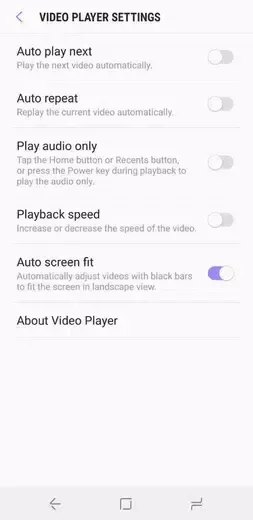
Player controls include autoplay, repeat, audio-only, speed change, and auto-fit.

Tips for Users:
Enable hardware acceleration only if your device supports the codec; otherwise you may see artifacts.
Use external subtitles when available for better timing control, especially with anime or foreign films.
Lower the buffer size if streaming over a stable local network to reduce latency; increase it on mobile networks to avoid stutters.
Keep the app updated to benefit from codec and security improvements.
FAQs:
Can Video Player play high-definition videos?
Yes, Video Player can play HD, full HD, 1080p, and even 4K videos with ease. You can enjoy your videos in stunning clarity and detail.
Does Video Player support all video file formats?
Yes, Video Player supports all video file formats, including AVI, MP4, WAV, AAC, MOV, MP3, WMV, RMVB, FLAC, 3GP, M4V, MKV, TS, MPG, FLV, and more. You can play any video file without any hassle.
Can I play videos in the background?
Yes, Video Player allows you to play videos in the background. This means that you can continue listening to the audio of a video even when you switch to another app or lock your screen.
Does Video Player have a subtitle download feature?
Yes, Video Player has a built-in subtitle downloader option. You can easily download subtitles for your videos and enjoy them with your preferred language or translation.

Final Words:
For example, you can choose whether or not you want the next video to start playing automatically when you're done watching the current one or, repeat the current video. You can also adjust the size of the video or follow the original format. Samsung Video Player is a great video playing app that lets Samsung smartphone users comfortably and easily watch their videos.







