

Kids Place is a powerful parental control tool that allows parents to restrict their children's access to numerous apps and device settings, preventing them from accessing them freely while using a smartphone or tablet. When installing the app, you'll need to set a PIN code and grant it accessibility permissions, as well as permissions to override other apps based on their intended use. With this application, you can easily limit your child's online time and control the apps they can access. Download and try it now!
Click to load YouTube / 点击加载视频
YouTube ↗Highlights:
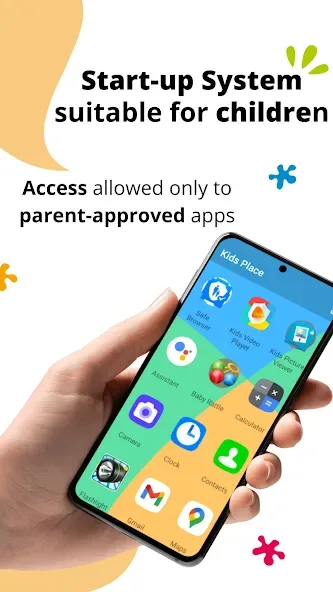
Use only parentally approved apps and block other apps and settings.
A customized home screen displays only parentally authorized apps.
Prevent children from purchasing or downloading new apps.
Block incoming calls when Kids Playground is running.
Disable all Wi-Fi signals when Kids Playground is running.
Toddler Lock - Automatically restarts apps accidentally stopped by a child, allowing parents to focus on their own tasks.
Suitable for children of all ages, including babies, toddlers, and teenagers.
Set any phone or tablet to Kids Mode.
Features:
Safe Environment: Kids Place allows you to create a safe and secure environment for children on your mobile phone.
Blocking Access: You can block children from accessing important programs on your phone, ensuring they only have access to the programs you choose.
Prevent Unwanted Actions: The app prevents children from making online purchases, downloading new software, making calls, or sending SMS that may lead to unwanted expenses.
Call and SMS Blocking: Incoming and outgoing calls and SMS are blocked, ensuring children can focus on safe and appropriate activities.
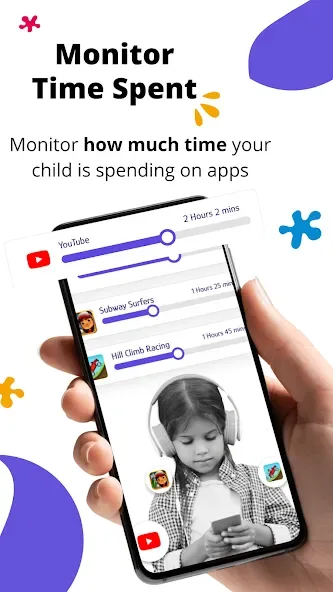
Customization Options: Kids Place offers rich customization options, allowing you to control the duration of application usage and set a password to exit safe mode.
Multiple Profiles: The app allows you to create different rules and profiles for multiple children, ensuring tailored protection for each child.
Tips for Users:
Customize App Selection: Take advantage of the app locking feature to select and lock down specific apps that you want to restrict your child's access to. Prioritize locking apps that are related to work, finances, shopping, and personal information storage.
Set Time Limits: In addition to app restrictions, consider setting time limits on how long your child can use their smartphone. Encourage them to engage in other activities and create a healthy balance between technology and real-world experiences.
Educate and Communicate: Take the time to explain to your child why certain apps are off-limits and the potential dangers they may encounter online. Open up a line of communication and encourage them to ask questions or seek help if they come across something inappropriate or confusing.
FAQs:
Can I choose which apps to lock down with the app?
Yes, you have the flexibility to choose any app to lock down and prevent your kids from accessing it. You can prioritize applications related to work, shopping, finance, and information storage.
Will my child be able to access locked apps when the app is disabled?
No, the locked apps can only be accessed when the app's kids mode is turned on. So, even if the app is unlocked, your child won't be able to open it unless they are in kids mode.
Can the app be used for educational purposes?
Absolutely! The app provides a curated selection of apps that are suitable for children. These apps can be educational and help children learn and cultivate meaningful lessons in life.
Conclusion:
Kids Place is a valuable tool for parents who want to ensure a safe and controlled smartphone experience for their children. By locking down specific apps, limiting internet access, and restricting app downloads, parents can protect their children from potentially harmful content and online risks. The app's user-friendly interface and customizable features make it easy for parents to set up and manage their child's device usage. With the app, parents can provide a safe digital environment for their children to explore and learn without constant supervision. Download the app today and give your child a secure and educational smartphone experience.








