
Video Converter/Compressor is a popular video conversion tool that allows users to freely import or export photos and videos in various formats, convert them to other formats, and share them with friends or other social media platforms to enjoy your wonderful moments together. Video Converter/Compressor also allows users to freely choose different photo or video resolutions to meet their personalized needs. Furthermore, Video Converter/Compressor is continuously updated, adding more new tools to bring users a more comfortable user experience.
Click to load YouTube / 点击加载视频
YouTube ↗Features:
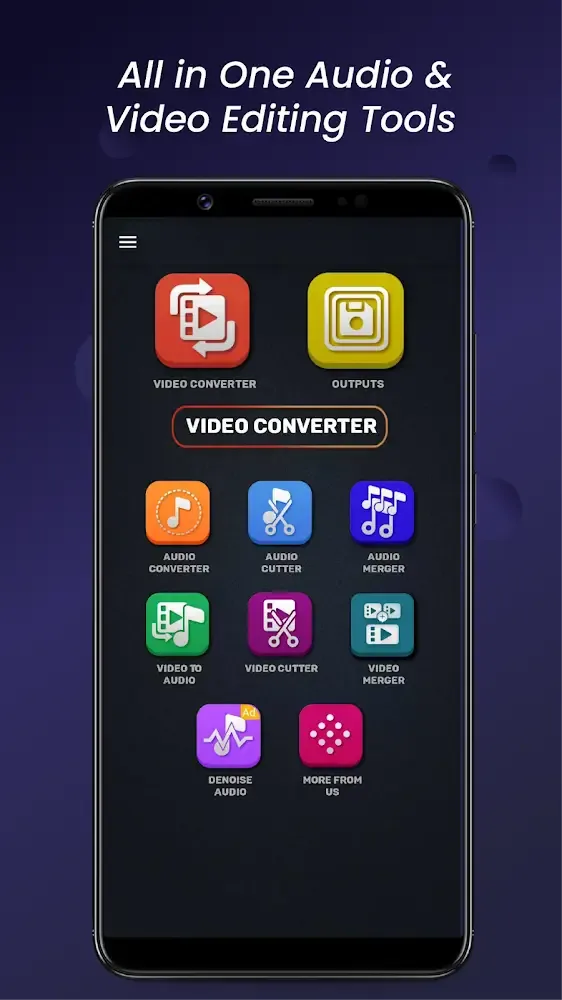
Cut, trim, and merge videos: All videos in Video Converter, Compressor can be easily formatted via Video Cutter and Video Merger menus inside the app, as it allows you to edit them on the fly. Select any of your videos to cut and trim them with great precision of milliseconds. Cut and trim videos to only keep parts of them that you’ll really need and get rid of the excess data. And at the same time, you’re allowed to join or merge different videos into one, using the simple Video Merger menu.
Extract audio from your videos: Video Converter, Compressor users can make use of the app to convert videos into audio-only files, which will make it possible to extract conversations, music, sound effects, and other useful audio assets. Make uses of the app to convert your MPEG, MPG, M4V, MOV, VOB, F4V, WEBM, WMV, DAV, DAT, MOVIE, MOD, MP4, MKV, AVI, 3GP, FLV, MTS, M2TS, TS videos into MP3, M4A(AAC), AC3, WAV, OGG, FLAC audio files without any troubles.
Cut and trim audio with ease: The Audio Cutter in Video Converter, Compressor will allow Android users to freely cut and trim their audio files on the go. Simply select your audio files from the storages and make uses of the similar features when working with your videos to edit the audio parts. Cut and trim videos with great precision.And like with videos, Video Converter, Compressor users can now freely merge audio files on their mobile devices in any formats. Here, the app lets you work with MP3, M4A(AAC), M4B(AAC), AC3, WAV, OGG, FLAC.
Powerful Audio Converter for any audio files: With the powerful Audio Converter available for all your audio files, Video Converter, Compressor users will now be able to convert and compress their audio to many formats. Have access to many supported formats of MP3, M4A(AAC), M4B(AAC), AC3, WAV, OGG, FLAC, and more. Convert your videos to audio files using different bitrates, switch between mono and stereo channels, and choose the formats that you want.
Highlights:
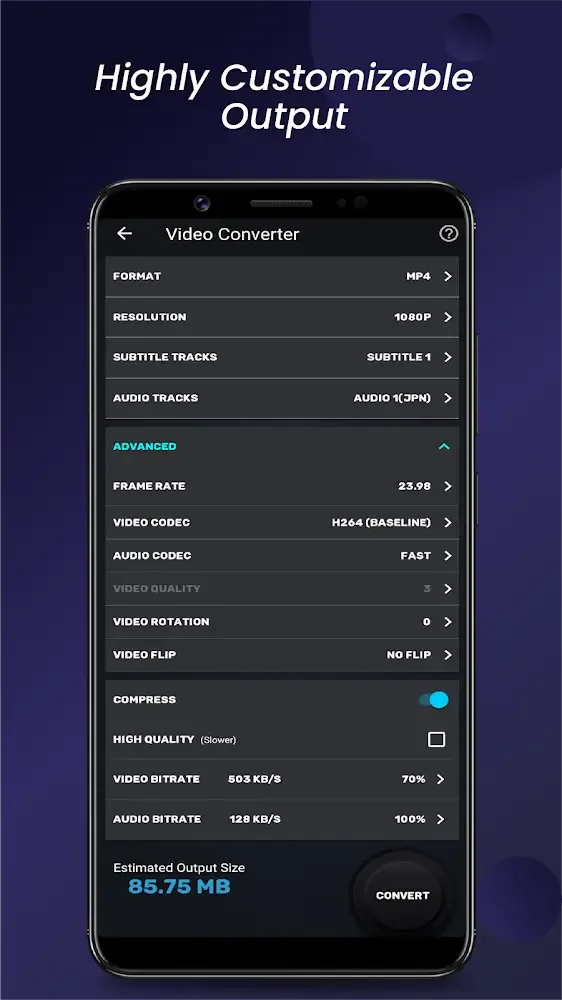
Powerful Codec Support: The backbone of any effective video processing tool lies in its codec support. Our application includes a vast range of codecs, such as H264 and VP9 for video and AAC and FLAC for audio. This ensures that you have the tools needed to produce high-quality media files without sacrificing performance. The video and audio processing capabilities are further enhanced by offering options for rotating and flipping videos, making this tool not just a converter but an all-around media editing suite.
Exceptional Compression Options: When file size matters, our compression options will not disappoint. The high-quality compression feature utilizes the X264 codec, effectively reducing file size while preserving nearly indistinguishable quality from the original. If you're looking to fit large files into limited storage or to facilitate quicker uploads, you can reset the video bitrate to meet specific size targets without compromising on quality.
Seamless Video Merging Features: Should you wish to compile clips into a cohesive piece, our video merger allows you to join multiple videos seamlessly. Choose between sequential merging or experiment with creative layouts such as top-bottom and side-by-side styles. This feature is perfect for creating compilations, trailers, or any personalized video project involving multiple clips.
Precision Cutting and Trimming Tools: Editing has never been easier thanks to our cutting and trimming functionalities. You can input specific start and end times down to the millisecond, ensuring that you keep only the portions you want. Use the 'Cut' feature to preserve the selected parts of your video, or enable the 'Trim' feature to remove unwanted sections, all with such precision that not a single frame is wasted.
Functions:
Convert and Compress your video to almost any video and audio formats.
Supported Formats: MP4, MKV, AVI, 3GP, FLV, MTS, M2TS, TS, MPEG, MPG, WMV, M4V, MOV, VOB, F4V, WEBM, DAV, DAT, MOVIE, MOD, MXF, LVF, H264.
Resolution: Choose from predefined 4K resolution to 240P or put any custom resolution.
Frame Rate: Choose from any predefined frame rates or put any custom frame rate.
Subtitle Track: Choose from existing subtitles tracks of the video or upload subrip, mov_text, srt, webvtt, vtt format subtitles.
Audio Track: Choose from existing audio tracks of the video to keep or add external audio tracks of mp3, aac, m4a, wav formats.
Video & Audio Codecs: We support h264, mpeg4, mpeg1, mpeg2, flv1, vp8, vp9, wmv1, wmv2, aac, mp3, mp2, ac3, opus, vorbis, flac, alac, wmav1, wmav2 video and audio codecs.
Rotate & Flip Video: Apply 90 degree clockwise/anticlockwise or 180 degree rotation and Flip videos vertically or horizontally.
Final Thoughts:
Because an increasing number of individuals have expressed an interest in editing movies and photographs in recent years, Video Converter and Compressor have developed a bespoke user interface that is not only intuitive but also provides a wealth of options that have been cleverly considered. It is possible to reduce the size of any video or image to an extremely small size while maintaining its quality in both appearance and sound. The video formats MP4, MKV, AVI, and 3GP, are the ones that are supported the most… The application will ensure that the image resolution is up to 4K or any other custom mode you want.








