

Documents play an increasingly important role in modern life, and CamScanner Pro helps you scan, share, and access them more effectively. CamScanner Pro boasts a wide range of practical features, offering everything you can imagine regarding documents, from wireless printing and remote faxing to cross-device synchronization! CamScanner Pro is easy to use; students, teachers, and social workers alike can find a suitable way to use it and use it with ease! In addition, CamScanner Pro provides document encryption, allowing you to effectively protect your privacy. With each version update, CamScanner Pro has become one of the best choices for document processing!
Features
Quickly Digitize Your Documents
This app is the best way to digitize paper documents. You can scan notes, receipts, whiteboard discussion records, certificates, and business cards. This allows you to access digital copies of your documents anytime, anywhere.
Instantly Share Scanned Documents
This app supports instant sharing of scanned documents through multiple channels such as email, Snapchat, WhatsApp, and WeChat. You can also save documents to your device or upload them to the cloud for secure storage.
Smart Customization Options
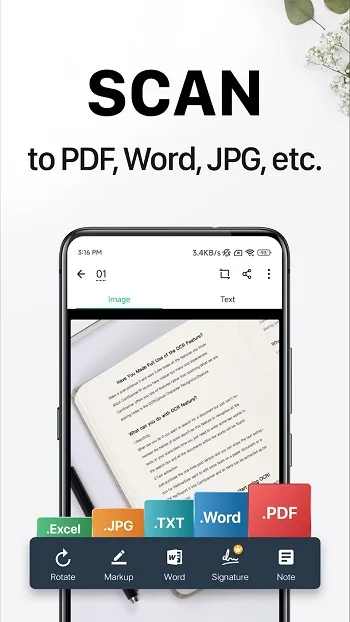
This application offers smart customization options that allow you to optimize your scanned documents. For example, you can adjust the cropping area, contrast, brightness, and color. You can also choose to save the document as a PDF or JPG.
Extract Text
This app uses OCR technology to extract text from scanned documents. This allows you to easily edit or format the document before sharing it with others. You can also get a download link for the extracted text file for future reference.
Wireless Printing and Remote Fax
This app allows you to wirelessly print scanned documents. You only need a printer compatible with this app. You can also remotely fax documents to over 30 countries, eliminating the need to go to a physical fax machine.
Advanced Editing Features
You can use this app to add annotations to scanned documents. You can also add signatures, watermarks, and timestamps. This allows you to personalize or enhance the security of documents before sharing them with others.
Cross-Device Sync
This application allows you to sync documents across different devices. This allows you to access scanned documents on your phone, tablet, and computer. This feature ensures convenience and flexibility.
Quick Search
This app allows you to quickly search for keywords in scanned documents. This allows you to easily find the documents you need. Its OCR function also makes it easier to find specific text in documents.
In-app purchases ($0.49 to $399.99 per item). This app offers in-app purchases to unlock premium features. For example, you can buy a subscription to remove ads or unlock features like bulk downloads.
Multi-language support
This app supports multiple languages. The developers recently added support for Filipino and Malayalam. This allows more users to use the app in their preferred language.
Target audience
For students
CamScanner Pro is a powerful tool for students to scan notes, assignments, or whiteboard discussions. It makes sharing documents with classmates or storing them for future reference incredibly easy.
For professionals
Business users can quickly digitize contracts, ID cards, receipts, and invoices. Annotation tools allow users to review and sign documents anytime, anywhere, while cloud sync ensures you always have access to your files.
For remote workers and freelancers
Remote work requires flexibility and efficiency. CamScanner Pro perfectly meets these two needs, allowing users to scan, organize, and send professional documents anytime, anywhere. Its document security features ensure confidential information is always protected.
For Educators
Teachers can scan worksheets, print materials, and notes, and share them electronically with students. Editing tools also allow for quick marking of assignments or tests.
Pros and Cons
Pros
The app offers advanced features and is free.
The CamScanner APK MOD includes improved features.
Users can export videos an unlimited number of times without any restrictions.
It has an unlimited number of OCR credits.
Users can remove watermarks from documents.
Cons
You will not receive official assistance.
This version may not receive updates regularly.
FAQs
What is CamScanner?
CamScanner is a mobile application that turns your phone into a smart scanner, allowing you to digitize documents, edit, share, and save them as PDF, JPG, or Word documents.
Is CamScanner free to use?
Yes, CamScanner offers a free version that includes core features such as scanning, editing, and sharing. The premium version adds OCR recognition, cloud storage, and many more advanced tools.
Can I scan handwritten notes with CamScanner?
Absolutely. CamScanner's OCR function can recognize and extract text from handwritten notes based on clarity, making them searchable and editable.
Can CamScanner be used offline?
Yes, you can scan and edit documents offline. However, features such as cloud sync, online fax, and certain sharing options require an internet connection.
Can CamScanner be used securely to store confidential documents?
CamScanner includes password protection options and encrypted links, making it a secure choice for storing or sending private and sensitive documents.
Summary
So, who is it for? Frankly, it's suitable for almost everyone, from freelancers managing contracts to college students organizing class notes. It's designed to reduce tedious work and streamline document processing—no desk, scanner, or filing cabinet needed. All you need is a mobile phone and about 30 seconds.








