

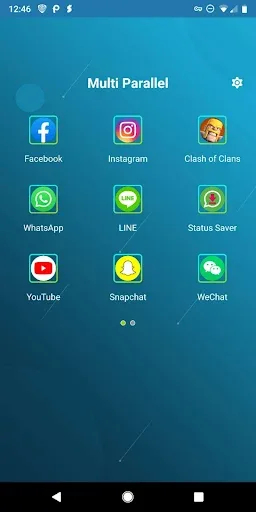
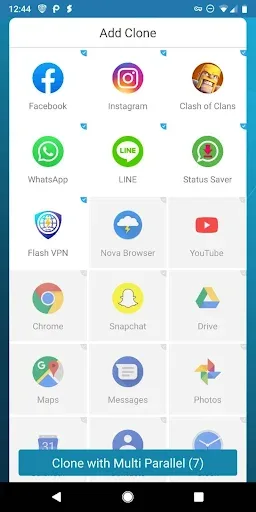
Multi Parallel is an app cloning software. It creates an independent virtual space where other apps can run without affecting the original device. Each cloned app runs independently, preventing data cloning. It's lightweight, low-power, and doesn't consume excessive memory or impact phone performance. Furthermore, Multi Parallel offers powerful personalization features, allowing you to customize the icons of cloned apps to avoid confusion.
How it Works
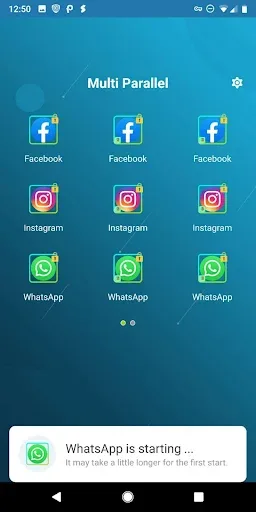
Simply put, this app creates a completely independent virtual space where other apps can run. This allows you to open the same app twice on the same device: once on the device itself and once in Multi Parallel - Multiple Accounts & App Clone. For example, if you have a work WhatsApp account and a personal account, you can use them both on the same phone without (and avoid) the inconvenience of having a separate phone for personal and work use.
Features
Log in to multiple instant messaging, social media, and gaming accounts simultaneously on the same device.
Balance work and personal profiles; cloned accounts run independently, preventing data cloning or alerts.
Customize each account with unique icons and labels for quick and clear identification.
A privacy lock allows you to lock the main hub or specific clones for enhanced security.
Toggle icons with clone labels with a single tap for quick navigation, even during busy times.
A lightweight and clean design, along with low memory and low power modes, reduces memory and battery consumption.
Highlights
Security Settings
While Multi Parallel allows you to run multiple accounts simultaneously, it doesn't compromise your security. The app focuses on protecting personal information and ensuring each account is independent and secure. You can use Multi Parallel's features with confidence, without worrying about your personal information being stolen or leaked. This is why Multi Parallel has attracted over 10 million downloads and millions of users.
Excellent Performance
While Multi Parallel allows you to run multiple applications simultaneously, it doesn't actually take up much space on your device. Multi Parallel is designed with performance optimization at its core, ensuring that running multiple accounts doesn't significantly degrade device performance. This optimization delivers a smooth, lag-free application experience and ensures seamless account switching.
Advantages and Disadvantages
Pros: Supports various popular apps and games. Allows for unlimited app cloning. Keeps data separate for each clone.
Cons: Slow loading times. Random crashes.
Summary
Multi Parallel helps users manage multiple instant messaging, social, and gaming accounts on the same device. Each account remains independent, allowing users to easily switch between work and personal conversations daily. The app is compatible with mainstream services and the latest Android versions, and the setup process is simple and easy to use. To ensure compatibility with newer apps, it is recommended that users download the latest version of Multi Parallel for stable updates and fixes. This approach simplifies the workflow and centralizes daily tasks within a single application.








