
True Liquid Glass is a theme wallpaper application that cleverly combines dynamic and transparent effects. Users can design different layouts of liquid glass-effect icons for their home screen and lock screen, experiencing a futuristic and immersive visual feast. Furthermore, it features a real-time preview customization function, allowing users to adjust effects such as blur, refraction, and corner radius in real time. Even if mistakes are made, there's no need to worry; recent layout changes can be easily undone or redone without losing progress.
Click to load YouTube / 点击加载视频
YouTube ↗Getting Started:
Grant permissions, then set the wallpaper — make sure to select “Homescreen and Lockscreen” to enable all features.
To enter Edit Mode, inside the Setup tab, turn on “Edit Layout on Homescreen”. You’ll be taken to your home screen with the Edit Panel open. Tap and hold any icon for more info.
️ The Edit Panel
Switch screens: Use the Edit Lock / Edit Home button. The title always shows which screen you’re editing.
Select: Tap a shape on-screen or pick its number from the scrollable selector.
Move: Long-press a shape and drag it anywhere.
Resize: Drag the handle, or tap the Resize button for advanced options.
Delete: Tap the ✕ handle — removes the shape from both layouts.
Visibility: Toggle Visible / Hidden per screen independently.
Icon Mode: Switch any shape between Panel and Icon style — independent per screen.
Grid Snap: Use the snap slider to align and resize precisely.
Page Swipe: Tap an empty area and swipe to change pages — the edit menu hides briefly to let you swipe freely.
Scrolling / Pinned: Toggle whether shapes scroll with pages or stay fixed.
Add & Duplicate: Use + to add shapes, or use duplicate to copy the selected shape.
Undo & Redo: Step back and forth freely.
Save & Exit: Tap ✕ icon in the top-right corner of the panel. Use the minimize button to temporarily hide it.
Add a clock using the clock icon.
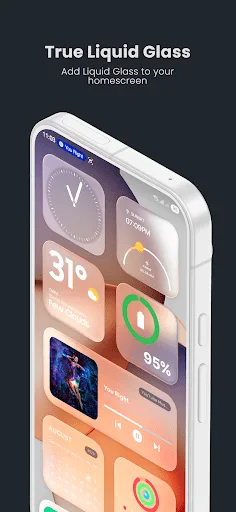
Features:
On-screen live editor
You can enter Edit Mode, select any shape, and adjust it directly on your home screen or lock screen. Move with a long press and resize from the handle. Toggle visibility per screen, align with Grid Snap, and fine tune roundness from the Visuals page.
Multi-page layouts and fluid transitions
Shapes can be pinned or allowed to scroll across pages. When you unlock, elements from the lock screen animate into the home layout for a consistent handover. OneUI multi page support is included. If your launcher is not supported, turn on compatibility mode and adjust as needed.
Icon and panel modes
Switch any shape between a panel and a squircle style icon. Settings are independent for each screen, so a shape can be a panel on the home screen and an icon on the lock screen. Control icon roundness with a dedicated slider. Widgets are not included, but you can place them above panels.
Wallpapers, presets, and motion
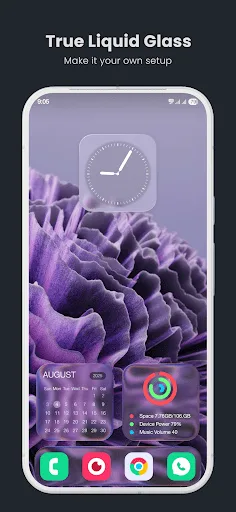
Choose a single image or an entire folder as the wallpaper source. Swipe in the preview to cycle images when using a folder. Save and share designs with Export and Import presets. A parallax effect uses the accelerometer with adjustable sensitivity. For reliable animations, turn off battery restrictions for this app.
FAQs:
Q: What is the app used for?
A: It’s a live wallpaper app that lets users create stunning glass-like effects and interactive designs for home and lock screens.
Q: Do I need to clear data after updates?
A: Yes, it’s recommended to clear app data after major updates for smooth performance and compatibility.
Q: Can I use different wallpapers for home and lock screens?
A: Absolutely! The app supports dual layouts, allowing separate designs for each screen.
Q: Does it affect battery performance?
A: Minimal impact when unrestricted battery usage is enabled. It’s optimized for smooth and efficient operation.
Q: Can I share my designs with others?
A: Yes, you can export and import presets to share your favorite designs or back them up easily.
Conclusion:
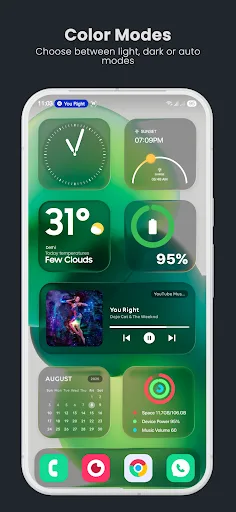
True Liquid Glass APK redefines Android customization by merging Material 3 aesthetics, Liquid Glass design, and Frosted Glass realism into one interactive live wallpaper system. With real-time editing tools, advanced blur rendering, parallax motion effects, and full multi-page support, the app transforms static home screens into immersive visual environments.The intuitive edit panel, detailed customization sliders, animated lock-to-home transitions, and preset management system provide both creative freedom and precision control. Whether designing minimalist squircle icons or layered frosted panels, every element can be fine-tuned to perfection.For users seeking depth, fluidity, and complete aesthetic control over their Android interface, True Liquid Glass APK delivers a visually stunning and technically refined customization experience.








