

VivaCut is a video editing application. Here you'll find a wealth of tools for video editing and an intuitive timeline to get your work done quickly. It supports exporting videos in high definition (720p or 1080p), allowing you to name your drafts, easily manage all your content, and share with one click to all social media platforms and streaming video apps! The application is simple and easy to use; regardless of your video editing experience, you'll always get the smoothest video editing experience.
Usage
It includes a wealth of features that let you create high-quality audio and video projects on your phone. Using the intuitive timeline, you can prepare your project in just a few minutes and then share your final work with anyone you want.
Notably, VivaCut's interface design is user-friendly for anyone, regardless of their experience. Basically, you can add videos at the bottom of the screen, then trim them, add transitions, and make them smoother.
You can add effects, GIFs, stickers, and text to each video in different tabs. On the other hand, you can edit certain parameters of the video from within the app itself, adjust pixels, and share it on social networks such as TikTok, Facebook, and Instagram.
Features
- Hollywood-level video editing
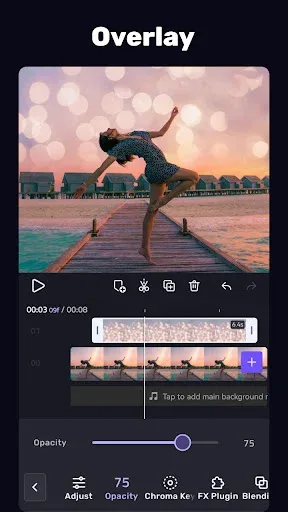
- Green screen keying/video compositing: Hollywood-level editing experience, action blockbuster production
- Keyframe animation: Supports masks, video/photo picture-in-picture, text, stickers, and emojis
- Masks: Linear, mirrored, radial, rectangular, elliptical, and other shapes
- Music-matched video: Supports adding beats to videos according to the music rhythm, making it easy to create beat-matched videos!
- Audio extraction: Extract music from any video, no more worries about lacking background music!
- Professional video editing software
- Multi-layer timeline: Intuitive and smooth editing interface, precise frame-by-frame scaling, and accurate video trimming.
- Text/Subtitles: Supports emojis; modify font, shadow, color, and transparency.
- Transitions: Various movie and special effects transitions make creating beat-synced videos easier.
- Video Parameter Adjustment: Common adjustment tools for brightness, contrast, saturation, hue, color temperature, vignette, etc.
- Aspect Ratio: The most comprehensive video aspect ratios for TikTok, YouTube, Instagram, etc.
- Filters: Edit your own videos using adjustable filters.
- Music: Add rich background music or sound effects to your videos to create the coolest beat-synced videos.
- Video Editing & Compositing/Overlaying
- Video Cutting: Split and cut; professional tools developed for precise editing.
- Video Compositing/Stabbing: Combine videos to create the best story.
- Picture-in-Picture: Multi-layer collage and overlay videos to create the coolest blockbuster.
- Double Exposure: Use various blending modes such as Color Burn, Multiply, Screen, Soft Light, Hard Light, etc., and customize layers.
- Speed Adjustment: Fast and slow adjustment, accurate to 0.2x - 4x.
- Photo MV: Select images and audio tracks to create a photo MV.
- Save and Share
- Customize Video Resolution: Export videos in 720p or 1080p HD quality.
- Rename Projects: Name your video drafts for easy categorization and management.
- One-click sharing to WeChat, Weibo, WeChat Moments, QQ Space, Douyin, Kuaishou, and more.
- New Features Coming Soon
- Undo and Redo: Recover from any mistakes with a single click.
- Animated Subtitles: The best choice for Vlog creation.
Highlights
VivaCut includes a range of text editing options. Users can edit, copy, and modify text styles, including various fonts, colors, opacity, shadows, and strokes. This flexibility allows users to create personalized text overlays, enhancing the visual appeal of their videos.
Transition effects are an important part of the app, enabling users to create smooth and cinematic transitions between video clips. This feature enhances the narrative of the video, making it more engaging. Video adjustment tools allow users to control brightness, contrast, saturation, hue, and color temperature, enabling fine-tuning for optimal image quality.
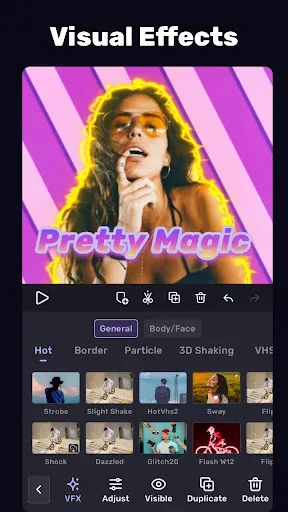
Filters and effects are another major highlight of VivaCut. Users can apply various filters to video clips and creatively combine them to create ideal visual effects. Furthermore, the app includes glitch art effects and transitions, further enhancing the dynamism of the editing process.
Pros and Cons
Pros: Amazing features, many tools and effects, easy to use.
Cons: Occasional stuttering, lag, and crashes.
Conclusion
When you need to edit and design videos, simply install VivaCut on your device for a unique experience. Most importantly, you have complete control over everything from details to the overall effect, allowing you to create beautiful, vibrant, and fully-featured videos that perfectly meet your expectations in the shortest amount of time.








