Cx File Explorer is a powerful file management tool that allows you to browse, move, copy, compress, rename, and delete files. It features dual-window split-screen and multi-tab browsing modes, significantly improving browsing and editing efficiency. It also provides charts to show your phone's storage usage and automatically scans and sorts large and cached files, helping you quickly clean up redundant content and free up space. Furthermore, users can set password protection for sensitive files to prevent the leakage of important documents and privacy.
Click to load YouTube / 点击加载视频
YouTube ↗How to use:
This quick guide outlines the basics of finding files, cleaning space, and connecting to other devices. To follow along, make sure the Cx File Explorer latest version is installed.
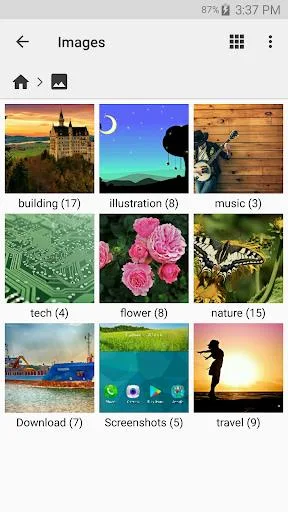
Open Cx File Explorer and move between Local, Library, and Network to locate your files. Start with Local for internal or SD storage, or use Library to jump straight to images, videos, or documents.
Select one or more items to manage them. Use Copy or Move to organize, Rename to adjust titles, Delete to remove clutter, and Share to send files to other apps. Enable the option to show hidden items if you need deeper access.
Add remote storage from the Network tab. Choose a cloud service to sign in or pick a protocol such as SMB, FTP, SFTP, or WebDAV, then enter your server details to connect.
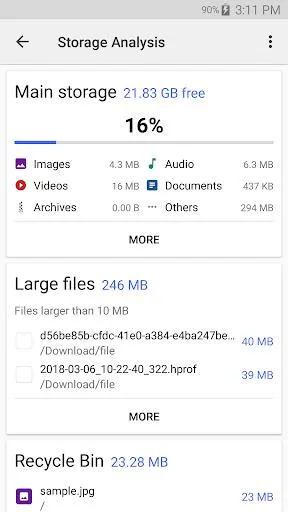
Analyze your storage from the tools section and review the visual breakdown. Remove junk and duplicate files, check unused apps, and send questionable items to the Recycle Bin so you can restore them later if needed.
Access your phone from a computer using the built-in option to start an FTP connection. Enter the on-screen address in your computer’s file manager to browse and transfer files over your local network.
Features:
Organize your files and folders: With a user-friendly UI, you can easily browse, move, copy, compress, rename, extract, delete, create and share files (folders) on both internal and external storage of your mobile device.
Access files on cloud storage: You can manage the files on cloud storages.
Access files on NAS (Network-attached storage): You can access files within remote or shared storage like FTP, FTPS, SFTP, SMB, WebDAV, and LAN. Also you can access your mobile device from PC using FTP(File Transfer Protocol).
Manage your apps: You can manage the apps installed on your mobile device.
Analyze and manage your storage: Cx File Explorer provides visualized storage analysis so that you can quickly scan the available space and manage it. The Recycle bin also helps you easily manage your storage.
Clean up storage quickly: Discover and clean junk files, duplicate files and unused apps in storage cleaner.
Supported devices: Android TV, phone and tablet
Material Design interface: Cx File Explorer uses the Material Design interface.

Pros and Cons:
Pros
Ordered and intuitive user interface
Easily manage the files and folders on your mobile device.
Access your files in the cloud and on NAS comfortably.
Completely free and without ads
Cons
Without dark mode

FAQs:
Is Cx File Explorer safe?
Yes, it’s totally safe! The apk file doesn’t contain any viruses.
How do I select dark mode for Cx File Explorer?
Unfortunately, at this moment dark theme isn’t available for this app. However, you can download modded apk (version 1.6.7) from this page as it has dark theme enabled.
How can I install Cx File Explorer apk on my iPhone?
Unfortunately, now you cannot install this file manager on your iOS device. However, it’s just a matter of time when the developer will make it work for your Apple iPhone or iPad!
Final Thoughts:
In conclusion, CX File Explorer APK is a powerful and lightweight Android file manager designed for fast performance and complete storage control. It offers useful features like Local Library, Network access, cloud integration, wireless file transfer and storage analysis tools for smooth daily use. The latest version 2.7.6 brings performance improvements, better archive handling, smoother media controls and Shizuku support, making it more reliable and efficient. It is ideal for both beginners and advanced users who want a simple, ad-free and secure file management experience. For more updates, support or similar apps such as GB WhatsApp Old Version, feel free to stay connected and explore more helpful guides and resources.